Note
Hello, welcome to the SunFounder Raspberry Pi & Arduino & ESP32 Enthusiasts Community on Facebook! Dive deeper into Raspberry Pi, Arduino, and ESP32 with fellow enthusiasts.
Why Join?
Expert Support: Solve post-sale issues and technical challenges with help from our community and team.
Learn & Share: Exchange tips and tutorials to enhance your skills.
Exclusive Previews: Get early access to new product announcements and sneak peeks.
Special Discounts: Enjoy exclusive discounts on our newest products.
Festive Promotions and Giveaways: Take part in giveaways and holiday promotions.
👉 Ready to explore and create with us? Click [here] and join today!
5. Hand Gesture Counting
1. Overview
In the previous section, we implemented real-time hand detection and landmark visualization.
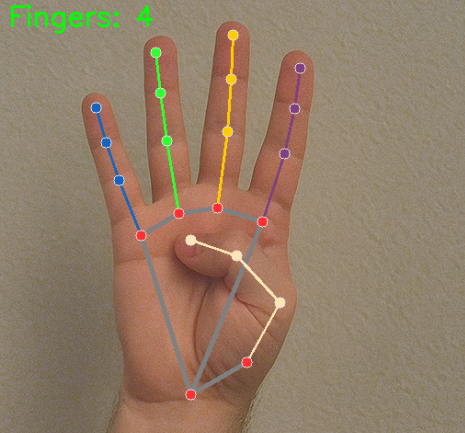
This section extends that functionality by using finger landmark positions to count the number of raised fingers (0–5).
By analyzing the relative positions of finger tips and their corresponding joints, we can determine whether each finger is extended.
2. How It Works
The program follows these steps:
Initialize the MediaPipe Hands model.
Capture video frames from the Raspberry Pi camera.
Detect 21 hand landmarks in real time.
Compare fingertip coordinates with their proximal joints.
Determine whether each finger is extended.
Count the number of raised fingers.
Display the result on the video frame.
This method is:
Lightweight and efficient
Suitable for Raspberry Pi
A foundation for gesture control and interactive systems
3. Run the Code
Important
Before you start, make sure:
The pan-tilt is assembled
You can access the Raspberry Pi desktop
The code package is installed
Fusion HAT+ is installed and configured
OpenCV is installed
For detailed instructions, see 0. Setup OpenCV.
Open the terminal and enter the following command:
sudo python3 ~/ai-lab-kit/mediapipe/mp_hand_count.py
After running the program, a window titled “Show Video” opens and displays the live camera feed.
When a hand appears in front of the camera:
MediaPipe detects the hand in real time.
21 landmark points and connection lines are drawn on the hand.
The program analyzes the positions of the fingertips and joints.
The number of raised fingers (0–5) is calculated.
The detected finger count is displayed in the top-left corner of the screen as:
Fingers: X
As you extend or fold your fingers, the number updates instantly in real time.
If no hand is detected, only the normal camera feed is displayed without a finger count.
Press
qto exit the program. The camera stops and the OpenCV window closes automatically.
4. Complete Code
from picamera2 import Picamera2, Preview
import cv2
import mediapipe.python.solutions.hands as mp_hands
import mediapipe.python.solutions.drawing_utils as drawing
import mediapipe.python.solutions.drawing_styles as drawing_styles

# Initialize the Hands model
hands = mp_hands.Hands(
   static_image_mode=False,  # Set to False for processing video frames
   max_num_hands=2,           # Maximum number of hands to detect
   min_detection_confidence=0.5  # Minimum confidence threshold for hand detection
)

# Open the camera
picam2 = Picamera2()
config = picam2.create_preview_configuration(
   main={"size": (640, 480), "format": "XRGB8888"} ,
)

picam2.configure(config)
picam2.start()

print("Streaming... press 'q' to quit")

# Finger tips and dips
finger_tips = [4, 8, 12, 16, 20]
finger_dips = [2, 6, 10, 14, 18]


while True:
   frame_bgra = picam2.capture_array()               # XRGB8888 to BGRA
   frame_bgr  = cv2.cvtColor(frame_bgra, cv2.COLOR_BGRA2BGR)

   # Convert the frame from BGR to RGB (required by MediaPipe)
   frame = cv2.cvtColor(frame_bgr, cv2.COLOR_BGR2RGB)

   # Process the frame for hand detection and tracking
   hands_detected = hands.process(frame)

   # Convert the frame back from RGB to BGR (required by OpenCV)
   frame = cv2.cvtColor(frame, cv2.COLOR_RGB2BGR)

   # If hands are detected, draw landmarks and connections on the frame
   if hands_detected.multi_hand_landmarks:
      for hand_landmarks in hands_detected.multi_hand_landmarks:
            drawing.draw_landmarks(
               frame,
               hand_landmarks,
               mp_hands.HAND_CONNECTIONS,
               drawing_styles.get_default_hand_landmarks_style(),
               drawing_styles.get_default_hand_connections_style(),
            )


            # Count the number of fingers raised (right hand)
            landmarks = hand_landmarks.landmark
            finger_count = 0

            # Check if thumb is up
            if landmarks[finger_tips[0]].x > landmarks[finger_dips[0]].x:
               finger_count += 1

            # Check if the other fingers are up
            for i in range(1, 5):
               if landmarks[finger_tips[i]].y < landmarks[finger_dips[i]].y:
                  finger_count += 1

            # Display the number of fingers raised
            cv2.putText(frame, f"Fingers: {finger_count}", (10, 30), cv2.FONT_HERSHEY_SIMPLEX, 1, (0, 255, 0), 2)


   # Display the frame with annotations
   cv2.imshow("Show Video", frame)

   # Exit the loop if 'q' key is pressed
   if cv2.waitKey(1) & 0xff == ord('q'):
      break

# Release the camera
picam2.stop_preview()
picam2.stop()
cv2.destroyAllWindows()
In each loop iteration, it determines whether each of the 5 fingers is extended and counts the number of extended fingers. For example:
✊ All fingers closed → Count 0
☝️ Index finger extended → Count 1
✌️ Index + Middle fingers → Count 2
🖐️ All five fingers open → Count 5
5. Detection Logic and Extensions
MediaPipe Hands returns 21 landmarks. We use fingertip and joint positions to determine whether each finger is extended.
finger_tips = [4, 8, 12, 16, 20]
finger_dips = [2, 6, 10, 14, 18]
finger_tips→ Fingertip indices (Thumb=4, Index=8, Middle=12, Ring=16, Pinky=20)finger_dips→ Corresponding proximal joints (Thumb=2, Index=6, Middle=10, Ring=14, Pinky=18)
Finger counting logic:
landmarks = hand_landmarks.landmark
finger_count = 0

# Check thumb (right hand)
if landmarks[finger_tips[0]].x > landmarks[finger_dips[0]].x:
    finger_count += 1

# Check other four fingers
for i in range(1, 5):
    if landmarks[finger_tips[i]].y < landmarks[finger_dips[i]].y:
        finger_count += 1

cv2.putText(frame, f"Fingers: {finger_count}", (10, 30),
            cv2.FONT_HERSHEY_SIMPLEX, 1, (0, 255, 0), 2)
Logic explanation:
Thumb → Compare
tip.xanddip.x(for right hand).Other fingers → Compare
tip.yanddip.y.If the fingertip is above (or outward from) the joint, the finger is considered extended.
Each satisfied condition increases the count by
+1.
Extension tips:
To support both left and right hands, use
hands_detected.multi_handednessto determine hand type, and reverse the thumb x-axis comparison accordingly.This logic can be extended to implement:
OK gesture recognition
Thumbs-up detection
Rock–paper–scissors interaction
Custom gesture-based controls
6. Troubleshooting
Thumb detection inaccurate
Thumb detection may be inaccurate because the logic differs for left and right hands. The horizontal comparison used for the thumb depends on hand orientation.
Use
multi_handednessto determine whether the detected hand is left or right, and adjust the thumb detection logic accordingly.Unstable detection
If finger counting appears unstable, lighting may be insufficient or the background may be cluttered.
Improve the lighting conditions and use a plain background to increase detection stability.
High latency
If the response feels slow, the resolution may be too high or the CPU may be overloaded.
Reduce the resolution (for example, 320×240) and close unnecessary background processes. You can also simplify the finger counting logic if needed.
7. Summary
Using MediaPipe Hands, we can quickly implement real-time gesture recognition.
This section implemented number gesture counting based on fingertip positions, laying the foundation for custom gesture recognition.
By adapting for left/right hands and expanding judgment rules, more complex interactive scenarios can be achieved.