Note
Hello, welcome to the SunFounder Raspberry Pi & Arduino & ESP32 Enthusiasts Community on Facebook! Dive deeper into Raspberry Pi, Arduino, and ESP32 with fellow enthusiasts.
Why Join?
Expert Support: Solve post-sale issues and technical challenges with help from our community and team.
Learn & Share: Exchange tips and tutorials to enhance your skills.
Exclusive Previews: Get early access to new product announcements and sneak peeks.
Special Discounts: Enjoy exclusive discounts on our newest products.
Festive Promotions and Giveaways: Take part in giveaways and holiday promotions.
👉 Ready to explore and create with us? Click [here] and join today!
13. Touchless Auto TTS — Hands-Free Voice Broadcast
1. Overview
In 12. Adding TTS Voice Broadcast to MediaPipe Projects (Section 12), we built a hand gesture
counting program where the user presses the t key to trigger
a TTS voice broadcast.
In this section, we take the next step: remove the keyboard entirely. The system now automatically detects when you hold a hand gesture steady and speaks the finger count — no keys, no buttons, completely touchless.
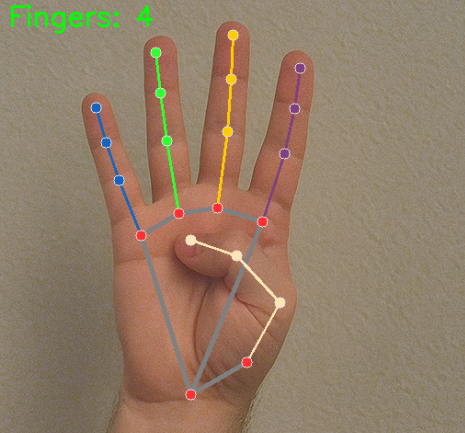
This lesson introduces a state-machine pattern for touchless interaction — a technique you can apply to accessibility projects, hands-free installations, and any scenario where keyboard input is not practical.
By the end of this lesson, you will know how to:
Design a state machine for hand-presence tracking
Detect gesture stability over multiple frames
Use a hold-duration gate to avoid false triggers
Auto-detect when a hand enters or leaves the frame
Provide multi-stage visual feedback (idle → detected → stable → speaking)
Display a progress bar for hold-duration countdown
2. How It Works
The program replaces the keyboard trigger with an automatic stability-based trigger. Here is the pipeline:
Initialize MediaPipe Hands for real-time hand detection.
Initialize the Fusion HAT+ TTS engine (Espeak).
Capture video frames and detect fingers (same as before).
Feed the finger count into a stability detector — a sliding window that checks whether the count has remained the same across multiple consecutive frames.
Once the count is confirmed stable, start a hold-duration timer.
If the user holds the same gesture for 2.5 seconds, TTS fires automatically.
If the hand leaves the frame, the system speaks “hand left the frame” after a short delay.
A progress bar and multi-color border show the current state at a glance.
The key design idea is:
The user’s steady hand replaces the keyboard — the system watches for intent (holding still) rather than reacting to every fleeting gesture.
This makes the project fully hands-free and accessible — ideal for assistive technology, interactive exhibits, or situations where the user cannot reach a keyboard.
3. Key Design Concepts
Adding auto-triggered TTS requires more sophisticated state management than the key-press version. Let’s walk through each new concept.
3.1 State Machine for Hand Tracking
The program tracks hand presence as a state, not just a
per-frame value. A HandTrackingState class encapsulates
all the state variables:
class HandTrackingState:
    def __init__(self):
        self.finger_history = deque(maxlen=FRAME_HISTORY_SIZE)
        self.current_fingers = 0
        self.stable_fingers = -1
        self.stable_start_time = 0
        self.is_stable = False
        self.hand_present = False
        self.hand_absent_start_time = 0
        self.last_tts_time = 0
        self.last_tts_message = ""
        self.last_no_hand_tts_time = 0

state = HandTrackingState()
By grouping all tracking variables into one object, the code stays organized even as the logic grows more complex.
The state machine transitions through these phases:
No hand — gray border, idle status
Hand detected, not yet stable — cyan border, “keep hand still” prompt
Stable, holding — green border fills in, progress bar animates
Speaking — bright green flash, “SPEAKING…” label
3.2 Stability Detection
A single-frame finger count is unreliable — the number can flicker due to camera noise or slight hand movement. To avoid false triggers, we use a sliding window of recent counts:
from collections import deque

FRAME_HISTORY_SIZE = 10
STABLE_FRAMES_REQUIRED = 5

state.finger_history = deque(maxlen=FRAME_HISTORY_SIZE)

def update_stability(new_count):
    state.finger_history.append(new_count)

    if len(state.finger_history) >= STABLE_FRAMES_REQUIRED:
        recent_counts = list(state.finger_history)[-STABLE_FRAMES_REQUIRED:]
        if all(c == new_count for c in recent_counts):
            # Gesture is stable!
            state.is_stable = True
            state.stable_start_time = time.time()
            state.current_fingers = new_count
            return True

    state.current_fingers = new_count
    return False
The gesture is considered stable only when the last 5 frames all report the same finger count. This filters out momentary flickers and ensures the system only speaks when the user is intentionally holding a gesture.
3.3 Auto-Trigger with Hold Duration
Stability alone is not enough — the user must hold the gesture long enough to demonstrate intent:
HOLD_DURATION_REQUIRED = 2.5    # seconds
MIN_TTS_INTERVAL = 4.0          # seconds between auto triggers

def should_trigger_tts():
    now = time.time()

    # Minimum interval between TTS triggers
    if now - state.last_tts_time < MIN_TTS_INTERVAL:
        return False

    # Hand must be present and stable
    if not state.hand_present or not state.is_stable:
        return False

    # Must have been stable for the required hold duration
    hold_time = now - state.stable_start_time
    if hold_time < HOLD_DURATION_REQUIRED:
        return False

    # Don't repeat the same count too quickly
    if state.stable_fingers == state.current_fingers:
        if now - state.last_tts_time < MIN_TTS_INTERVAL * 2:
            return False

    return True
Three gates protect against false triggers:
Minimum interval — at least 4 seconds between any two TTS events.
Hold duration — the gesture must be held steady for 2.5 seconds.
Repeat guard — the same count won’t be spoken again for 8 seconds.
3.4 Hand Exit Detection
When the user removes their hand from the camera, the system notices and speaks a notification:
HAND_EXIT_DELAY = 4.0  # seconds after hand leaves

# When hand just left:
if state.hand_present:
    state.hand_present = False
    state.is_stable = False
    state.stable_fingers = -1
    state.finger_history.clear()

    if now - state.last_tts_time >= MIN_TTS_INTERVAL:
        tts.say("hand left the frame")
The exit message only fires if enough time has passed since the last TTS event — preventing it from interrupting a finger-count announcement.
3.5 Building the Message
Message construction is identical to the key-press version:
if count == 0:
    message = "no fingers detected"
elif count == 1:
    message = "one finger detected"
else:
    message = f"{count} fingers detected"
Note
Unlike the key-press version which sums fingers across both hands,
this version uses max(total_fingers, finger_count) to pick
the hand with the most visible fingers. This produces more
reliable results when both hands are in frame.
3.6 Multi-Stage Visual Feedback
Instead of a single green flash, this version provides a continuous color-coded border that reflects the current state:
COLOR_IDLE     = (128, 128, 128)   # gray   — no hand
COLOR_DETECTED = (255, 255, 0)     # cyan   — hand seen, not yet stable
COLOR_STABLE   = (0, 255, 0)       # green  — gesture stable, holding
COLOR_SPEAKING = (0, 255, 0)       # bright green — TTS in progress
The border color transitions smoothly from cyan to green as the hold duration progresses, giving the user real-time feedback on how close they are to triggering TTS.
Progress bar: A small bar in the top-right corner fills from left to right as the hold duration counts up. When it reaches 100%, TTS fires. This gives the user a clear visual countdown.
Status text: A status line below the finger count shows the current phase:
"Status: No hand detected""Status: Detecting... keep hand still""Status: Hold gesture (1.3s to speak)""Status: Ready to speak!"
4. Run the Code
Important
Before you start, make sure:
The Fusion HAT+ is assembled and the speaker is connected
You can access the Raspberry Pi desktop
The code package is installed
MediaPipe and OpenCV are installed
For detailed instructions, see 0. Setup MediaPipe and 0. Setup OpenCV.
Open the terminal and enter the following command:
sudo python3 ~/ai-lab-kit/mediapipe/mp_hand_count_tts_without_tap.py
After running the program:
A window titled “MediaPipe Hand Detection + AUTO TTS (Touchless Mode)” opens, showing the live camera feed.
Hold your hand up to the camera — the finger count appears in the top-left corner.
Keep your hand still — watch the border change from gray to cyan to green, and the progress bar fill up.
After 2.5 seconds of holding the same gesture, the system automatically speaks the finger count.
Remove your hand from the camera — after a moment, the system says “hand left the frame.”
Hint
Try showing different numbers of fingers and holding each one steady for a few seconds. You should hear each count spoken automatically. Notice how the border color and progress bar guide you through the process.
Press
qto exit the program.
5. Complete Code
"""
MediaPipe Hand Detection + Auto TTS (Touchless Mode)
====================================================
Detects fingers via webcam in real time. Automatically speaks the finger count
when a stable hand gesture is maintained for a certain duration.

No keyboard input required for triggering TTS.

Usage:
    python mp_hand_count_auto_tts.py

Controls:
    'q'  - quit
"""

from picamera2 import Picamera2
import cv2
import mediapipe.python.solutions.hands as mp_hands
import mediapipe.python.solutions.drawing_utils as drawing
import mediapipe.python.solutions.drawing_styles as drawing_styles
from fusion_hat.tts import Espeak
import time
from collections import deque


# ======================== Init TTS ========================
tts = Espeak()
tts.set_amp(200)       # volume 0-200, default 100
tts.set_speed(150)     # speed 80-260, default 150
tts.set_pitch(80)      # pitch 0-99, default 80

# ======================== Init MediaPipe Hands ========================
hands = mp_hands.Hands(
    static_image_mode=False,
    max_num_hands=2,
    min_detection_confidence=0.5,
    min_tracking_confidence=0.5
)

# ======================== Init Camera ========================
picam2 = Picamera2()
config = picam2.create_preview_configuration(
    main={"size": (640, 480), "format": "XRGB8888"},
)
picam2.configure(config)
picam2.start()

# ======================== Constants ========================
# Finger tip and dip landmark indices
FINGER_TIPS = [4, 8, 12, 16, 20]   # thumb, index, middle, ring, pinky tips
FINGER_DIPS = [2, 6, 10, 14, 18]   # corresponding middle joints

# Auto TTS parameters
STABLE_FRAMES_REQUIRED = 5      # frames needed to confirm stability
HOLD_DURATION_REQUIRED = 2.5    # seconds hand must stay stable before speaking
MIN_TTS_INTERVAL = 4.0          # seconds between auto TTS triggers
HAND_EXIT_DELAY = 4.0           # seconds after hand leaves before saying "hand left"
NO_HAND_COOLDOWN = 5.0          # seconds without hand before suppressing "no hand" repeats

# Frame processing
FRAME_HISTORY_SIZE = 10         # for stability detection

# Border colors (BGR)
COLOR_IDLE = (128, 128, 128)    # gray
COLOR_DETECTED = (255, 255, 0)  # cyan
COLOR_STABLE = (0, 255, 0)      # green
COLOR_SPEAKING = (0, 255, 0)    # bright green

print("=" * 60)
print("  MediaPipe Hand Detection + AUTO TTS (Touchless Mode)")
print("  No keyboard needed - just show a stable hand gesture")
print("  Press 'q' to quit")
print("=" * 60)

# ======================== State Management ========================
class HandTrackingState:
    def __init__(self):
        self.finger_history = deque(maxlen=FRAME_HISTORY_SIZE)
        self.current_fingers = 0
        self.stable_fingers = -1
        self.stable_start_time = 0
        self.is_stable = False
        self.hand_present = False
        self.hand_absent_start_time = 0
        self.last_tts_time = 0
        self.last_tts_message = ""
        self.last_no_hand_tts_time = 0

state = HandTrackingState()

def get_finger_count(hand_landmarks):
    """Count fingers for a single hand (right hand logic)"""
    landmarks = hand_landmarks.landmark
    finger_count = 0

    # Thumb: extended when x_tip > x_dip (right hand)
    if landmarks[FINGER_TIPS[0]].x > landmarks[FINGER_DIPS[0]].x:
        finger_count += 1

    # Other four fingers: tip is above dip when extended (smaller y)
    for i in range(1, 5):
        if landmarks[FINGER_TIPS[i]].y < landmarks[FINGER_DIPS[i]].y:
            finger_count += 1

    return finger_count

def update_stability(new_count):
    """Update stability state based on finger count history"""
    state.finger_history.append(new_count)

    if len(state.finger_history) >= STABLE_FRAMES_REQUIRED:
        recent_counts = list(state.finger_history)[-STABLE_FRAMES_REQUIRED:]
        if all(c == new_count for c in recent_counts):
            if not state.is_stable or state.current_fingers != new_count:
                state.is_stable = True
                state.stable_start_time = time.time()
                state.current_fingers = new_count
                return True
    else:
        state.is_stable = False

    state.current_fingers = new_count
    return False

def should_trigger_tts():
    """Check if conditions are met for auto TTS"""
    now = time.time()

    if now - state.last_tts_time < MIN_TTS_INTERVAL:
        return False

    if not state.hand_present or not state.is_stable:
        return False

    hold_time = now - state.stable_start_time
    if hold_time < HOLD_DURATION_REQUIRED:
        return False

    if state.stable_fingers == state.current_fingers:
        if now - state.last_tts_time < MIN_TTS_INTERVAL * 2:
            return False

    return True

def trigger_tts():
    """Execute TTS for current finger count"""
    now = time.time()
    count = state.current_fingers

    if count == 0:
        message = "no fingers detected"
    elif count == 1:
        message = "one finger detected"
    else:
        message = f"{count} fingers detected"

    if message == state.last_tts_message and now - state.last_tts_time < 3.0:
        return False

    print(f"[TTS] {message} (held for {HOLD_DURATION_REQUIRED}s)")
    tts.say(message)

    state.last_tts_time = now
    state.last_tts_message = message
    state.stable_fingers = count

    return True

def trigger_hand_exit_tts():
    """Say hand has left the frame"""
    now = time.time()
    if now - state.last_tts_time >= MIN_TTS_INTERVAL:
        print("[TTS] hand left the frame")
        tts.say("hand left the frame")
        state.last_tts_time = now
        state.last_tts_message = "hand left"

def get_border_color():
    """Determine border color based on current state"""
    now = time.time()

    if hasattr(state, 'speaking_until') and now < state.speaking_until:
        return COLOR_SPEAKING

    if not state.hand_present:
        return COLOR_IDLE

    if state.is_stable:
        hold_progress = min(1.0, (now - state.stable_start_time) / HOLD_DURATION_REQUIRED)
        if hold_progress < 1.0:
            r = int(COLOR_DETECTED[0] * (1-hold_progress) + COLOR_STABLE[0] * hold_progress)
            g = int(COLOR_DETECTED[1] * (1-hold_progress) + COLOR_STABLE[1] * hold_progress)
            b = int(COLOR_DETECTED[2] * (1-hold_progress) + COLOR_STABLE[2] * hold_progress)
            return (b, g, r)
        else:
            return COLOR_STABLE

    return COLOR_DETECTED

# ======================== Main Loop ========================
frame_count = 0
speaking_flash_until = 0

while True:
    # ---- 1. Capture frame ----
    frame_bgra = picam2.capture_array()
    frame_bgr = cv2.cvtColor(frame_bgra, cv2.COLOR_BGRA2BGR)

    # ---- 2. Convert to RGB for MediaPipe ----
    frame_rgb = cv2.cvtColor(frame_bgr, cv2.COLOR_BGR2RGB)
    hands_detected = hands.process(frame_rgb)

    # ---- 3. Convert back to BGR for OpenCV display ----
    frame = cv2.cvtColor(frame_rgb, cv2.COLOR_RGB2BGR)

    # ---- 4. Detect hands and count fingers ----
    total_fingers = 0
    has_hand = False

    if hands_detected.multi_hand_landmarks:
        has_hand = True
        for hand_landmarks in hands_detected.multi_hand_landmarks:
            drawing.draw_landmarks(
                frame,
                hand_landmarks,
                mp_hands.HAND_CONNECTIONS,
                drawing_styles.get_default_hand_landmarks_style(),
                drawing_styles.get_default_hand_connections_style(),
            )

            finger_count = get_finger_count(hand_landmarks)
            total_fingers = max(total_fingers, finger_count)

    # ---- 5. Update state machine ----
    now = time.time()

    if has_hand:
        if not state.hand_present:
            state.hand_present = True
            state.is_stable = False
            state.finger_history.clear()
            print("[INFO] Hand detected")
        state.hand_absent_start_time = now
    else:
        if state.hand_present:
            state.hand_present = False
            state.is_stable = False
            state.stable_fingers = -1
            state.finger_history.clear()
            if now - state.last_tts_time >= MIN_TTS_INTERVAL:
                trigger_hand_exit_tts()

    if has_hand:
        update_stability(total_fingers)

        if should_trigger_tts():
            if trigger_tts():
                speaking_flash_until = now + 0.8
                state.speaking_until = speaking_flash_until

    # ---- 6. Display information on screen ----
    display_text = f"Fingers: {total_fingers}"
    cv2.putText(frame, display_text, (10, 40),
                cv2.FONT_HERSHEY_SIMPLEX, 1.2, (0, 255, 0), 2)

    if not has_hand:
        status_text = "Status: No hand detected"
        status_color = (128, 128, 128)
    elif state.is_stable:
        hold_progress = min(1.0, (now - state.stable_start_time) / HOLD_DURATION_REQUIRED)
        if hold_progress < 1.0:
            remaining = HOLD_DURATION_REQUIRED - (now - state.stable_start_time)
            status_text = f"Status: Hold gesture ({remaining:.1f}s to speak)"
            status_color = (255, 255, 0)
        else:
            status_text = "Status: Ready to speak!"
            status_color = (0, 255, 0)
    else:
        status_text = "Status: Detecting... keep hand still"
        status_color = (0, 200, 200)

    cv2.putText(frame, status_text, (10, 80),
                cv2.FONT_HERSHEY_SIMPLEX, 0.6, status_color, 2)

    cv2.putText(frame, "Keep gesture still to auto-speak | 'q' to quit",
                (10, frame.shape[0] - 15),
                cv2.FONT_HERSHEY_SIMPLEX, 0.5, (180, 180, 180), 1)

    # ---- 7. Visual border feedback ----
    h, w = frame.shape[:2]
    thickness = 6

    if now < speaking_flash_until:
        border_color = (0, 255, 0)
        cv2.rectangle(frame, (0, 0), (w - 1, h - 1), border_color, thickness)
        cv2.putText(frame, "SPEAKING...", (w - 180, 40),
                    cv2.FONT_HERSHEY_SIMPLEX, 0.7, (0, 255, 0), 2)
    else:
        border_color = get_border_color()
        cv2.rectangle(frame, (0, 0), (w - 1, h - 1), border_color, thickness)

    # ---- 8. Progress bar for hold duration ----
    if has_hand and state.is_stable:
        hold_progress = min(1.0, (now - state.stable_start_time) / HOLD_DURATION_REQUIRED)
        bar_width = int(w * 0.4)
        bar_height = 8
        bar_x = w - bar_width - 10
        bar_y = 10
        filled_width = int(bar_width * hold_progress)

        cv2.rectangle(frame, (bar_x, bar_y), (bar_x + bar_width, bar_y + bar_height),
                     (60, 60, 60), -1)
        cv2.rectangle(frame, (bar_x, bar_y), (bar_x + filled_width, bar_y + bar_height),
                     (0, 255, 0), -1)

    # ---- 9. Key handling ----
    key = cv2.waitKey(1) & 0xff

    if key == ord('q'):
        break

    # ---- 10. Show frame ----
    cv2.imshow("MediaPipe Hand Detection + AUTO TTS (Touchless Mode)", frame)

# ======================== Cleanup ========================
picam2.stop_preview()
picam2.stop()
cv2.destroyAllWindows()
print("Exited.")
6. Code Explanation
Let’s walk through the code section by section, focusing on what’s new compared to the key-press version from 12. Adding TTS Voice Broadcast to MediaPipe Projects.
6.1 Imports and New Dependencies
from collections import deque
import time
The key addition is deque — a double-ended queue from
Python’s collections module. It provides a fixed-size
sliding window for stability detection: when you append
to a deque(maxlen=N), old items are automatically
dropped, keeping only the most recent N values.
This is perfect for tracking the last 5–10 finger counts without manual list management.
6.2 Constants and Configuration
STABLE_FRAMES_REQUIRED = 5      # frames needed to confirm stability
HOLD_DURATION_REQUIRED = 2.5    # seconds hand must stay stable
MIN_TTS_INTERVAL = 4.0          # seconds between auto TTS triggers
HAND_EXIT_DELAY = 4.0           # seconds after hand leaves
NO_HAND_COOLDOWN = 5.0          # seconds before suppressing repeats
FRAME_HISTORY_SIZE = 10         # for stability detection

COLOR_IDLE     = (128, 128, 128)   # gray
COLOR_DETECTED = (255, 255, 0)     # cyan
COLOR_STABLE   = (0, 255, 0)       # green
COLOR_SPEAKING = (0, 255, 0)       # bright green
All timing and behavior parameters are declared as named constants
at the top of the file. This makes the program easy to tune —
want a longer hold time? Change HOLD_DURATION_REQUIRED.
Want less frequent announcements? Increase MIN_TTS_INTERVAL.
The four border colors define a visual language:
Gray — idle, no hand in frame
Cyan — hand detected, but not yet stable
Green — gesture is stable and holding
Bright green — currently speaking
6.3 HandTrackingState Class
class HandTrackingState:
    def __init__(self):
        self.finger_history = deque(maxlen=FRAME_HISTORY_SIZE)
        self.current_fingers = 0
        self.stable_fingers = -1
        self.stable_start_time = 0
        self.is_stable = False
        self.hand_present = False
        self.hand_absent_start_time = 0
        self.last_tts_time = 0
        self.last_tts_message = ""
        self.last_no_hand_tts_time = 0

state = HandTrackingState()
This class bundles all tracking variables into a single object. Each variable serves a specific role:
finger_history— sliding window of recent finger counts (used by the stability detector)current_fingers— the finger count for the current framestable_fingers— the last confirmed stable count that was spokenstable_start_time— when the current stable period beganis_stable— whether the gesture is currently confirmed stablehand_present— whether a hand is currently in framehand_absent_start_time— when the hand last left the framelast_tts_time— timestamp of the last TTS eventlast_tts_message— the last spoken message (to avoid repeats)last_no_hand_tts_time— timestamp of last “no hand” announcement
A single state instance is created globally, so all helper
functions can read and modify it without passing parameters.
6.4 Stability Detection Function
def update_stability(new_count):
    state.finger_history.append(new_count)

    if len(state.finger_history) >= STABLE_FRAMES_REQUIRED:
        recent_counts = list(state.finger_history)[-STABLE_FRAMES_REQUIRED:]
        if all(c == new_count for c in recent_counts):
            if not state.is_stable or state.current_fingers != new_count:
                state.is_stable = True
                state.stable_start_time = time.time()
                state.current_fingers = new_count
                return True
    else:
        state.is_stable = False

    state.current_fingers = new_count
    return False
This function is the heart of the touchless system. Here’s how it works:
Append the new finger count to the sliding window.
Check if we have enough frames (at least 5).
Compare the last 5 frames — if they all match the current count, the gesture is stable.
Record the time when stability began (
stable_start_time) — this is used by the hold-duration timer.Return
Trueon the frame where stability is first confirmed,Falseotherwise.
The all(c == new_count for c in recent_counts) expression is
elegant: it checks that every value in the window matches the
current count. If even one frame differs, stability is broken.
6.5 Auto TTS Trigger Logic
def should_trigger_tts():
    now = time.time()

    if now - state.last_tts_time < MIN_TTS_INTERVAL:
        return False
    if not state.hand_present or not state.is_stable:
        return False
    hold_time = now - state.stable_start_time
    if hold_time < HOLD_DURATION_REQUIRED:
        return False
    if state.stable_fingers == state.current_fingers:
        if now - state.last_tts_time < MIN_TTS_INTERVAL * 2:
            return False
    return True
This function acts as a gate — all conditions must be met before TTS can fire:
Minimum interval: at least 4 seconds since the last TTS.
Hand present and stable: the gesture must be confirmed stable.
Hold duration: the user must have held the gesture for at least 2.5 seconds.
Repeat guard: the same finger count won’t be spoken again for 8 seconds (2× the minimum interval).
Tip
The hold duration creates a clear intent signal — momentary gestures are ignored, but a deliberate hold triggers speech. This is the key difference from the key-press approach: the user’s patience replaces the button press.
6.6 Hand Exit Detection
# In the main loop:
if has_hand:
    if not state.hand_present:
        # Hand just entered
        state.hand_present = True
        state.is_stable = False
        state.finger_history.clear()
        print("[INFO] Hand detected")
    state.hand_absent_start_time = now
else:
    if state.hand_present:
        # Hand just left
        state.hand_present = False
        state.is_stable = False
        state.stable_fingers = -1
        state.finger_history.clear()
        if now - state.last_tts_time >= MIN_TTS_INTERVAL:
            trigger_hand_exit_tts()
When the hand enters or leaves the frame, the state is reset:
Stability is cleared (
is_stable = False)The finger history is wiped (
history.clear())If the hand just left, and enough time has passed since the last TTS, the system says “hand left the frame”
Resetting stability on entry and exit prevents stale state from carrying over between hand appearances.
6.7 Multi-Color Border and Progress Bar
def get_border_color():
    now = time.time()

    if hasattr(state, 'speaking_until') and now < state.speaking_until:
        return COLOR_SPEAKING

    if not state.hand_present:
        return COLOR_IDLE

    if state.is_stable:
        hold_progress = min(1.0, (now - state.stable_start_time) / HOLD_DURATION_REQUIRED)
        if hold_progress < 1.0:
            # Smooth blend from cyan to green
            r = int(COLOR_DETECTED[0] * (1-hold_progress) + COLOR_STABLE[0] * hold_progress)
            g = int(COLOR_DETECTED[1] * (1-hold_progress) + COLOR_STABLE[1] * hold_progress)
            b = int(COLOR_DETECTED[2] * (1-hold_progress) + COLOR_STABLE[2] * hold_progress)
            return (b, g, r)
        else:
            return COLOR_STABLE

    return COLOR_DETECTED
The border color is not just decorative — it’s a real-time status indicator:
No hand → gray border
Hand detected, not stable → cyan border
Stable, still holding → smooth gradient from cyan to green as the hold duration progresses
Hold complete / speaking → bright green border
The progress bar works alongside the border:
if has_hand and state.is_stable:
    hold_progress = min(1.0, (now - state.stable_start_time) / HOLD_DURATION_REQUIRED)
    bar_width = int(w * 0.4)
    bar_height = 8
    bar_x = w - bar_width - 10
    bar_y = 10
    filled_width = int(bar_width * hold_progress)

    cv2.rectangle(frame, (bar_x, bar_y), (bar_x + bar_width, bar_y + bar_height),
                 (60, 60, 60), -1)  # background
    cv2.rectangle(frame, (bar_x, bar_y), (bar_x + filled_width, bar_y + bar_height),
                 (0, 255, 0), -1)   # fill
A dark gray bar (40% of frame width) sits in the top-right corner. A green fill sweeps across it as the hold time progresses. When the bar is full, TTS fires.
Together, the border color and progress bar give the user continuous feedback — they always know exactly how close they are to triggering speech.
7. Extension Ideas
The touchless auto-TTS pattern opens up many possibilities:
Assistive communication — Map specific gestures to pre-recorded phrases. Hold up 1 finger for “yes”, 2 for “no”, 3 for “help”. The system speaks the phrase automatically.
Hands-free presentation control — Hold a gesture to advance slides or trigger sound effects during a talk.
Interactive museum exhibit — Visitors hold up fingers to hear facts about numbered exhibits. No touching required.
GPIO button integration — Add a physical button via
fusion_hatGPIO that enables/disables auto-TTS mode, giving the user manual control over when the system listens.Multi-gesture vocabulary — Extend the stability detector to recognize a sequence of gestures (e.g., 1 finger → 2 fingers → 3 fingers) as a “command code” that triggers different actions.
Combine with Face Detection — Auto-announce when a face enters or leaves the frame: “Person detected” / “Person left.”
8. Troubleshooting
TTS fires too frequently or on unstable gestures
Increase
STABLE_FRAMES_REQUIRED(e.g., from 5 to 8) to require more frames of consistency before confirming stability.Increase
HOLD_DURATION_REQUIRED(e.g., from 2.5 to 3.5) to require a longer hold before speaking.TTS never fires, even when holding steady
Make sure your hand is well-lit and clearly visible to the camera. Check that
min_detection_confidenceis not set too high (0.5 is a good default).Verify that the status text on screen shows “Ready to speak!” — if it stays at “Detecting…” or the progress bar never fills, the stability detector may not be confirming.
“Hand left the frame” spoken at wrong times
The exit message respects
MIN_TTS_INTERVAL— it won’t fire if a finger-count announcement just happened. If you want it to always speak, remove theMIN_TTS_INTERVALcheck fromtrigger_hand_exit_tts().Progress bar not appearing
The progress bar only appears when
has_handisTrueandstate.is_stableisTrue. If either condition is false, the bar is hidden. Check the status text to determine which condition is failing.Border color doesn’t change
Verify that
get_border_color()is being called on every frame and that thestate.hand_presentandstate.is_stableflags are being updated correctly in the main loop.
9. Summary
This lesson demonstrated how to remove the keyboard trigger and build a fully touchless auto-TTS system.
The project uses a state machine (
HandTrackingStateclass) to track hand presence, gesture stability, and TTS timing.Key design patterns covered:
Stability detection — sliding window of finger counts to confirm the user is holding a gesture steady
Hold-duration gate — requiring 2.5 seconds of stability before triggering TTS, replacing the key press with intent
Auto exit detection — speaking “hand left the frame” when the hand disappears
Multi-stage visual feedback — color-coded border (gray → cyan → green) plus a progress bar for real-time status
State reset on hand entry/exit — clearing history and stability to prevent stale data from carrying over
These patterns are project-agnostic — you can apply the state-machine + stability-detection approach to any computer vision project that needs touchless interaction.
Combining auto-TTS with gesture recognition opens the door to assistive technology, hands-free control systems, and interactive installations.