Bemerkung
Hallo und herzlich willkommen in der SunFounder Raspberry Pi & Arduino & ESP32 Enthusiasten-Community auf Facebook! Tauchen Sie gemeinsam mit anderen Technikbegeisterten tiefer in die Welt von Raspberry Pi, Arduino und ESP32 ein.
Warum beitreten?
Expertenunterstützung: Lösen Sie technische Probleme und Herausforderungen nach dem Kauf mit Unterstützung unserer Community und unseres Teams.
Lernen & Teilen: Tauschen Sie Tipps und Anleitungen aus, um Ihre Fähigkeiten zu erweitern.
Exklusive Vorschauen: Erhalten Sie vorab Einblicke in neue Produkte und Ankündigungen.
Sonderrabatte: Profitieren Sie von exklusiven Rabatten auf unsere neuesten Produkte.
Feiertagsaktionen & Verlosungen: Nehmen Sie an spannenden Verlosungen und saisonalen Aktionen teil.
👉 Bereit, mit uns gemeinsam zu entdecken und zu gestalten? Klicken Sie auf [here] und treten Sie noch heute bei!
USB HDMI Adapter
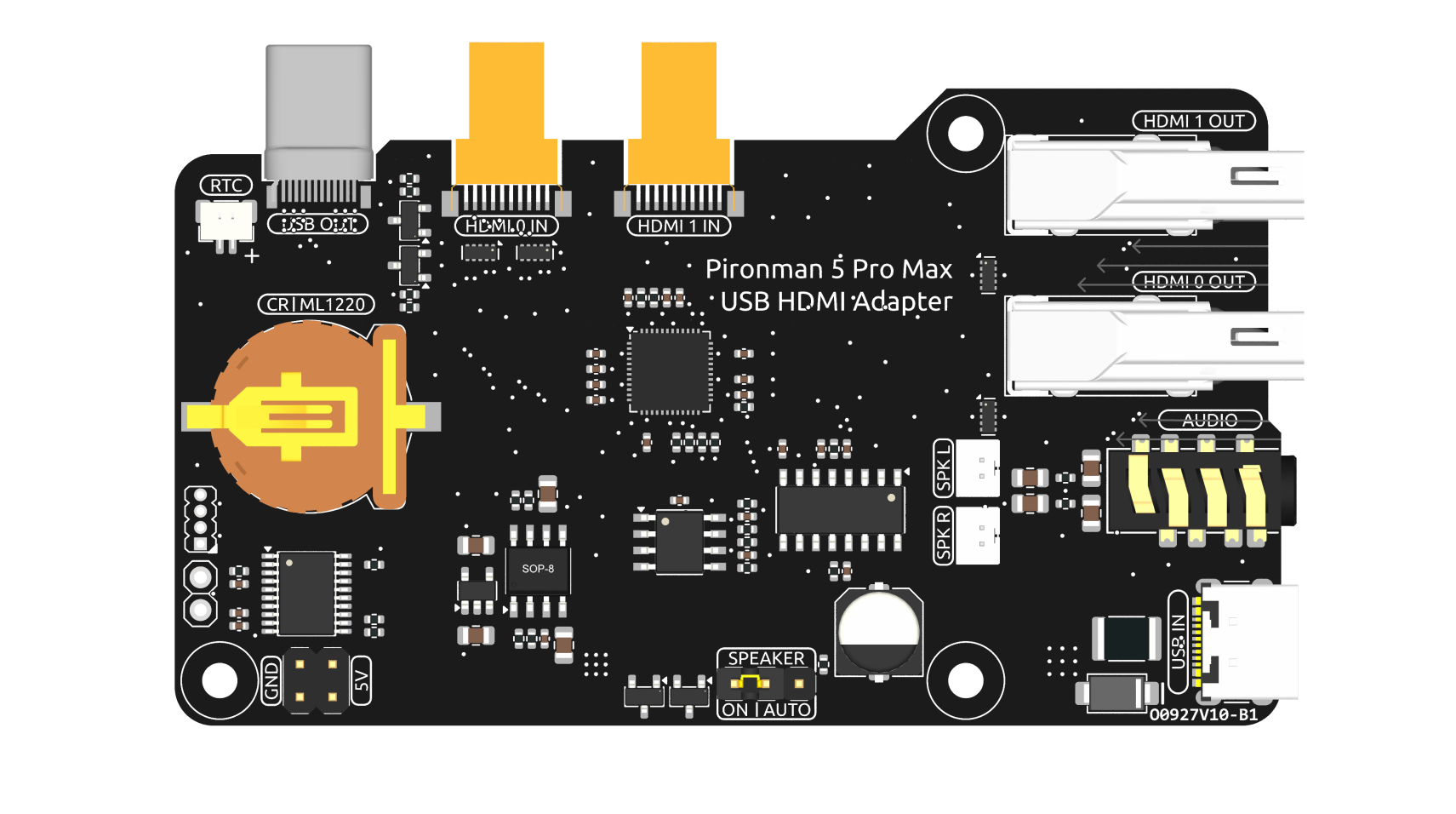
This USB HDMI adapter board is specifically designed for the Raspberry Pi 5. Its primary function is to reposition the USB and HDMI connections to align with the USB interface side of the Raspberry Pi, enhancing accessibility and cable management.
Additionally, the HDMI port is converted to a standard HDMI Type A interface, offering broader compatibility.
NVMe Additional Power Supply
The board features a 5V power header specifically for NVMe PIP power supply. Coupled with an extension header, it can be connected to the NVMe’s additional power interface to provide extra power.
1220RTC Battery Holder
A 1220RTC battery holder is incorporated for convenient installation of an RTC battery. It connects to the Raspberry Pi’s RTC interface via an SH1.0 2P reverse cable.
The battery holder is compatible with both CR1220 and ML1220 batteries. If using an ML1220 (Lithium Manganese Dioxide battery), charging can be configured directly on the Raspberry Pi. Note that the CR1220 is not rechargeable.
Enabling Trickle Charging
Warnung
If you’re using a CR1220 battery, do not enable trickle charging as it can cause irreparable damage to the battery and risk damaging the board.
By default, the trickle charging feature for the battery is disabled. The sysfs files indicate the current trickle charging voltage and limits:
pi@raspberrypi:~ $ cat /sys/devices/platform/soc/soc:rpi_rtc/rtc/rtc0/charging_voltage
0
pi@raspberrypi:~ $ cat /sys/devices/platform/soc/soc:rpi_rtc/rtc/rtc0/charging_voltage_promax
4400000
pi@raspberrypi:~ $ cat /sys/devices/platform/soc/soc:rpi_rtc/rtc/rtc0/charging_voltage_min
1300000
To enable trickle charging, add rtc_bbat_vchg to /boot/firmware/config.txt:
Open the
/boot/firmware/config.txt.sudo nano /boot/firmware/config.txtAdd
rtc_bbat_vchgto/boot/firmware/config.txt.dtparam=rtc_bbat_vchg=3000000
After rebooting, the system will display:
pi@raspberrypi:~ $ cat /sys/devices/platform/soc/soc:rpi_rtc/rtc/rtc0/charging_voltage
3000000
pi@raspberrypi:~ $ cat /sys/devices/platform/soc/soc:rpi_rtc/rtc/rtc0/charging_voltage_promax
4400000
pi@raspberrypi:~ $ cat /sys/devices/platform/soc/soc:rpi_rtc/rtc/rtc0/charging_voltage_min
1300000
This confirms the battery is now under trickle charging. To disable this feature, simply remove the dtparam line from config.txt.
Audio Interface
This section covers the audio output features of the board, including the speaker output and headphone jack.
Speaker Port
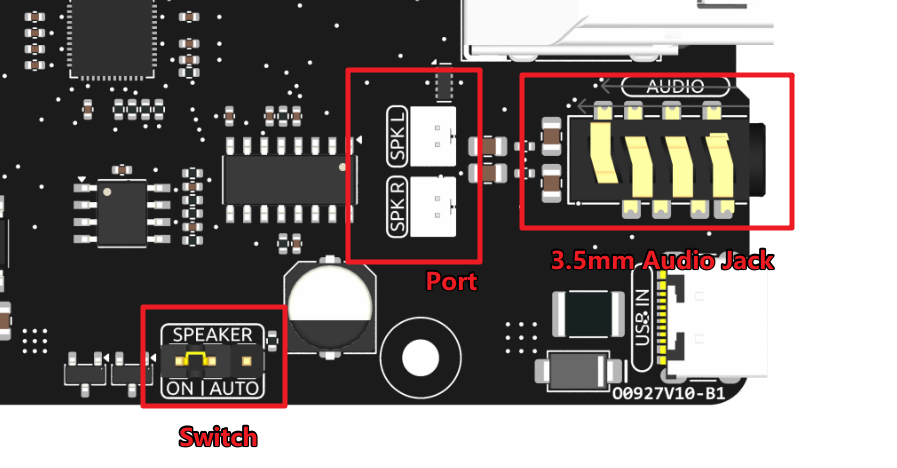
The board features a dual-channel speaker output interface that supports two 4Ω 3W speakers.
Speaker Switch
The speaker audio signal originates from the HDMI0 source. If HDMI0 is connected to a display with built-in speakers, both the Pironman 5 Pro Max speakers and the display speakers may play audio simultaneously. The SPEAKER jumper allows you to control this behavior.
Connect the jumper to the left two pins (ON) to keep the speakers always enabled.
Connect the jumper to the right two pins (AUTO) to have the speakers automatically disabled when headphones are inserted or when HDMI0 is connected.
Therefore, if you wish to use the onboard speakers while an HDMI display is connected, you can either:
Connect the display to the HDMI1 port instead.
Set the SPEAKER jumper to the ON position.
3.5mm Audio Jack
The headphone jack shares the same audio source as the speakers but carries an unamplified signal. It uses a switched jack, which automatically disables the speaker amplifier when headphones are inserted, preventing both from playing sound simultaneously.
The jack is a 4-pin TRRS connector but supports standard stereo audio output only:
Tip (T): Left Channel
Ring 1 (R1): Right Channel
Ring 2 (R2): Ground
Sleeve (S): Ground
This configuration maintains compatibility with most common 4-pin headphone standards.