Note
Hello, welcome to the SunFounder Raspberry Pi & Arduino & ESP32 Enthusiasts Community on Facebook! Dive deeper into Raspberry Pi, Arduino, and ESP32 with fellow enthusiasts.
Why Join?
Expert Support: Solve post-sale issues and technical challenges with help from our community and team.
Learn & Share: Exchange tips and tutorials to enhance your skills.
Exclusive Previews: Get early access to new product announcements and sneak peeks.
Special Discounts: Enjoy exclusive discounts on our newest products.
Festive Promotions and Giveaways: Take part in giveaways and holiday promotions.
👉 Ready to explore and create with us? Click [here] and join today!
2.14 - Feel the Water Level
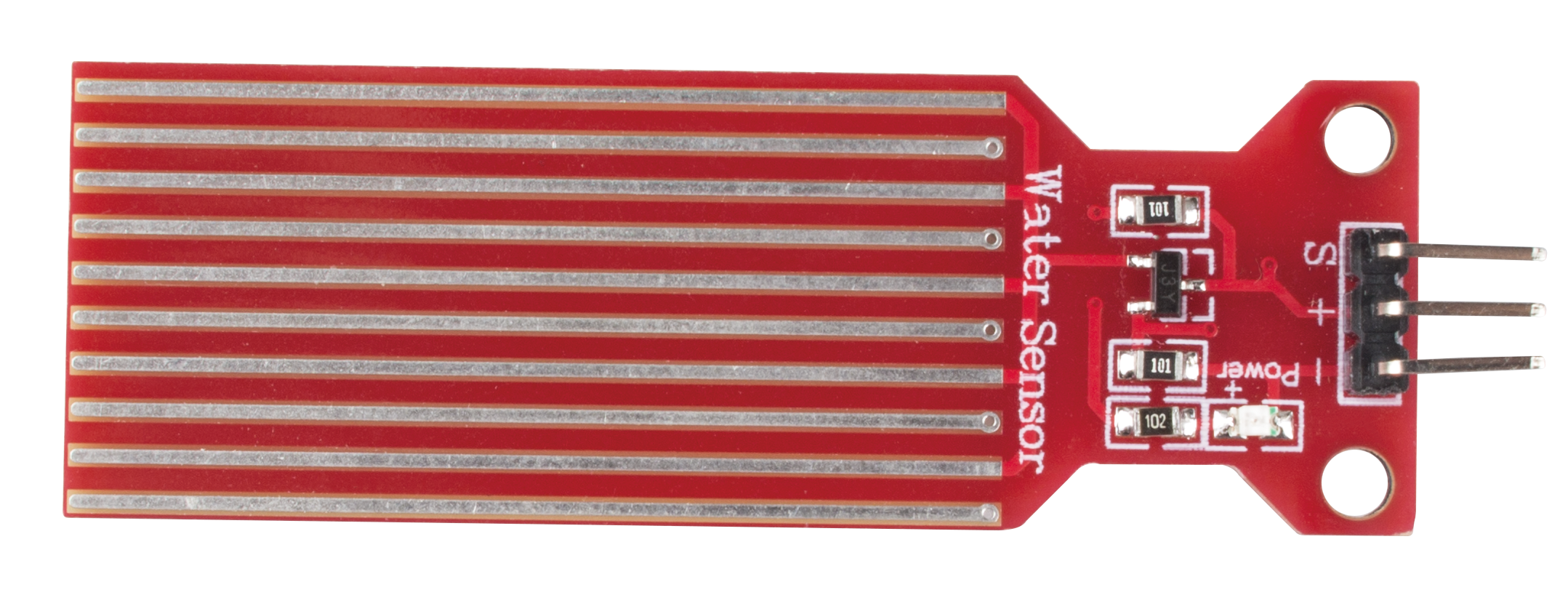
Water sensor is designed for water detection, which can be widely used in sensing rainfall, water level, and even liquid leakage.
It measures the water level by having a series of exposed parallel wire traces to measure the size of the water drops/volume. The water volume is easily converted to an analog signal, and the output analog value can be read directly by the main control board to achieve the water level alarm effect.
Warning
The sensor cannot be fully submerged in water, please only leave the part where the ten Traces are located in contact with water. Also, energizing the sensor in a humid environment will accelerate the corrosion of the probe and reduce the life of the sensor, so it is recommended that you only supply power when taking readings.
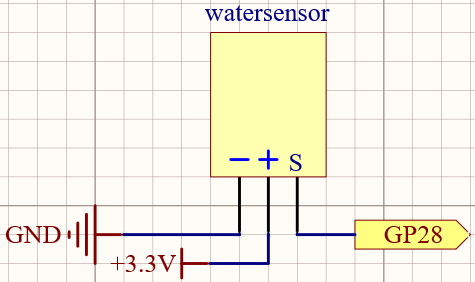
Schematic
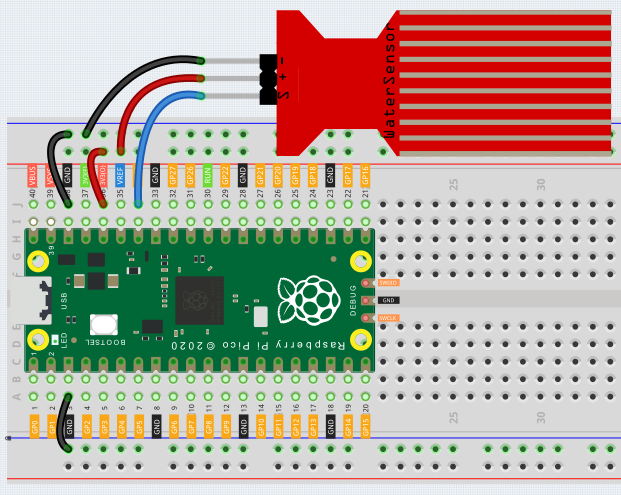
Wiring
Code
Note
You can open the file
2.14_feel_the_water_level.inounder the path ofeuler-kit/arduino/2.14_feel_the_water_level.Or copy this code into Arduino IDE.
Then select the Raspberry Pi Pico board and the correct port before clicking the Upload button.
After the program is run, submerge the Water Sensor module slowly into the water, and as the depth increases, the Shell will print a larger value.
Learn More
There is a way to use the analog input module as a digital module.
First, take a reading of the Water Sensor in a dry environment first, record it, and use it as a threshold value. Then, complete the programming and re-read the reading of the water sensor. When the reading of the water sensor deviates significantly from the reading in a dry environment, it is exposed to liquid. In other words, by placing this device near a water pipe, it can detect if a water pipe is leaking.
Note
You can open the file
2.14_water_level_threshold.inounder the path ofeuler-kit/arduino/2.14_water_level_threshold.Or copy this code into Arduino IDE.
Then select the Raspberry Pi Pico board and the correct port before clicking the Upload button.