Note
Hello, welcome to the SunFounder Raspberry Pi & Arduino & ESP32 Enthusiasts Community on Facebook! Dive deeper into Raspberry Pi, Arduino, and ESP32 with fellow enthusiasts.
Why Join?
Expert Support: Solve post-sale issues and technical challenges with help from our community and team.
Learn & Share: Exchange tips and tutorials to enhance your skills.
Exclusive Previews: Get early access to new product announcements and sneak peeks.
Special Discounts: Enjoy exclusive discounts on our newest products.
Festive Promotions and Giveaways: Take part in giveaways and holiday promotions.
👉 Ready to explore and create with us? Click [here] and join today!
3.1 - Beep
The active buzzer is a typical digital output device that is as easy to use as lighting up an LED!
Schematic
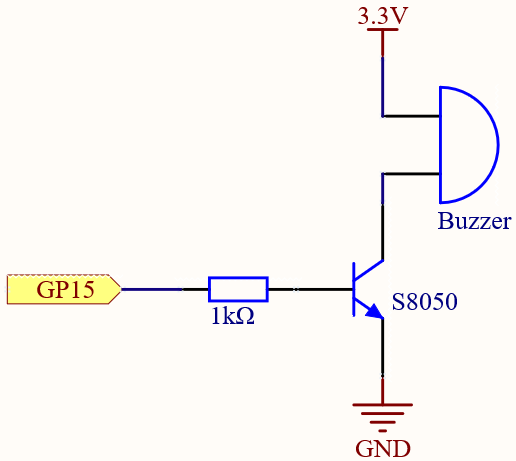
When the GP15 output is high, after the 1K current limiting resistor (to protect the transistor), the S8050 (NPN transistor) will conduct, so that the buzzer will sound.
The role of S8050 (NPN transistor) is to amplify the current and make the buzzer sound louder. In fact, you can also connect the buzzer directly to GP15, but you will find that the buzzer sound is smaller.
Wiring
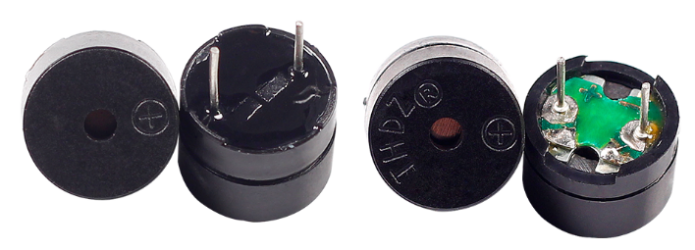
Two types of buzzers are included in the kit. We need to use active buzzer. Turn them around, the sealed back (not the exposed PCB) is the one we want.
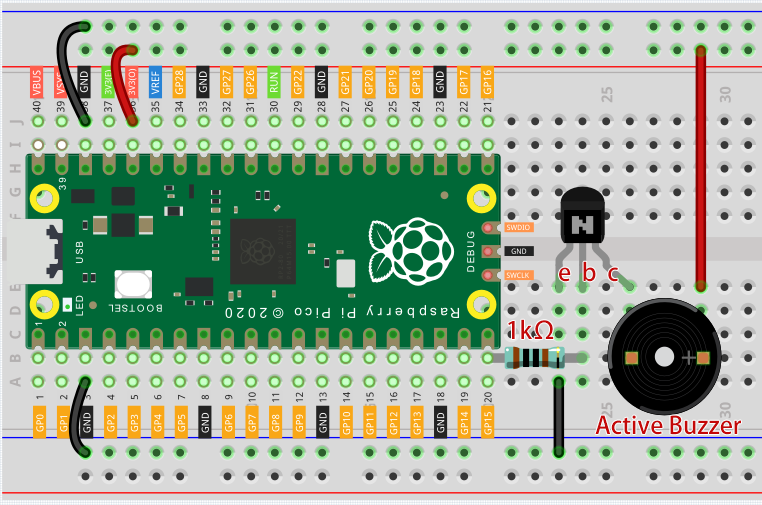
The buzzer needs to use a transistor when working, here we use S8050 (NPN Transistor).
Code
Note
You can open the file
3.1_beep.inounder the path ofeuler-kit/arduino/3.1_beep.Or copy this code into Arduino IDE.
Then select the Raspberry Pi Pico board and the correct port before clicking the Upload button.
After the code runs, you will hear a beep every second.