Note
Hello, welcome to the SunFounder Raspberry Pi & Arduino & ESP32 Enthusiasts Community on Facebook! Dive deeper into Raspberry Pi, Arduino, and ESP32 with fellow enthusiasts.
Why Join?
Expert Support: Solve post-sale issues and technical challenges with help from our community and team.
Learn & Share: Exchange tips and tutorials to enhance your skills.
Exclusive Previews: Get early access to new product announcements and sneak peeks.
Special Discounts: Enjoy exclusive discounts on our newest products.
Festive Promotions and Giveaways: Take part in giveaways and holiday promotions.
👉 Ready to explore and create with us? Click [here] and join today!
3.5 - Small Fan
Now we use the L293D to drive the DC motor to make it rotate clockwise and counterclockwise. Since the DC motor requires a relatively large current, for safety reasons, here we use a power module to supply power to the motor.
Schematic
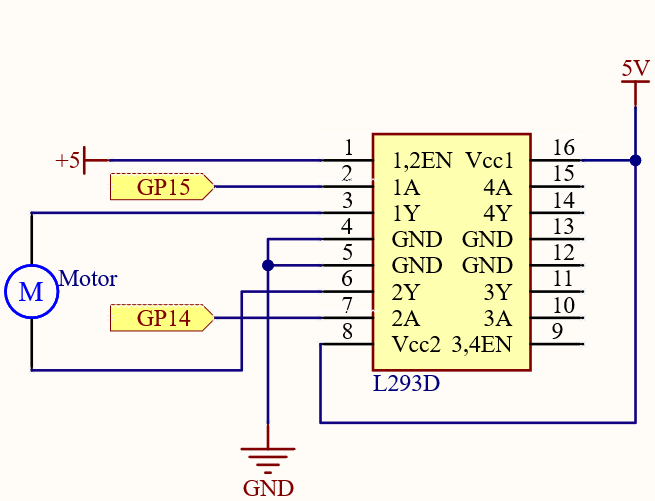
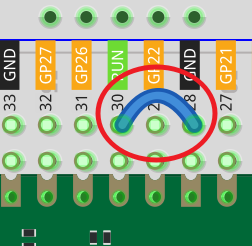
In this circuit, you will see that the button is connected to the RUN pin. This is because the motor is operating with too much current, which may cause the Pico to disconnect from the computer, and the button needs to be pressed (for the Pico’s RUN pin to receive a low level) to reset.
L293D is a motor driver chip, EN is connected to 5V to make L293D work. 1A and 2A are the inputs connected to GP15 and GP14 respectively; 1Y and 2Y are the outputs connected to the two ends of the motor.
Y (output) is in phase with A (input), so if GP15 and GP14 are given different levels respectively, the direction of motor rotation can be changed.
Wiring
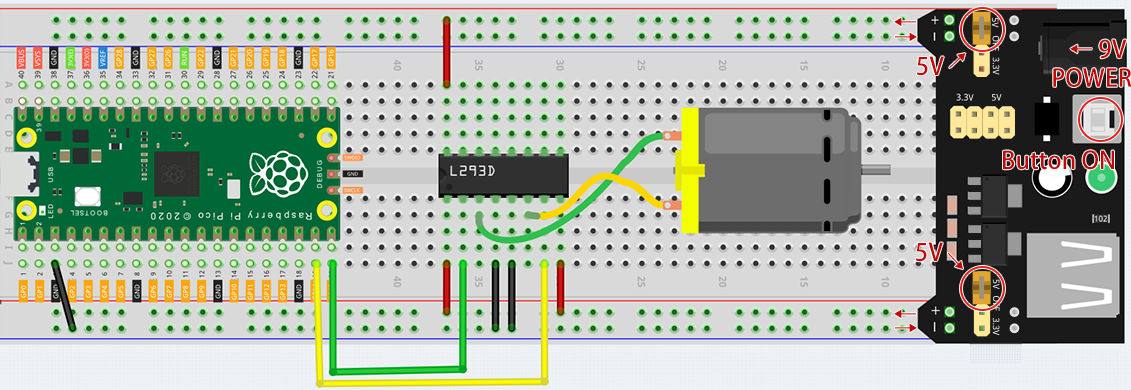
Since DC motors require a high current, we use a power supply module to power the motor here for safety reasons.
Code
Note
You can open the file
3.5_small_fan.inounder the path ofeuler-kit/arduino/3.5_small_fan.Or copy this code into Arduino IDE.
Then select the Raspberry Pi Pico board and the correct port before clicking the Upload button.
Once the program is running, the motor will rotate back and forth in a regular pattern.
Note
If you can not upload the code again, this time you need to connect the RUN pin on the Pico with a wire to GND to reset it, and then unplug this wire to run the code again.
This is because the motor is operating with too much current, which may cause the Pico to disconnect from the computer.