Note
Hello, welcome to the SunFounder Raspberry Pi & Arduino & ESP32 Enthusiasts Community on Facebook! Dive deeper into Raspberry Pi, Arduino, and ESP32 with fellow enthusiasts.
Why Join?
Expert Support: Solve post-sale issues and technical challenges with help from our community and team.
Learn & Share: Exchange tips and tutorials to enhance your skills.
Exclusive Previews: Get early access to new product announcements and sneak peeks.
Special Discounts: Enjoy exclusive discounts on our newest products.
Festive Promotions and Giveaways: Take part in giveaways and holiday promotions.
👉 Ready to explore and create with us? Click [here] and join today!
1.2.2 Passive Buzzer
Introduction
In this lesson, we will learn how to make a passive buzzer play music.
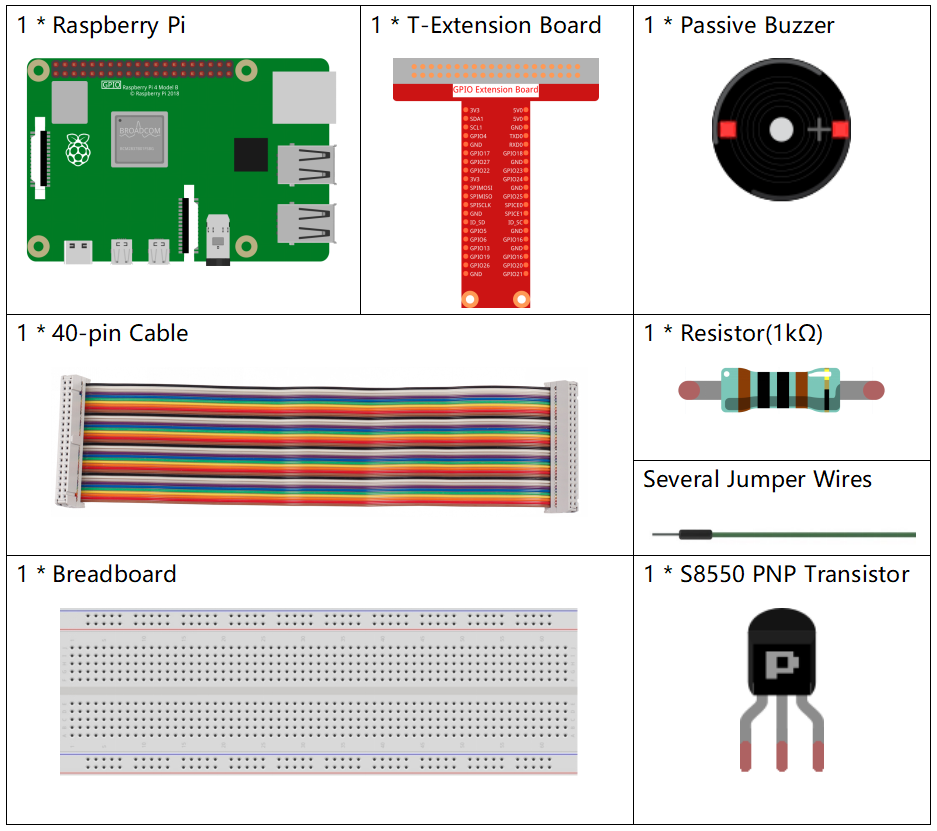
Components
Schematic Diagram
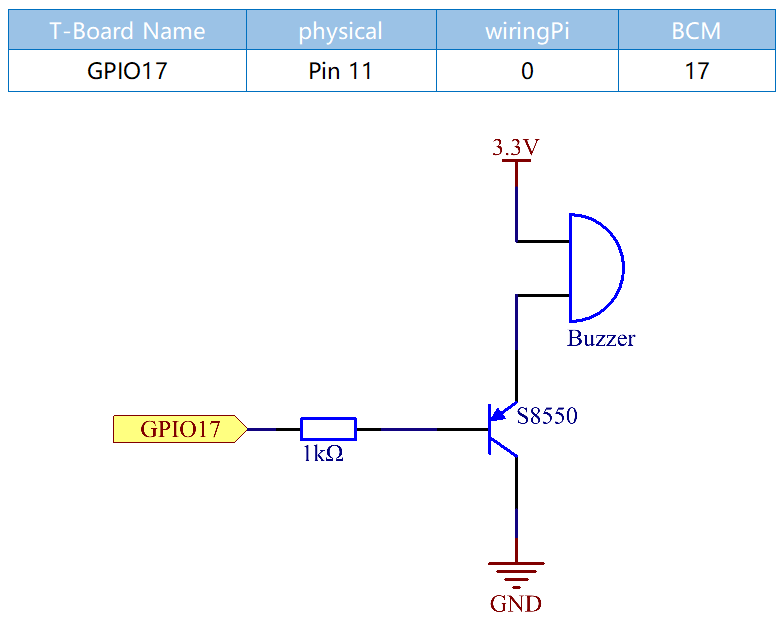
In this experiment, a passive buzzer, a PNP transistor and a 1k resistor are used between the base of the transistor and GPIO to protect the transistor.
When GPIO17 is given different frequencies, the passive buzzer will emit different sounds; in this way, the buzzer plays music.
Experimental Procedures
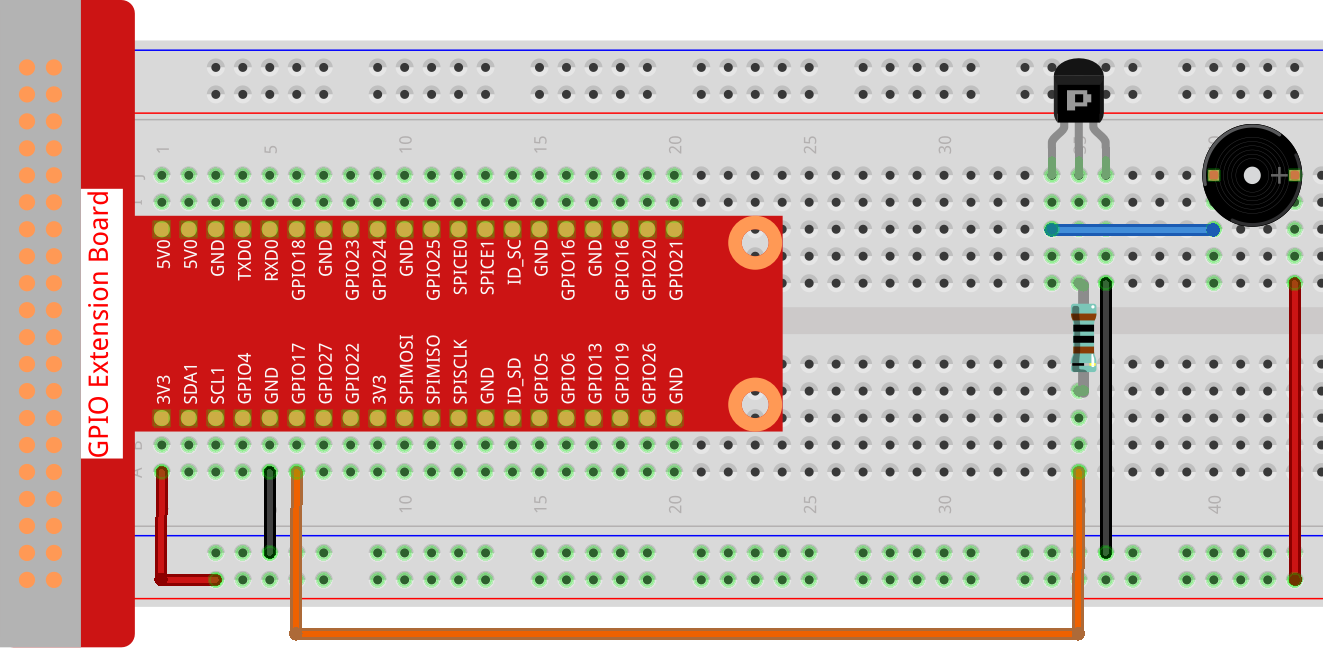
Step 1: Build the circuit.
Step 2: Change directory.
cd ~/davinci-kit-for-raspberry-pi/c/1.2.2/
Step 3: Compile.
gcc 1.2.2_PassiveBuzzer.c -lwiringPi
Step 4: Run.
sudo ./a.out
The code run, the buzzer plays a piece of music.
Note
If it does not work after running, or there is an error prompt: "wiringPi.h: No such file or directory", please refer to Install and Check the WiringPi.
Code
#include <wiringPi.h>
#include <softTone.h>
#include <stdio.h>

#define BuzPin    0

#define  CL1  131
#define  CL2  147
#define  CL3  165
#define  CL4  175
#define  CL5  196
#define  CL6  221
#define  CL7  248

#define  CM1  262
#define  CM2  294
#define  CM3  330
#define  CM4  350
#define  CM5  393
#define  CM6  441
#define  CM7  495

#define  CH1  525
#define  CH2  589
#define  CH3  661
#define  CH4  700
#define  CH5  786
#define  CH6  882
#define  CH7  990

int song_1[] = {CM3,CM5,CM6,CM3,CM2,CM3,CM5,CM6,CH1,CM6,CM5,CM1,CM3,CM2,
                CM2,CM3,CM5,CM2,CM3,CM3,CL6,CL6,CL6,CM1,CM2,CM3,CM2,CL7,
                CL6,CM1,CL5};

int beat_1[] = {1,1,3,1,1,3,1,1,1,1,1,1,1,1,3,1,1,3,1,1,1,1,1,1,1,2,1,1,
                1,1,1,1,1,1,3};


int song_2[] = {CM1,CM1,CM1,CL5,CM3,CM3,CM3,CM1,CM1,CM3,CM5,CM5,CM4,CM3,CM2,
                CM2,CM3,CM4,CM4,CM3,CM2,CM3,CM1,CM1,CM3,CM2,CL5,CL7,CM2,CM1
                };

int beat_2[] = {1,1,1,3,1,1,1,3,1,1,1,1,1,1,3,1,1,1,2,1,1,1,3,1,1,1,3,3,2,3};

int main(void)
{
    int i, j;
    if(wiringPiSetup() == -1){ //when initialize wiring failed,print message to screen
        printf("setup wiringPi failed !");
        return 1;
    }

    if(softToneCreate(BuzPin) == -1){
        printf("setup softTone failed !");
        return 1;
    }

    while(1){
        printf("music is being played...\n");
        delay(100);
        for(i=0;i<sizeof(song_1)/4;i++){
            softToneWrite(BuzPin, song_1[i]);
            delay(beat_1[i] * 500);
        }

        for(i=0;i<sizeof(song_2)/4;i++){
            softToneWrite(BuzPin, song_2[i]);
            delay(beat_2[i] * 500);
        }
    }

    return 0;
}
Code Explanation
#define  CL1  131
#define  CL2  147
#define  CL3  165
#define  CL4  175
#define  CL5  196
#define  CL6  221
#define  CL7  248

#define  CM1  262
#define  CM2  294
These frequencies of each note are as shown. CL refers to low note, CM middle note, CH high note, 1-7 correspond to the notes C, D, E, F, G, A, B.
int song_1[] = {CM3,CM5,CM6,CM3,CM2,CM3,CM5,CM6,CH1,CM6,CM5,CM1,CM3,CM2,
                CM2,CM3,CM5,CM2,CM3,CM3,CL6,CL6,CL6,CM1,CM2,CM3,CM2,CL7,
                CL6,CM1,CL5};
int beat_1[] = {1,1,3,1,1,3,1,1,1,1,1,1,1,1,3,1,1,3,1,1,1,1,1,1,1,2,1,1,
                1,1,1,1,1,1,3};
The array, song_1[] stores a musical score of a song in which beat_1[] refers to the beat of each note in the song (0.5s for each beat).
if(softToneCreate(BuzPin) == -1){
        printf("setup softTone failed !");
        return 1;
This creates a software controlled tone pin. You can use any GPIO pin and the pin numbering will be that of the wiringPiSetup() function you used. The return value is 0 for success. Anything else and you should check the global errnovariable to see what went wrong.
for(i=0;i<sizeof(song_1)/4;i++){
    softToneWrite(BuzPin, song_1[i]);
    delay(beat_1[i] * 500);
}
Employ a for statement to play song_1.
In the judgment condition, i<sizeof(song_1)/4,“devide by 4” is used because the array song_1[] is an array of the data type of integer, and each element takes up four bytes.
The number of elements in song_1 (the number of musical notes) is gotten by deviding sizeof(song_4) by 4.
To enable each note to play for beat * 500ms, the function delay(beat_1[i] * 500) is called.
The prototype of softToneWrite(BuzPin, song_1[i]):
void softToneWrite (int pin, int freq);
This updates the tone frequency value on the given pin. The tone does not stop playing until you set the frequency to 0.