Note
Hello, welcome to the SunFounder Raspberry Pi & Arduino & ESP32 Enthusiasts Community on Facebook! Dive deeper into Raspberry Pi, Arduino, and ESP32 with fellow enthusiasts.
Why Join?
Expert Support: Solve post-sale issues and technical challenges with help from our community and team.
Learn & Share: Exchange tips and tutorials to enhance your skills.
Exclusive Previews: Get early access to new product announcements and sneak peeks.
Special Discounts: Enjoy exclusive discounts on our newest products.
Festive Promotions and Giveaways: Take part in giveaways and holiday promotions.
👉 Ready to explore and create with us? Click [here] and join today!
(Example) Smart Weather Station
Introduction
This project creates a comprehensive Smart Weather Station that combines local environmental sensors with global weather data and AI analysis. The system integrates:
Local sensor data from DHT11 (temperature/humidity) and LDR (light sensor)
Global weather forecasts from OpenWeather API
AI-powered voice analysis using OpenAI’s GPT and TTS capabilities
Visual display on a 128x64 OLED screen
Interactive button for on-demand AI weather insights
The weather station automatically compares local conditions with forecast data and provides intelligent recommendations through voice output, creating a complete environmental monitoring solution.
You can use the other LLM modules and TTS modules to build your own smart devices. See:
What You’ll Need
The following components are required for this project:
COMPONENT |
PURCHASE LINK |
|---|---|
- |
|
- |
|
Raspberry Pi |
- |
Wiring Diagram
Connect the components to the Fusion HAT+ as follows:

Get and Save your API Key
Go to OpenAI Platform and log in. On the API keys page, click Create new secret key.

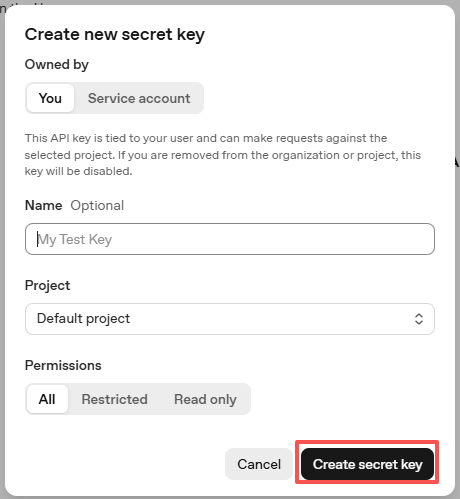
Fill in the details (Owner, Name, Project, and permissions if needed), then click Create secret key.
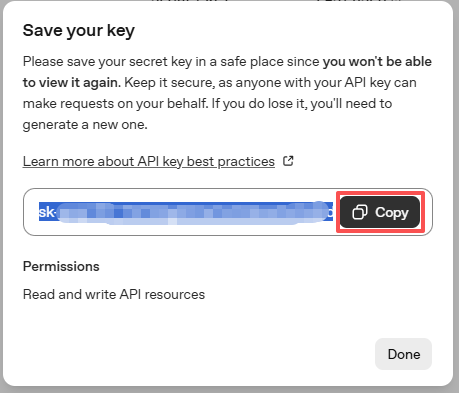
Once the key is created, copy it right away — you won’t be able to see it again. If you lose it, you’ll need to generate a new one.
In your project folder (for example:
/), create a file calledsecret.py:cd ~/ai-lab-kit/llm sudo nano secret.py
Paste your key into the file like this:
# secret.py
# Store secrets here. Never commit this file to Git.
OPENAI_API_KEY = "sk-xxx"
Enable billing and check models
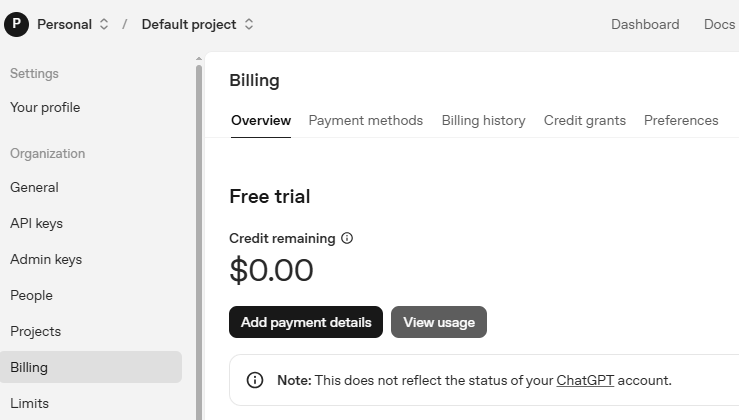
Before using the key, go to the Billing page in your OpenAI account, add your payment details, and top up a small amount of credits.
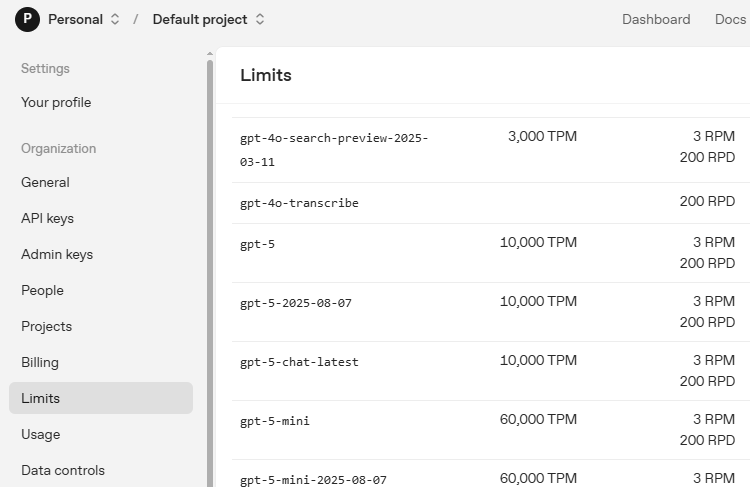
Then go to the Limits page to check which models are available for your account and copy the exact model ID to use in your code.
Get OpenWeather API keys
OpenWeather is an online service, owned by OpenWeather Ltd, that provides global weather data via API, including current weather data, forecasts, nowcasts and historical weather data for any geographical location.
Visit OpenWeather to log in/create an account.
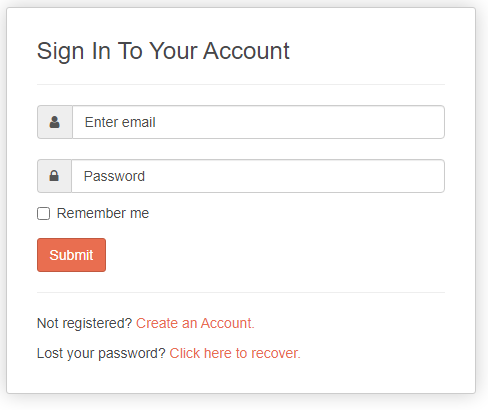
Click into the API page from the navigation bar.

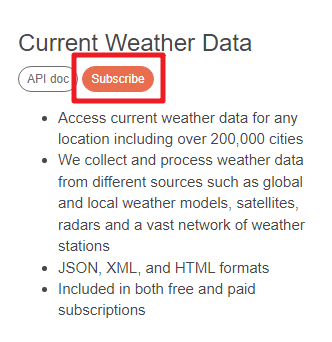
Find Current Weather Data and click Subscribe.
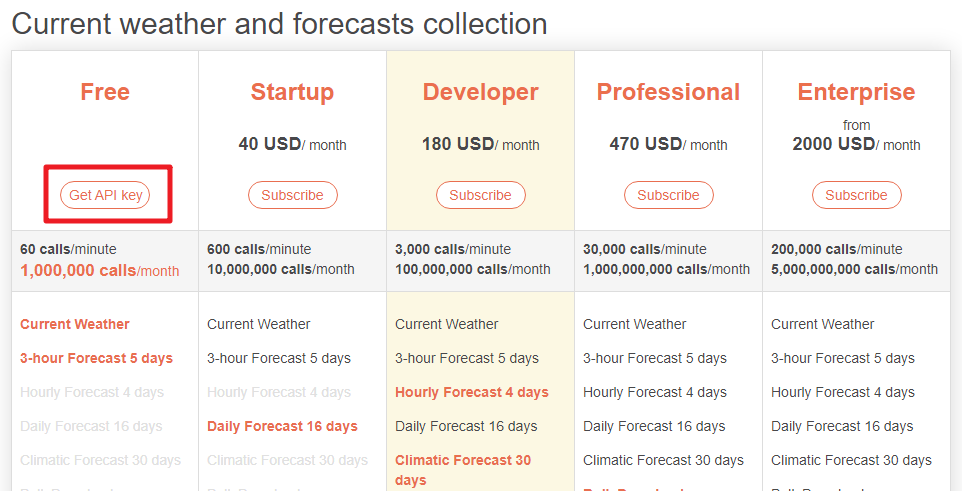
Under Current weather and forecasts collection, subscribe to the appropriate service. In our project, Free is good enough.
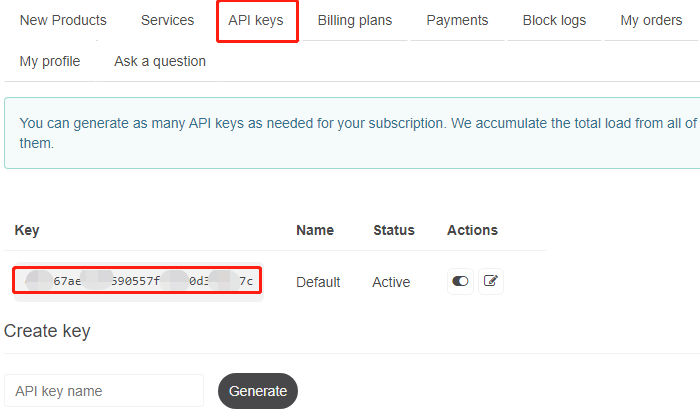
Copy the Key from the API keys page.
Open the
secret.pyfile with the following command:cd ~/ai-lab-kit/llm sudo nano secret.py
Add the copied API Key:
OPENWEATHER_API_KEY = "732exxxxxxxxxxxxxxxxxxxxx919b"Press
Ctrl + X,Y, and thenEnterto save the file and exit.
Run the Example
Run the code
cd ~/ai-lab-kit/llm
sudo python3 llm_openai_weather.py
What you will see after the script starts
The OLED turns on and begins showing weather information.
The program prints startup information in the terminal, including the target city and button pin.
The OLED automatically switches pages every 10 seconds (3 pages total):
Page 1: Local Sensors (DHT11 + LDR) Shows local temperature, humidity, and light level (with a small light bar).
Page 2: Weather Forecast (OpenWeather) Shows the current temperature, weather description, and last update time.
Page 3: AI Insights Shows the differences between local sensor readings and OpenWeather data, and a simple comfort status (e.g., Comfortable / Warm / Cool / Humid / Dry).
Trigger AI voice analysis
Press the button on GPIO 27 to let the AI generate a short “weather reporter” style analysis.
The terminal will print an
AI Analysissection, including:Local readings (temperature / humidity / light)
Remote weather (OpenWeather temperature + description)
A short text summary generated by the AI
The OLED will temporarily show SPEAKING…
The analysis will be spoken through the speaker using OpenAI TTS
Data update behavior
Local sensors update about every 2 seconds.
OpenWeather data updates about every 5 minutes.
The light reading is smoothed automatically to reduce flickering.
Stop the program
Press
Ctrl+Cin the terminal to exit.The OLED will clear and the program stops safely.
Code
Here is the full Python script for the Smart Weather Station:
#!/usr/bin/env python3
# -*- coding: utf-8 -*-

"""
Smart Weather Station with AI Assistant
- Reads local temperature & humidity from DHT11 on GPIO 17
- Reads light level from LDR on ADC A0 (0..4095)
- Fetches weather forecast from OpenWeather API
- Provides AI voice analysis using OpenAI (triggered by button)
- Displays all information on 128x64 SSD1306 OLED
"""

import time
import requests
from datetime import datetime
from statistics import mean
from fusion_hat.modules import DHT11
from fusion_hat.adc import ADC
from fusion_hat.pin import Pin, Mode, Pull
from PIL import Image, ImageDraw, ImageFont
import adafruit_ssd1306
import board
from sunfounder_voice_assistant.tts import OpenAI_TTS
from secret import OPENAI_API_KEY, OPENWEATHER_API_KEY
from signal import pause

# Configuration
DHT_PIN = 17          # DHT11 uses GPIO 17
LDR_CH = 0
I2C_ADDR = 0x3C

# OpenWeather API Configuration
CITY_NAME = "Shanghai"
COUNTRY_CODE = "CN"
LATITUDE = 31.2304
LONGITUDE = 121.4737
UNITS = "metric"

# Update intervals in seconds
WEATHER_UPDATE_INTERVAL = 300
SENSOR_UPDATE_INTERVAL = 2

# GPIO Pins
BUTTON_PIN = 27  # Button uses GPIO 27

# OLED Setup
WIDTH, HEIGHT = 128, 64
i2c = board.I2C()
oled = adafruit_ssd1306.SSD1306_I2C(WIDTH, HEIGHT, i2c, addr=I2C_ADDR)
oled.fill(0)
oled.show()

# Load fonts
try:
    font_small = ImageFont.truetype("/usr/share/fonts/truetype/dejavu/DejaVuSans.ttf", 10)
    font_medium = ImageFont.truetype("/usr/share/fonts/truetype/dejavu/DejaVuSans.ttf", 12)
    font_large = ImageFont.truetype("/usr/share/fonts/truetype/dejavu/DejaVuSans.ttf", 14)
except:
    print("Warning: Using default font")
    font_small = ImageFont.load_default()
    font_medium = ImageFont.load_default()
    font_large = ImageFont.load_default()

image = Image.new("1", (WIDTH, HEIGHT))
draw = ImageDraw.Draw(image)

# Sensors
dht = DHT11(pin=DHT_PIN)
ldr = ADC(LDR_CH)

# Button for triggering AI analysis
button = Pin(BUTTON_PIN, mode=Mode.IN, pull=Pull.DOWN)

# OpenWeather API Class
class WeatherAPI:
    def __init__(self, api_key, city, country_code, lat=None, lon=None):
        self.api_key = api_key
        self.city = city
        self.country_code = country_code
        self.lat = lat
        self.lon = lon
        self.current_weather = None
        self.forecast = None
        self.last_update = 0

    def get_weather_url(self):
        if self.lat and self.lon:
            return f"https://api.openweathermap.org/data/2.5/weather?lat={self.lat}&lon={self.lon}&appid={self.api_key}&units={UNITS}"
        else:
            return f"https://api.openweathermap.org/data/2.5/weather?q={self.city},{self.country_code}&appid={self.api_key}&units={UNITS}"

    def get_forecast_url(self):
        if self.lat and self.lon:
            return f"https://api.openweathermap.org/data/2.5/forecast?lat={self.lat}&lon={self.lon}&appid={self.api_key}&units={UNITS}"
        else:
            return f"https://api.openweathermap.org/data/2.5/forecast?q={self.city},{self.country_code}&appid={self.api_key}&units={UNITS}"

    def update_weather(self):
        try:
            # Current weather
            response = requests.get(self.get_weather_url(), timeout=10)
            if response.status_code == 200:
                self.current_weather = response.json()
                print(f"Weather API success: {self.current_weather['weather'][0]['description']}")
            else:
                print(f"Weather API error: {response.status_code}")
                return False

            # Forecast
            response = requests.get(self.get_forecast_url(), timeout=10)
            if response.status_code == 200:
                self.forecast = response.json()

            self.last_update = time.time()
            return True

        except Exception as e:
            print(f"Weather API error: {e}")
            return False

    def get_temperature(self):
        if self.current_weather:
            return self.current_weather['main']['temp']
        return None

    def get_humidity(self):
        if self.current_weather:
            return self.current_weather['main']['humidity']
        return None

    def get_weather_description(self):
        if self.current_weather:
            return self.current_weather['weather'][0]['description'].title()
        return None

    def get_weather_condition(self):
        if self.current_weather:
            weather_id = self.current_weather['weather'][0]['id']
            if weather_id < 300:
                return "TSTORM"
            elif weather_id < 600:
                return "RAIN"
            elif weather_id < 700:
                return "SNOW"
            elif weather_id == 800:
                return "CLEAR"
            elif weather_id < 900:
                return "CLOUDS"
            else:
                return "OTHER"
        return "N/A"

    def get_forecast_summary(self):
        if not self.forecast or 'list' not in self.forecast:
            return "No forecast"

        forecasts = self.forecast['list'][:8]
        temps = [f['main']['temp'] for f in forecasts]
        min_temp = min(temps)
        max_temp = max(temps)

        conditions = {}
        for f in forecasts:
            condition = f['weather'][0]['main']
            conditions[condition] = conditions.get(condition, 0) + 1

        most_common = max(conditions, key=conditions.get)

        return f"{min_temp:.0f}-{max_temp:.0f}C {most_common}"

# AI Weather Analyst Class
class WeatherAI:
    def __init__(self, api_key):
        self.api_key = api_key
        self.tts = OpenAI_TTS(api_key=api_key)
        self.tts.set_voice(self.tts.Voice.ALLOY)
        self.is_speaking = False

    def analyze_weather(self, local_temp, local_hum, local_light, weather_data):
        temp_diff = abs(local_temp - weather_data.get('current_temp', local_temp)) if weather_data.get('current_temp') else 0

        if temp_diff > 3:
            accuracy = "significantly different from"
        elif temp_diff > 1:
            accuracy = "slightly different from"
        else:
            accuracy = "very close to"

        recommendations = []
        if local_hum > 80:
            recommendations.append("It's quite humid")
        elif local_hum < 30:
            recommendations.append("The air is dry")

        if local_light > 80:
            recommendations.append("It's bright here")
        elif local_light < 20:
            recommendations.append("It's quite dark")

        weather_desc = weather_data.get('weather_desc', '').lower()
        if 'rain' in weather_desc or 'drizzle' in weather_desc or 'thunderstorm' in weather_desc:
            recommendations.append("Don't forget an umbrella")
        elif 'clear' in weather_desc:
            recommendations.append("Great day to go outside")
        elif 'cloud' in weather_desc:
            recommendations.append("Partly cloudy today")

        rec_text = ". ".join(recommendations) + "." if recommendations else "Conditions are normal."

        analysis = f"Local sensors show {local_temp:.1f}C, which is {accuracy} the forecast. {rec_text}"
        return analysis

    def speak_analysis(self, analysis_text):
        if self.is_speaking:
            print("Already speaking, please wait...")
            return False

        try:
            self.is_speaking = True
            print(f"Speaking analysis: {analysis_text}")
            self.tts.say(analysis_text, instructions="speak clearly and professionally like a weather reporter")
            self.is_speaking = False
            return True
        except Exception as e:
            print(f"TTS error: {e}")
            self.is_speaking = False
            return False

# Light sensor helper
_light_window = []

def light_percent(raw, min_val=0, max_val=4095):
    global _light_window

    _light_window.append(raw)
    if len(_light_window) > 5:
        _light_window.pop(0)

    smooth_raw = int(mean(_light_window))
    pct = (smooth_raw - min_val) / (max_val - min_val) * 100 if max_val > min_val else 50
    pct = max(0, min(100, pct))

    return int(pct), smooth_raw

# Display Manager Class
class DisplayManager:
    def __init__(self):
        self.current_page = 0
        self.num_pages = 3
        self.last_page_change = 0
        self.page_cycle_interval = 10

    def next_page(self):
        self.current_page = (self.current_page + 1) % self.num_pages
        self.last_page_change = time.time()

    def should_change_page(self):
        return time.time() - self.last_page_change > self.page_cycle_interval

    def draw_page(self, page_num, local_temp, local_hum, light_pct, weather_api, weather_ai):
        draw.rectangle((0, 0, WIDTH, HEIGHT), outline=0, fill=0)

        if page_num == 0:
            self._draw_local_sensors(local_temp, local_hum, light_pct)
        elif page_num == 1:
            self._draw_weather_forecast(weather_api)
        elif page_num == 2:
            self._draw_ai_insights(local_temp, local_hum, light_pct, weather_api)

        # Page indicator at bottom right
        indicator = f"{page_num+1}/{self.num_pages}"
        indicator_width = len(indicator) * 6
        draw.text((WIDTH - indicator_width - 2, HEIGHT - 10), indicator, font=font_small, fill=255)

    def _draw_local_sensors(self, temp, hum, light):
        # Title at top
        draw.text((2, 2), "LOCAL SENSORS", font=font_medium, fill=255)

        # Temperature - larger font on first line
        temp_text = f"Temp: {temp:.1f} C"
        draw.text((10, 18), temp_text, font=font_large, fill=255)

        # Humidity - second line
        hum_text = f"Humidity: {hum:.1f}%"
        draw.text((10, 38), hum_text, font=font_medium, fill=255)

        # Light with bar on same line
        light_text = f"Light: {light}%"
        draw.text((10, 53), light_text, font=font_small, fill=255)

        # Light bar positioned next to text, not overlapping
        bar_x = 60  # Position after "Light: XX%"
        bar_y = 55
        bar_width = 50
        bar_height = 4

        # Draw background bar
        draw.rectangle((bar_x, bar_y, bar_x + bar_width, bar_y + bar_height), outline=255, fill=0)

        # Draw filled portion
        fill_width = int(bar_width * light / 100)
        if fill_width > 0:
            draw.rectangle((bar_x, bar_y, bar_x + fill_width, bar_y + bar_height), outline=0, fill=255)

    def _draw_weather_forecast(self, weather_api):
        draw.text((2, 2), "WEATHER", font=font_medium, fill=255)

        if not weather_api.current_weather:
            draw.text((10, 25), "No weather data", font=font_medium, fill=255)
            draw.text((10, 45), "Check connection", font=font_small, fill=255)
            return

        current_temp = weather_api.get_temperature()
        weather_desc = weather_api.get_weather_description()
        weather_cond = weather_api.get_weather_condition()

        # Temperature - large font
        if current_temp is not None:
            draw.text((10, 18), f"{current_temp:.0f} C", font=font_large, fill=255)

        # Weather description
        if weather_desc:
            desc_text = weather_desc[:15]
            draw.text((10, 38), desc_text, font=font_medium, fill=255)

        # Weather condition
        if weather_cond:
            draw.text((10, 53), weather_cond, font=font_small, fill=255)

        # Update time at top right
        if weather_api.last_update > 0:
            update_time = datetime.fromtimestamp(weather_api.last_update).strftime("%H:%M")
            update_text = f"Up: {update_time}"
            update_width = len(update_text) * 6
            draw.text((WIDTH - update_width - 2, 2), update_text, font=font_small, fill=255)

    def _draw_ai_insights(self, local_temp, local_hum, light_pct, weather_api):
        draw.text((2, 2), "AI INSIGHTS", font=font_medium, fill=255)

        api_temp = weather_api.get_temperature() if weather_api.current_weather else None
        api_hum = weather_api.get_humidity() if weather_api.current_weather else None

        line_y = 18

        # Temperature difference
        if api_temp is not None:
            temp_diff = local_temp - api_temp
            temp_symbol = "+" if temp_diff > 0 else "" if temp_diff == 0 else ""
            diff_text = f"Temp: {temp_symbol}{temp_diff:.1f}C"
            draw.text((10, line_y), diff_text, font=font_medium, fill=255)
            line_y += 15

        # Humidity difference
        if api_hum is not None:
            hum_diff = local_hum - api_hum
            hum_symbol = "+" if hum_diff > 0 else "" if hum_diff == 0 else ""
            diff_text = f"Hum: {hum_symbol}{hum_diff:.1f}%"
            draw.text((10, line_y), diff_text, font=font_medium, fill=255)
            line_y += 15

        # Comfort level
        comfort = "Normal"
        comfort_color = 255

        if 20 <= local_temp <= 25 and 40 <= local_hum <= 60:
            comfort = "Comfortable"
            comfort_color = 255
        elif local_temp > 28:
            comfort = "Warm"
            comfort_color = 255
        elif local_temp < 16:
            comfort = "Cool"
            comfort_color = 255
        elif local_hum > 70:
            comfort = "Humid"
            comfort_color = 255
        elif local_hum < 30:
            comfort = "Dry"
            comfort_color = 255

        draw.text((10, line_y), f"Feel: {comfort}", font=font_small, fill=comfort_color)

        # Button hint at bottom left
        draw.text((2, HEIGHT - 10), "Press BTN for AI", font=font_small, fill=255)

# Main Application Class
class SmartWeatherStation:
    def __init__(self):
        print("Initializing Smart Weather Station...")

        self.weather_api = WeatherAPI(OPENWEATHER_API_KEY, CITY_NAME, COUNTRY_CODE, LATITUDE, LONGITUDE)
        self.weather_ai = WeatherAI(OPENAI_API_KEY)
        self.display = DisplayManager()

        self.local_temp = 0.0
        self.local_hum = 0.0
        self.light_pct = 0
        self.raw_adc = 0

        self.last_weather_update = 0
        self.last_sensor_update = 0

        # Setup button callback
        button.when_activated = self._button_pressed

        # Initial readings
        self._update_sensors()
        self.weather_api.update_weather()

        print("Smart Weather Station ready!")
        print(f"City: {CITY_NAME}")
        print(f"Temperature unit: {UNITS}")
        print(f"Button on GPIO {BUTTON_PIN} for AI analysis")
        print("="*50)

    def _update_sensors(self):
        try:
            result = dht.read()
            if result:
                hum, temp = result
                self.local_hum = float(hum)
                self.local_temp = float(temp)

            raw = ldr.read()
            self.light_pct, self.raw_adc = light_percent(raw)

            self.last_sensor_update = time.time()
            return True

        except Exception as e:
            print(f"Sensor error: {e}")
            return False

    def _update_weather(self):
        if time.time() - self.last_weather_update > WEATHER_UPDATE_INTERVAL:
            print("Updating weather data...")
            if self.weather_api.update_weather():
                self.last_weather_update = time.time()
                return True
        return False

    def _button_pressed(self):
        """Called when button is pressed"""
        print("\n" + "="*50)
        print("Button pressed! Triggering AI analysis...")
        print("="*50)

        # Update sensors first to get latest data
        self._update_sensors()

        # Get weather data
        api_temp = self.weather_api.get_temperature()

        if api_temp is None:
            print("No weather data available. Please wait for update.")
            return

        # Prepare weather data for analysis
        weather_data = {
            'current_temp': api_temp,
            'weather_desc': self.weather_api.get_weather_description(),
            'forecast_summary': self.weather_api.get_forecast_summary()
        }

        # Generate analysis
        analysis = self.weather_ai.analyze_weather(
            self.local_temp,
            self.local_hum,
            self.light_pct,
            weather_data
        )

        print(f"\nAI Analysis:")
        print(f"Local: {self.local_temp:.1f}C, {self.local_hum:.1f}%, Light: {self.light_pct}%")
        print(f"Remote: {api_temp}C, {self.weather_api.get_weather_description()}")
        print(f"Analysis: {analysis}")

        # Show "Speaking..." on display
        self._show_speaking_message()

        # Speak the analysis
        success = self.weather_ai.speak_analysis(analysis)

        if success:
            print("Analysis completed successfully!")
        else:
            print("Analysis failed or interrupted.")

        print("="*50)

    def _show_speaking_message(self):
        """Display a temporary "Speaking..." message"""
        draw.rectangle((0, 0, WIDTH, HEIGHT), outline=0, fill=0)
        draw.text((WIDTH//2 - 40, HEIGHT//2 - 10), "SPEAKING...", font=font_medium, fill=255)
        oled.image(image)
        oled.show()

    def run(self):
        print("\n" + "="*50)
        print("SMART WEATHER STATION")
        print("="*50)
        print("Display Pages:")
        print("1. Local Sensors (DHT11 + LDR)")
        print("2. Weather Forecast (OpenWeather)")
        print("3. AI Insights (Comparisons)")
        print("")
        print(f"Press button on GPIO {BUTTON_PIN} for AI voice analysis")
        print("Press Ctrl+C to exit")
        print("="*50 + "\n")

        try:
            while True:
                current_time = time.time()

                # Update sensors periodically
                if current_time - self.last_sensor_update > SENSOR_UPDATE_INTERVAL:
                    self._update_sensors()

                # Update weather data periodically
                self._update_weather()

                # Auto-cycle display pages
                if self.display.should_change_page():
                    self.display.next_page()

                # Draw current page
                self.display.draw_page(
                    self.display.current_page,
                    self.local_temp,
                    self.local_hum,
                    self.light_pct,
                    self.weather_api,
                    self.weather_ai
                )

                # Update OLED display
                oled.image(image)
                oled.show()

                # Small delay to prevent CPU overload
                time.sleep(0.1)

        except KeyboardInterrupt:
            print("\nShutting down...")

        finally:
            # Cleanup
            oled.fill(0)
            oled.show()
            print("Smart Weather Station stopped.")

# Main Entry Point
if __name__ == "__main__":
    if not OPENAI_API_KEY or OPENAI_API_KEY == "your-openai-api-key-here":
        print("ERROR: Please set your OpenAI API key in secret.py")
        exit(1)

    if not OPENWEATHER_API_KEY or OPENWEATHER_API_KEY == "your-openweather-api-key-here":
        print("ERROR: Please set your OpenWeather API key in secret.py")
        print("Get one at: https://openweathermap.org/api")
        exit(1)

    station = SmartWeatherStation()
    station.run()
Understanding the Code
Sensor Integration
The system reads from two local sensors:
# DHT11 for temperature and humidity
dht = DHT11(pin=DHT_PIN)
result = dht.read()  # Returns (humidity, temperature)

# LDR (Light Dependent Resistor) through ADC
ldr = ADC(LDR_CH)
raw = ldr.read()  # Returns 0-4095 value
OpenWeather API Integration
The WeatherAPI class manages connections to OpenWeather for current conditions and forecasts:
class WeatherAPI:
    def update_weather(self):
        # Current weather endpoint
        response = requests.get(self.get_weather_url(), timeout=10)
        self.current_weather = response.json()

        # Forecast endpoint
        response = requests.get(self.get_forecast_url(), timeout=10)
        self.forecast = response.json()
AI Analysis Engine
The WeatherAI class generates intelligent weather insights and converts them to speech:
class WeatherAI:
    def analyze_weather(self, local_temp, local_hum, local_light, weather_data):
        # Calculate temperature difference
        temp_diff = abs(local_temp - weather_data.get('current_temp', local_temp))

        # Generate recommendations based on conditions
        recommendations = []
        if local_hum > 80:
            recommendations.append("It's quite humid")

        # Combine into analysis text
        analysis = f"Local sensors show {local_temp:.1f}C..."
        return analysis

    def speak_analysis(self, analysis_text):
        self.tts.say(analysis_text, instructions="speak clearly...")
Multi-Page Display System
The DisplayManager handles three information pages that auto-rotate:
class DisplayManager:
    def draw_page(self, page_num, ...):
        if page_num == 0:
            self._draw_local_sensors(...)
        elif page_num == 1:
            self._draw_weather_forecast(...)
        elif page_num == 2:
            self._draw_ai_insights(...)

    def _draw_local_sensors(self, temp, hum, light):
        # Draw temperature, humidity, and light level with progress bar
Button Event Handling
The button triggers AI voice analysis when pressed:
button = Pin(BUTTON_PIN, mode=Mode.IN, pull=Pull.DOWN)
button.when_activated = self._button_pressed

def _button_pressed(self):
    # Update sensors, generate analysis, and speak
    analysis = self.weather_ai.analyze_weather(...)
    self.weather_ai.speak_analysis(analysis)
Data Smoothing for Light Sensor
The light sensor uses moving average smoothing for stable readings:
def light_percent(raw, min_val=0, max_val=4095):
    _light_window.append(raw)
    if len(_light_window) > 5:
        _light_window.pop(0)

    smooth_raw = int(mean(_light_window))  # Moving average
    pct = (smooth_raw - min_val) / (max_val - min_val) * 100
Main Application Loop
The SmartWeatherStation class coordinates all components with proper timing:
def run(self):
    while True:
        # Update sensors every 2 seconds
        if time.time() - self.last_sensor_update > SENSOR_UPDATE_INTERVAL:
            self._update_sensors()

        # Update weather every 5 minutes
        self._update_weather()

        # Auto-cycle pages every 10 seconds
        if self.display.should_change_page():
            self.display.next_page()

        # Draw current page
        self.display.draw_page(...)
Troubleshooting
“DHT11 read failed” errors
Ensure proper wiring: VCC (3.3V), DATA (GPIO 17), GND
Add a 10kΩ pull-up resistor between DATA and VCC
Keep sensor away from heat sources (Raspberry Pi itself can heat up)
Try adding a small delay between readings:
time.sleep(2)
OpenWeather API error
Verify your API key is correct and not expired
Check internet connection:
ping 8.8.8.8Ensure you’re using the correct city name and country code
Free tier has rate limits (60 calls/minute, 1,000,000 calls/month)
OLED display not showing
Check I2C connection:
sudo i2cdetect -y 1(should show 0x3C)Verify OLED is powered (3.3V or 5V depending on model)
Ensure correct I2C address (0x3C or 0x3D)
No sound from TTS
Check audio output configuration:
sudo raspi-config→ System Options → AudioTest audio:
speaker-test -t sine -f 440Verify OpenAI TTS API key has sufficient credits
Check internet connectivity for API calls
Button not responding
Verify wiring: button between GPIO 27 and GND
Check pull-down resistor is configured in code
Test button with simple script to verify functionality
Inaccurate light readings
Calibrate LDR by adjusting min_val and max_val in light_percent()
Cover LDR completely for minimum value reading
Expose to bright light for maximum value reading
Ensure LDR is not in shadow of other components
Weather data outdated
Increase WEATHER_UPDATE_INTERVAL for more frequent updates
Check if API calls are succeeding (look for error messages)
Verify system time is correct:
date
This smart weather station demonstrates how local sensor data, cloud services, and AI can be combined to create a sophisticated environmental monitoring system that provides actionable insights and intelligent recommendations!