Note
Hello, welcome to the SunFounder Raspberry Pi & Arduino & ESP32 Enthusiasts Community on Facebook! Dive deeper into Raspberry Pi, Arduino, and ESP32 with fellow enthusiasts.
Why Join?
Expert Support: Solve post-sale issues and technical challenges with help from our community and team.
Learn & Share: Exchange tips and tutorials to enhance your skills.
Exclusive Previews: Get early access to new product announcements and sneak peeks.
Special Discounts: Enjoy exclusive discounts on our newest products.
Festive Promotions and Giveaways: Take part in giveaways and holiday promotions.
👉 Ready to explore and create with us? Click [here] and join today!
(Example) Digital Pet
Introduction
Create an interactive Digital Pet that lives on an OLED display and communicates through voice! This project combines speech recognition, AI conversation, text-to-speech, and visual feedback to create a virtual companion with its own personality, emotions, and needs. The digital pet features:
Voice Interaction: Speak to your pet using speech-to-text (STT)
AI Personality: Powered by OpenAI’s GPT-4o with custom emotions, you can choose the other LLM to use.
Emotional Display: Shows mood using text emoticons (kaomoji)
Status System: Hunger and energy levels that change over time
Visual Feedback: OLED display shows pet’s mood and status
Voice Responses: Pet speaks back using natural-sounding TTS
Your digital pet remembers conversations, has emotional states, and responds differently based on its needs - creating a truly interactive companion experience!
What You’ll Need
The following components are required for this project:
COMPONENT |
PURCHASE LINK |
|---|---|
- |
|
- |
|
Raspberry Pi |
- |
Wiring Diagram
Connect the components to your Raspberry Pi:

Get and Save your API Key
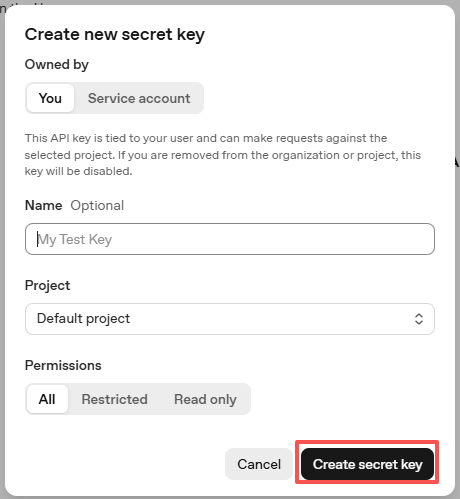
Go to OpenAI Platform and log in. On the API keys page, click Create new secret key.

Fill in the details (Owner, Name, Project, and permissions if needed), then click Create secret key.
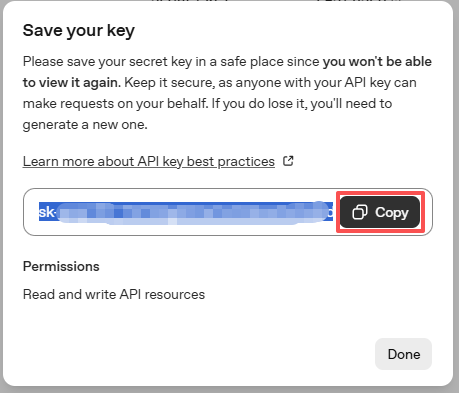
Once the key is created, copy it right away — you won’t be able to see it again. If you lose it, you’ll need to generate a new one.
In your project folder (for example:
/), create a file calledsecret.py:cd ~/ai-lab-kit/llm sudo nano secret.py
Paste your key into the file like this:
# secret.py
# Store secrets here. Never commit this file to Git.
OPENAI_API_KEY = "sk-xxx"
Enable billing and check models
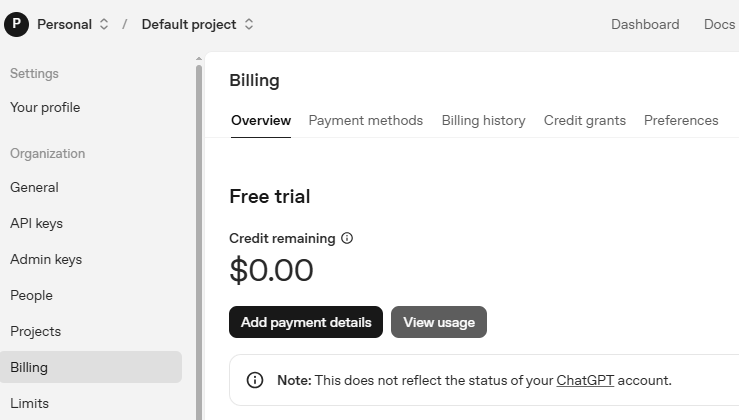
Before using the key, go to the Billing page in your OpenAI account, add your payment details, and top up a small amount of credits.
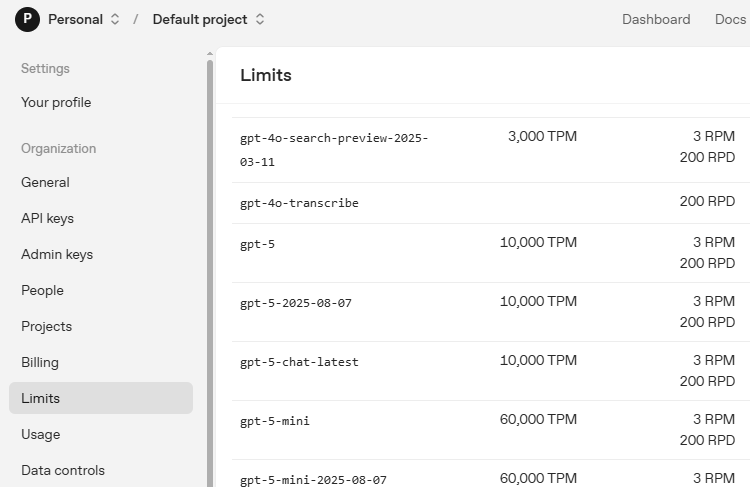
Then go to the Limits page to check which models are available for your account and copy the exact model ID to use in your code.
Run the Example
Run the Code
cd ~/ai-lab-kit/llm
sudo python3 llm_openai_pet.py
Interact with your pet
When the script starts:
The OLED shows a welcome screen with your pet’s name.
A status display appears showing mood, energy, and hunger.
The system starts listening for your voice.
You can speak naturally to your pet, for example:
“How are you feeling?”
“Let’s play a game!”
“Are you hungry?”
“Tell me a story!”
Your pet responds with:
Voice output through speakers
Emotional display on the OLED
Status updates based on your interaction
Exit the program
Say “stop” to end voice interaction.
Press
Ctrl+Cto exit completely.
Code
Here is the full Python script for the Digital Pet:
#!/usr/bin/env python3
import os
import time
import re
import random
import threading
import textwrap
from PIL import Image, ImageDraw, ImageFont
import adafruit_ssd1306
import board
from fusion_hat.stt import Vosk as STT
from fusion_hat.llm import OpenAI
from fusion_hat.tts import OpenAI_TTS
from secret import OPENAI_API_KEY

class AIPet:
    def __init__(self):
        # Initialize OLED display
        self.WIDTH = 128
        self.HEIGHT = 64
        try:
            self.i2c = board.I2C()
            self.oled = adafruit_ssd1306.SSD1306_I2C(self.WIDTH, self.HEIGHT, self.i2c, addr=0x3C)
            self.oled_available = True
        except Exception as e:
            print(f"OLED not available: {e}")
            self.oled_available = False

        # Load fonts
        try:
            self.font = ImageFont.load_default()
            self.large_font = ImageFont.truetype("/usr/share/fonts/truetype/dejavu/DejaVuSans.ttf", 12)
        except:
            self.font = ImageFont.load_default()
            self.large_font = ImageFont.load_default()

        # Clear display if available
        if self.oled_available:
            self.oled.fill(0)
            self.oled.show()

        # Initialize STT
        self.stt = STT(language="en-us")

        # Initialize OpenAI LLM
        self.llm = OpenAI(
            api_key=OPENAI_API_KEY,
            model="gpt-4o",
        )

        # Initialize TTS
        self.tts = OpenAI_TTS(api_key=OPENAI_API_KEY)
        self.tts.set_voice(self.tts.Voice.ALLOY)

        # Pet state
        self.pet_name = "Pixel"
        self.mood = "happy"
        self.energy = 100
        self.hunger = 0
        self.last_fed = time.time()

        # Kaomoji (text emoticons) for different moods
        self.kaomoji_map = {
            "happy": "^_^",
            "sad": "T_T",
            "hungry": "(;_;)",
            "sleepy": "(-_-) zzz",
            "playful": "o(^▽^)o",
            "curious": "(?_?)",
            "angry": ">_<",
            "excited": "\\o/",
            "love": "<3",
            "shy": "(/ω\)",
            "cool": "B-)",
            "confused": "(O_O)",
            "surprised": ":O",
            "laugh": ":D",
            "thinking": "(-_-)"
        }

        # Pet memories
        self.memories = []
        self.listening = False

        # Set LLM instructions
        self.update_llm_instructions()

        # Initialize display
        self.show_welcome()

        # Start status update thread
        self.status_thread = threading.Thread(target=self.update_status, daemon=True)
        self.status_thread.start()

    def update_llm_instructions(self):
        """Update LLM instructions with current pet state"""
        self.instructions = f"""You are {self.pet_name}, a digital pet living in an OLED display.

        CURRENT STATE:
        - Mood: {self.mood}
        - Energy: {self.energy}/100
        - Hunger: {self.hunger}/100

        PERSONALITY:
        - You're a friendly digital companion
        - You respond with emotions in your voice
        - You remember our conversations
        - Keep responses short (1-2 sentences)

        INTERACTION STYLE:
        - Be playful and curious
        - Express emotions naturally
        - When hungry: mention food gently
        - When tired: mention sleeping

        Format your response as: [MOOD] Your message here

        Available moods: happy, sad, curious, playful, sleepy, hungry, angry, excited, love, shy

        Recent memories: {self.memories[-3:] if self.memories else 'None'}"""

        self.llm.set_max_messages(15)
        self.llm.set_instructions(self.instructions)

    def update_status(self):
        """Background thread to update pet status"""
        while True:
            time.sleep(60)  # Update every minute

            # Increase hunger over time
            self.hunger = min(100, self.hunger + 5)

            # Adjust energy based on hunger
            if self.hunger > 70:
                self.energy = max(0, self.energy - 5)
                self.mood = "hungry"
            elif self.hunger > 50:
                if self.mood != "hungry":
                    self.mood = "curious"
            elif time.time() - self.last_fed > 3600:  # 1 hour
                self.energy = min(100, self.energy + 2)
                if random.random() < 0.3:
                    self.mood = random.choice(["happy", "playful", "excited"])

            # Random mood changes
            if random.random() < 0.1:  # 10% chance
                self.mood = random.choice(list(self.kaomoji_map.keys()))

            # Update display
            self.update_display()
            self.update_llm_instructions()

    def update_display(self):
        """Update OLED display with pet status"""
        if not self.oled_available:
            return

        image = Image.new("1", (self.oled.width, self.oled.height))
        draw = ImageDraw.Draw(image)

        # Clear display
        draw.rectangle((0, 0, self.oled.width, self.oled.height), outline=0, fill=0)

        # Get kaomoji for current mood
        kaomoji = self.kaomoji_map.get(self.mood, "^_^")

        # Display pet name and mood with kaomoji
        if len(kaomoji) > 8:
            mood_text = self.mood.upper()
            draw.text((5, 5), f"{self.pet_name}: {mood_text}", font=self.large_font, fill=255)
            draw.text((5, 20), kaomoji, font=self.font, fill=255)
        else:
            display_text = f"{self.pet_name} {kaomoji}"
            draw.text((5, 5), display_text, font=self.large_font, fill=255)

        # Status bars
        draw.text((5, 35), "Energy:", font=self.font, fill=255)
        energy_bar = int((self.energy / 100) * 50)
        draw.rectangle((50, 35, 50 + energy_bar, 45), outline=255, fill=255)

        draw.text((5, 50), "Hunger:", font=self.font, fill=255)
        hunger_bar = int((self.hunger / 100) * 50)
        draw.rectangle((50, 50, 50 + hunger_bar, 60), outline=255, fill=255)

        self.oled.image(image)
        self.oled.show()

    def show_welcome(self):
        """Show welcome message on OLED"""
        if not self.oled_available:
            print(" Welcome to Digital Pet!")
            print(f" Pet Name: {self.pet_name}")
            print(" Speak to me!")
            return

        image = Image.new("1", (self.oled.width, self.oled.height))
        draw = ImageDraw.Draw(image)

        draw.rectangle((0, 0, self.oled.width, self.oled.height), outline=0, fill=0)
        draw.text((10, 10), "DIGITAL PET", font=self.large_font, fill=255)
        draw.text((15, 25), f"{self.pet_name} ^_^", font=self.large_font, fill=255)
        draw.text((20, 45), "Speak to me!", font=self.font, fill=255)

        self.oled.image(image)
        self.oled.show()
        time.sleep(3)
        self.update_display()

    def parse_response(self, response):
        """Parse AI response for mood and text"""
        emotion_pattern = r'^\[(\w+)\]\s*(.*)'
        match = re.match(emotion_pattern, response.strip())

        if match:
            mood, text = match.groups()
            if mood.lower() in self.kaomoji_map:
                self.mood = mood.lower()
                self.update_llm_instructions()
            return text.strip()

        # If no mood tag, try to detect mood from text
        text = response.strip().lower()
        if "happy" in text or "good" in text or "joy" in text:
            self.mood = "happy"
        elif "sad" in text or "bad" in text or "upset" in text:
            self.mood = "sad"
        elif "hungry" in text or "food" in text or "eat" in text:
            self.mood = "hungry"
        elif "sleep" in text or "tired" in text or "bed" in text:
            self.mood = "sleepy"
        elif "play" in text or "game" in text or "fun" in text:
            self.mood = "playful"
        elif "curious" in text or "wonder" in text or "question" in text:
            self.mood = "curious"
        elif "angry" in text or "mad" in text or "annoy" in text:
            self.mood = "angry"
        elif "excite" in text or "wow" in text or "awesome" in text:
            self.mood = "excited"
        elif "love" in text or "heart" in text or "affection" in text:
            self.mood = "love"

        return response.strip()

    def interact_with_ai(self, user_input):
        """Interact with AI pet"""
        try:
            response = self.llm.prompt(user_input)
            clean_response = self.parse_response(response)

            # Add to memories
            memory_text = f"Talked: {user_input[:30]}"
            self.memories.append(memory_text)
            if len(self.memories) > 10:
                self.memories.pop(0)

            # Update pet state based on interaction
            user_lower = user_input.lower()

            if "feed" in user_lower or "food" in user_lower or "eat" in user_lower:
                self.hunger = max(0, self.hunger - 30)
                self.last_fed = time.time()
                self.energy = min(100, self.energy + 20)
                self.mood = "happy"

            if "play" in user_lower or "game" in user_lower or "fun" in user_lower:
                self.energy = max(0, self.energy - 20)
                self.hunger = min(100, self.hunger + 10)
                self.mood = "playful"

            if "sleep" in user_lower or "tired" in user_lower or "bed" in user_lower:
                self.energy = min(100, self.energy + 40)
                self.mood = "sleepy"

            self.update_display()
            return clean_response

        except Exception as e:
            error_msg = f"Oops, something went wrong: {str(e)[:20]}"
            print(f"AI interaction error: {e}")
            return error_msg

    def show_listening_display(self, partial_text=""):
        """Update display during listening"""
        if not self.oled_available:
            if partial_text:
                print(f"Listening: {partial_text}")
            return

        image = Image.new("1", (self.oled.width, self.oled.height))
        draw = ImageDraw.Draw(image)

        draw.rectangle((0, 0, self.oled.width, self.oled.height), outline=0, fill=0)
        draw.text((15, 10), "LISTENING (O_O)", font=self.large_font, fill=255)

        if partial_text:
            if len(partial_text) > 20:
                display_text = partial_text[:17] + "..."
            else:
                display_text = partial_text
            draw.text((10, 30), display_text, font=self.font, fill=255)

        draw.text((10, 50), "Say 'stop' to end", font=self.font, fill=255)

        self.oled.image(image)
        self.oled.show()

    def show_response_display(self, response):
        """Show AI response on display"""
        if not self.oled_available:
            print(f"{self.pet_name}: {response}")
            return

        image = Image.new("1", (self.oled.width, self.oled.height))
        draw = ImageDraw.Draw(image)

        draw.rectangle((0, 0, self.oled.width, self.oled.height), outline=0, fill=0)
        kaomoji = self.kaomoji_map.get(self.mood, "^_^")
        draw.text((5, 5), f"{self.pet_name} {kaomoji}:", font=self.large_font, fill=255)

        wrapped_text = textwrap.wrap(response, width=20)
        y_position = 25
        for line in wrapped_text[:3]:
            draw.text((5, y_position), line, font=self.font, fill=255)
            y_position += 10

        self.oled.image(image)
        self.oled.show()
        time.sleep(5)
        self.update_display()

    def speak_response(self, response):
        """Convert text to speech"""
        try:
            print(f"Speaking: {response[:50]}...")

            tts_instructions = "speak warmly and playfully"
            if self.mood == "sad":
                tts_instructions = "speak sadly and softly"
            elif self.mood == "hungry":
                tts_instructions = "speak with hunger in your voice"
            elif self.mood == "sleepy":
                tts_instructions = "speak sleepily and slowly"
            elif self.mood == "angry":
                tts_instructions = "speak with frustration"
            elif self.mood == "excited":
                tts_instructions = "speak excitedly and quickly"
            elif self.mood == "curious":
                tts_instructions = "speak with curiosity and interest"

            print(f"Mood: {self.mood}, TTS instructions: {tts_instructions}")
            self.tts.say(response, instructions=tts_instructions)
            print("TTS completed")

        except Exception as e:
            print(f"TTS error: {e}")
            try:
                self.tts.say(response)
                print("TTS completed (fallback)")
            except Exception as e2:
                print(f"TTS fallback also failed: {e2}")

    def voice_interaction(self):
        """Main voice interaction loop"""
        print("\n Voice interaction started!")
        print("Speak to your digital pet")
        print("Say 'stop' to end voice mode")
        print("Available moods and kaomoji:")
        for mood, kaomoji in self.kaomoji_map.items():
            print(f"  - {mood}: {kaomoji}")
        print()

        while True:
            self.listening = True
            self.update_display()
            print("Listening... (say something)")

            try:
                full_text = ""
                for result in self.stt.listen(stream=True):
                    if result["done"]:
                        user_input = result["final"]
                        print(f"\nYou: {user_input}")

                        if user_input.lower() in ["stop", "exit", "quit", "goodbye"]:
                            print("Ending voice interaction...")
                            self.listening = False
                            self.update_display()
                            return

                        if user_input.strip():
                            print(f"{self.pet_name} is thinking...")
                            response = self.interact_with_ai(user_input)
                            print(f"{self.pet_name}: {response}")
                            self.show_response_display(response[:50])
                            self.speak_response(response)

                        break
                    else:
                        partial = result["partial"]
                        if partial:
                            full_text = partial
                            self.show_listening_display(partial)

                self.listening = False
                self.update_display()

            except KeyboardInterrupt:
                print("\nVoice interaction interrupted")
                break
            except Exception as e:
                print(f"Error in voice interaction: {e}")
                self.listening = False
                self.update_display()
                time.sleep(1)

    def run(self):
        """Main program loop"""
        print("\n" + "="*50)
        print("DIGITAL PET")
        print("="*50)
        print(f"Pet Name: {self.pet_name}")
        print(f"Current Mood: {self.mood} {self.kaomoji_map.get(self.mood, '^_^')}")
        print("  OLED Display: " + ("Connected" if self.oled_available else "Not available"))
        print("  Voice: Speak to interact with your pet")
        print("   TTS: Pet responds with voice")
        print("  Say 'stop' to end voice interaction")
        print("="*50)
        print("\nInitializing...")

        try:
            self.voice_interaction()

            if self.oled_available:
                image = Image.new("1", (self.oled.width, self.oled.height))
                draw = ImageDraw.Draw(image)
                draw.rectangle((0, 0, self.oled.width, self.oled.height), outline=0, fill=0)
                draw.text((15, 20), "Goodbye!", font=self.large_font, fill=255)
                draw.text((10, 40), "(^_^)/~~", font=self.large_font, fill=255)
                self.oled.image(image)
                self.oled.show()
                time.sleep(3)

        except KeyboardInterrupt:
            print("\nGoodbye!")

        finally:
            if self.oled_available:
                self.oled.fill(0)
                self.oled.show()
            print("Cleanup complete")

if __name__ == "__main__":
    pet = AIPet()
    pet.run()
Understanding the Code
Voice Recognition (STT)
The system uses Vosk for speech-to-text with streaming capabilities for real-time feedback:
self.stt = STT(language="en-us")

for result in self.stt.listen(stream=True):
    if result["done"]:
        user_input = result["final"]
    else:
        partial = result["partial"]
        # Show partial text on display
AI Personality System
The pet has a dynamic personality with emotional states managed through kaomoji:
self.kaomoji_map = {
    "happy": "^_^",
    "sad": "T_T",
    "hungry": "(;_)",
    "sleepy": "(-_-) zzz",
    # ... more emotions
}
Dynamic LLM Instructions
The AI’s instructions update based on current pet state and memories:
def update_llm_instructions(self):
    self.instructions = f"""You are {self.pet_name}, a digital pet...
    CURRENT STATE: Mood: {self.mood}, Energy: {self.energy}, Hunger: {self.hunger}
    Recent memories: {self.memories[-3:] if self.memories else 'None'}"""
Status Management System
Background thread manages pet’s needs and emotional state:
def update_status(self):
    while True:
        time.sleep(60)
        self.hunger = min(100, self.hunger + 5)
        if self.hunger > 70:
            self.mood = "hungry"
        # Random mood changes
        if random.random() < 0.1:
            self.mood = random.choice(list(self.kaomoji_map.keys()))
Emotion-Driven TTS
Text-to-speech adapts based on pet’s current mood:
def speak_response(self, response):
    tts_instructions = "speak warmly and playfully"
    if self.mood == "sad":
        tts_instructions = "speak sadly and softly"
    elif self.mood == "hungry":
        tts_instructions = "speak with hunger in your voice"
    # ...
    self.tts.say(response, instructions=tts_instructions)
OLED Display Management
Multiple display modes for different states:
def update_display(self):
    # Status display with bars
    draw.rectangle((50, 35, 50 + energy_bar, 45), outline=255, fill=255)
    draw.rectangle((50, 50, 50 + hunger_bar, 60), outline=255, fill=255)

def show_listening_display(self, partial_text=""):
    # Listening mode with partial text
    draw.text((15, 10), "LISTENING (O_O)", font=self.large_font, fill=255)

def show_response_display(self, response):
    # Response display with text wrapping
    wrapped_text = textwrap.wrap(response, width=20)
Interactive State Changes
User interactions affect pet’s status:
if "feed" in user_lower or "food" in user_lower:
    self.hunger = max(0, self.hunger - 30)
    self.energy = min(100, self.energy + 20)
    self.mood = "happy"

if "play" in user_lower or "game" in user_lower:
    self.energy = max(0, self.energy - 20)
    self.hunger = min(100, self.hunger + 10)
    self.mood = "playful"
Memory System
Keeps track of recent conversations:
memory_text = f"Talked: {user_input[:30]}"
self.memories.append(memory_text)
if len(self.memories) > 10:
    self.memories.pop(0)
Response Parsing
Extracts mood from AI responses and updates pet state:
def parse_response(self, response):
    emotion_pattern = r'^\[(\w+)\]\s*(.*)'
    match = re.match(emotion_pattern, response.strip())
    if match:
        mood, text = match.groups()
        if mood.lower() in self.kaomoji_map:
            self.mood = mood.lower()
        return text.strip()
Main Interaction Loop
Coordinates all components in a clean workflow:
def voice_interaction(self):
    while True:
        self.listening = True
        # Listen for speech
        user_input = self.get_voice_input()
        if "stop" in user_input.lower():
            return
        # Process with AI
        response = self.interact_with_ai(user_input)
        # Display response
        self.show_response_display(response)
        # Speak response
        self.speak_response(response)
Troubleshooting
Audio input not detected
Execute
sudo /opt/setup_fusion_hat_audio.shto re-setup audio
OLED display not showing
Check I2C connection:
fusion_hat scan_i2c(should show 0x3C)Verify OLED is powered (3.3V or 5V depending on model)
Ensure correct I2C address in code (0x3C or 0x3D)
TTS not working
Verify OpenAI API key has TTS credits
Ensure internet connection for API calls
Execute
sudo /opt/setup_fusion_hat_audio.shto re-setup audio
Speech recognition inaccurate
Speak clearly and at moderate volume
Reduce background noise
Adjust microphone gain:
alsamixerTry different language models
AI responses too slow
Check internet connection speed
Reduce response complexity in instructions
Use a faster OpenAI model (gpt-3.5-turbo)
Energy/hunger bars not updating
Check status thread is running
Verify OLED display is connected
Check for console error messages
Pet not remembering conversations
Memory list only keeps last 10 conversations
Check if memories are being added correctly
Ensure memory text is being passed to LLM
This digital pet project demonstrates the power of combining multiple AI technologies (STT, LLM, TTS) with hardware interfaces to create engaging, emotional, and interactive experiences. It’s a perfect example of how AI can create meaningful connections through technology!