Note
Hello, welcome to the SunFounder Raspberry Pi & Arduino & ESP32 Enthusiasts Community on Facebook! Dive deeper into Raspberry Pi, Arduino, and ESP32 with fellow enthusiasts.
Why Join?
Expert Support: Solve post-sale issues and technical challenges with help from our community and team.
Learn & Share: Exchange tips and tutorials to enhance your skills.
Exclusive Previews: Get early access to new product announcements and sneak peeks.
Special Discounts: Enjoy exclusive discounts on our newest products.
Festive Promotions and Giveaways: Take part in giveaways and holiday promotions.
👉 Ready to explore and create with us? Click [here] and join today!
(Example) AI Health Assistant with Temperature Monitoring
Introduction
This project creates an intelligent AI Health Assistant that combines body temperature sensing with voice interaction to provide personalized health assessments. The system integrates:
Thermistor-based Temperature Sensing for accurate body temperature measurement
Speech Recognition for understanding user symptoms and queries
AI-Powered Health Analysis using OpenAI GPT for medical assessment
Text-to-Speech Feedback providing audible health recommendations
Real-time Monitoring with continuous temperature conversion
The health assistant measures body temperature through a thermistor circuit, analyzes the reading with AI, and provides appropriate health advice based on established medical temperature ranges.
What You’ll Need
The following components are required for this project:
COMPONENT |
PURCHASE LINK |
|---|---|
BUY (10kΩ) |
|
- |
|
Raspberry Pi |
- |
Wiring Diagram
Connect the components to the Fusion HAT+ as follows:

Get and Save your API Key
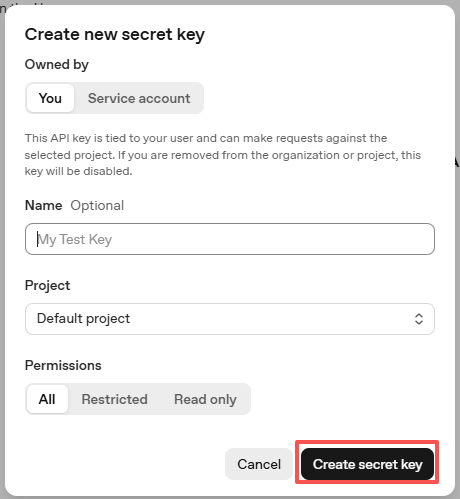
Go to OpenAI Platform and log in. On the API keys page, click Create new secret key.

Fill in the details (Owner, Name, Project, and permissions if needed), then click Create secret key.
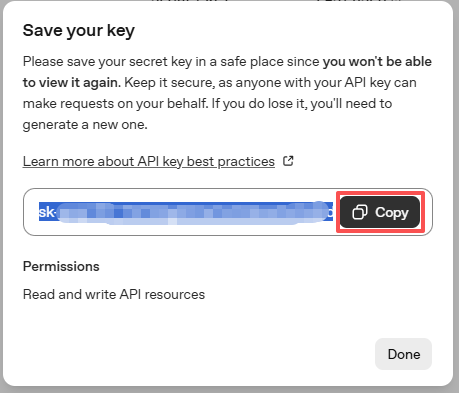
Once the key is created, copy it right away — you won’t be able to see it again. If you lose it, you’ll need to generate a new one.
In your project folder (for example:
/), create a file calledsecret.py:cd ~/ai-lab-kit/llm sudo nano secret.py
Paste your key into the file like this:
# secret.py
# Store secrets here. Never commit this file to Git.
OPENAI_API_KEY = "sk-xxx"
Enable billing and check models
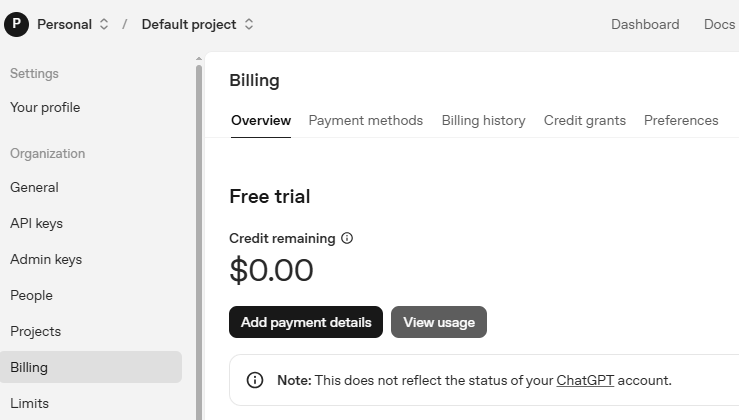
Before using the key, go to the Billing page in your OpenAI account, add your payment details, and top up a small amount of credits.
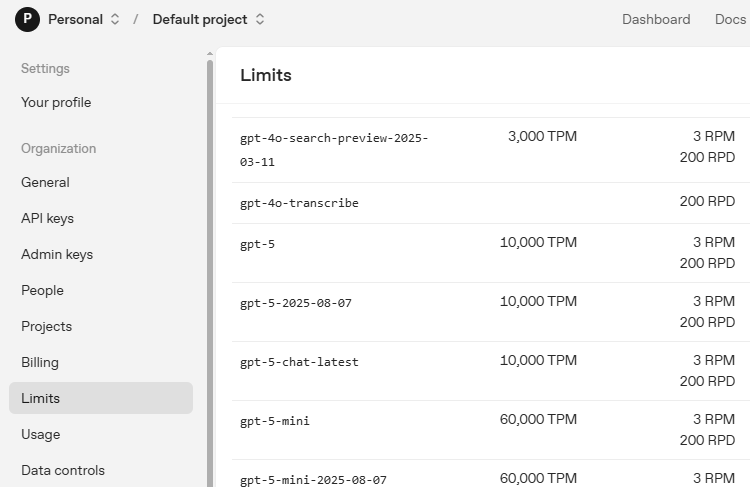
Then go to the Limits page to check which models are available for your account and copy the exact model ID to use in your code.
Run the Example
Run the Code
cd ~/ai-lab-kit/llm
sudo python3 llm_openai_health.py
Check the Result
When the program starts, it will prompt you to speak. It will then estimate your body temperature and provide health advice.
Typical console output:
Hello, I am a health assistant. Please hold your thermometer and I will assess your
body temperature based on the thermistor reading. If you feel unwell, please provide
your symptoms and I will provide appropriate health advice.

Say something
partial: I feel
partial: I feel very
partial: I feel very warm
final: I feel very warm and tired

Your body temperature is 38.7°C, which indicates a mild fever. Please rest, stay
hydrated, and monitor your symptoms. If the fever persists or worsens, consider
seeking medical attention.
Example Scenarios
Normal Temperature (36.5°C):
User: "How's my temperature?"
AI: "Your body temperature is 36.5°C, which is within the normal range. You're
doing well, but continue to monitor how you feel."
High Fever (39.2°C):
User: "I have a headache and feel hot"
AI: "Your body temperature is 39.2°C, indicating a high fever. Please rest
immediately, stay hydrated, and consider seeking medical advice as soon as possible."
Low Temperature (34.2°C):
User: "I feel cold and shivering"
AI: "Your body temperature is 34.2°C, which is below normal and may indicate
hypothermia. Please warm up immediately with blankets and warm drinks."
Code
Here is the full Python script for the AI Health Assistant:
from fusion_hat.llm import OpenAI
from secret import OPENAI_API_KEY
import time
from fusion_hat.stt import STT
from fusion_hat.adc import ADC
import math
from fusion_hat.tts import Pico2Wave

# Setup Text-to-Speech and Speech-to-Text
tts = Pico2Wave()
tts.set_lang('en-US')
stt = STT(language="en-us")

# Register OpenAI API
# openai.com

# Export your openai api key with :LLM_API_KEY
# export LLM_API_KEY=sk-xxxxxxxxxxxxxxxxx

# Setup ADC for thermistor reading on channel A3
thermistor = ADC('A3')

# Setup LLM with health assessment instructions
INSTRUCTIONS = '''
You are a health assistant. Your task is to assess the user's body temperature based on the thermistor reading and provide appropriate health advice.

The thermistor reading represents body temperature in Celsius.

### Input Format:
"thermistor: [value], message: [user query]"

### Output Guidelines:
1. If temperature < 35.0°C, warn about hypothermia and suggest warming up.
2. If 35.0°C ≤ temperature ≤ 37.5°C, confirm normal temperature and reassure the user.
3. If 37.5°C < temperature ≤ 38.5°C, indicate mild fever and suggest rest and hydration.
4. If temperature > 38.5°C, alert about high fever and recommend medical attention.
5. Include the temperature value in your response to justify your assessment.
6. Your reply should be brief and concise, no more than two sentences.

### Example Input:
thermistor: 39.0, message: I feel unwell.

### Example Output:
Your body temperature is 39.0°C, which indicates a high fever. Please rest, stay hydrated, and consider seeking medical advice if symptoms persist.
'''

WELCOME = "Hello, I am a health assistant. Please hold your thermometer and I will assess your body temperature based on the thermistor reading. If you feel unwell, please provide your symptoms and I will provide appropriate health advice."

llm = OpenAI(
    api_key=OPENAI_API_KEY,
    model="gpt-4o",
)

# Set how many messages to keep
llm.set_max_messages(20)
# Set instructions
llm.set_instructions(INSTRUCTIONS)
# Set welcome message
llm.set_welcome(WELCOME)

print(WELCOME)

# Function to read and convert thermistor value to temperature
def temperature():
    while True:
        # Read analog value (0-4095)
        analogVal = thermistor.read()

        # Calculate voltage across thermistor
        Vr = 3.3 * float(analogVal) / 4095

        # Check for sensor issues
        if 3.3 - Vr < 0.1:
            print("Please check the sensor")
            continue

        # Calculate thermistor resistance
        Rt = 10000 * Vr / (3.3 - Vr)

        # Convert resistance to temperature using Steinhart-Hart equation
        # B = 3950 (thermistor coefficient), R0 = 10000Ω at 25°C
        temp = 1 / (((math.log(Rt / 10000)) / 3950) + (1 / (273.15 + 25)))

        # Convert from Kelvin to Celsius
        Cel = temp - 273.15

        return Cel

# Main loop for voice interaction
while True:
    print("Say something")

    # Listen for speech input
    for result in stt.listen(stream=True):
        if result["done"]:
            # Print final recognized text
            print(f"\r\x1b[Kfinal: {result['final']}")

            # Measure temperature and combine with user query
            current_temp = temperature()
            input_text = f"thermistor: {current_temp:.1f}, message: {result['final']}"

            # Get response from LLM with streaming
            response = llm.prompt(input_text, stream=True)

            # Collect the full response
            string = ""
            for next_word in response:
                if next_word:
                    print(next_word, end="", flush=True)
                    string += next_word

            # Speak the response
            tts.say(string)
            print("")  # New line after response

        else:
            # Print partial recognition results
            print(f"\r\x1b[Kpartial: {result['partial']}", end="", flush=True)
Understanding the Code
Temperature Sensor Initialization
The thermistor is connected to ADC channel A3:
thermistor = ADC('A3')
This reads analog values from 0-4095 representing voltage levels.
Steinhart-Hart Temperature Conversion
The thermistor uses the Steinhart-Hart equation for accurate temperature calculation:
# Read analog value (0-4095)
analogVal = thermistor.read()

# Convert to voltage (0-3.3V)
Vr = 3.3 * float(analogVal) / 4095

# Calculate thermistor resistance using voltage divider formula
Rt = 10000 * Vr / (3.3 - Vr)

# Steinhart-Hart equation: 1/T = 1/T0 + 1/B * ln(R/R0)
temp = 1 / (((math.log(Rt / 10000)) / 3950) + (1 / (273.15 + 25)))

# Convert Kelvin to Celsius
Cel = temp - 273.15
Sensor Error Checking
The code includes basic error detection:
if 3.3 - Vr < 0.1:
    print("Please check the sensor")
    continue
This detects if the thermistor is disconnected or shorted.
Speech Recognition Setup
Both STT and TTS are configured for English:
tts = Pico2Wave()
tts.set_lang('en-US')
stt = STT(language="en-us")
Contextual Input Construction
Temperature data is combined with user query:
current_temp = temperature()
input_text = f"thermistor: {current_temp:.1f}, message: {result['final']}"
Format:
"thermistor: 37.2, message: I feel dizzy"Medical Classification Logic
The AI instructions define temperature ranges:
# Temperature ranges for medical assessment:
# < 35.0°C: Hypothermia warning
# 35.0-37.5°C: Normal range
# 37.5-38.5°C: Mild fever
# > 38.5°C: High fever
Real-time Speech Processing
The system shows partial recognition results:
for result in stt.listen(stream=True):
    if result["done"]:
        # Final recognition
        print(f"final: {result['final']}")
    else:
        # Partial recognition
        print(f"partial: {result['partial']}", end="", flush=True)
Streaming AI Response
AI response is streamed and spoken simultaneously:
response = llm.prompt(input_text, stream=True)
string = ""

for next_word in response:
    if next_word:
        print(next_word, end="", flush=True)
        string += next_word

tts.say(string)  # Speak complete response
Temperature Formatting
Temperature is formatted to one decimal place:
f"thermistor: {current_temp:.1f}"
This ensures consistent precision (e.g., 36.5°C instead of 36.512345°C).
Clear Console Display
Uses ANSI escape codes for clean output:
print(f"\r\x1b[Kpartial: {result['partial']}", end="", flush=True)
\r: Return to start of line\x1b[K: Clear to end of linePrevents overlapping text during streaming
Troubleshooting
Temperature readings inaccurate
Check thermistor wiring: proper voltage divider configuration
Verify resistor value: should match thermistor’s nominal resistance
Calibrate with known temperature source
Check ADC reference voltage (should be 3.3V stable)
No speech recognition
Test microphone:
arecord --duration=3 test.wav && aplay test.wavCheck audio device selection in STT initialization
Ensure background noise is minimal
Speak clearly and at moderate pace
AI not responding
Check internet connection
Verify OpenAI API key in
secret.pyEnsure billing is enabled on OpenAI account
Check if API rate limits are exceeded
Temperature jumps erratically
Add software filtering: moving average of readings
Check for loose connections
Add capacitor (0.1µF) across thermistor for noise reduction
Ensure thermistor is making good thermal contact
Text-to-speech not working
Test audio output:
speaker-test -t sine -f 440Verify language setting:
tts.set_lang('en-US')Check volume:
alsamixerRe-execute the audio setup script:
sudo /opt/setup_fusion_hat_audio.sh
Sensor reading shows 0 or 4095
Check wiring: thermistor may be shorted (0) or open (4095)
Verify voltage divider calculation
Test ADC with known voltage source
Check ADC channel (should be A3)
Safety and Medical Disclaimer
Warning
This project is for educational and demonstration purposes only. It is NOT a medical device and must NOT be used for real medical diagnosis or treatment.
Safety guidelines
Not for medical use: Do not rely on this system for any health or treatment decisions.
Emergency situations: Always seek professional medical help for serious symptoms.
Accuracy limitations: Thermistor accuracy is limited compared to medical thermometers.
Calibration required: Regular calibration against a medical thermometer is essential.
Supervision needed: Adult supervision is recommended when used for educational purposes.
When to seek medical attention
Seek professional medical help if any of the following occur:
Temperature > 39.5°C (103.1°F) in adults
Temperature > 38.0°C (100.4°F) in infants under 3 months
Fever lasting more than 3 days
Difficulty breathing or chest pain
Severe headache or stiff neck
Confusion or seizures
This AI Health Assistant demonstrates how sensor technology, voice interaction, and artificial intelligence can work together to create accessible health monitoring tools, while emphasizing the importance of professional medical consultation for serious health concerns!