Note
Hello, welcome to the SunFounder Raspberry Pi & Arduino & ESP32 Enthusiasts Community on Facebook! Dive deeper into Raspberry Pi, Arduino, and ESP32 with fellow enthusiasts.
Why Join?
Expert Support: Solve post-sale issues and technical challenges with help from our community and team.
Learn & Share: Exchange tips and tutorials to enhance your skills.
Exclusive Previews: Get early access to new product announcements and sneak peeks.
Special Discounts: Enjoy exclusive discounts on our newest products.
Festive Promotions and Giveaways: Take part in giveaways and holiday promotions.
👉 Ready to explore and create with us? Click [here] and join today!
(Example) Blindfolded Watermelon Smashing Game
Introduction
This project creates an interactive Blindfolded Watermelon Smashing Game where players navigate a 20×20 meter grid using a joystick while relying on an AI assistant for directional guidance. The system integrates:
Joystick controls for player movement on X/Y axes
AI-powered guidance using OpenAI’s GPT-4
Text-to-speech feedback using Pico2Wave
Random target generation for watermelon placement
Interactive button for smashing actions
The player starts at the center (0,0) and must find a randomly placed watermelon using only audio directions from the AI assistant, creating an engaging sensory-deprived gaming experience.
You can combine various input devices with LLM modules to create interactive AI games. See:
What You’ll Need
The following components are required for this project:
COMPONENT |
PURCHASE LINK |
|---|---|
- |
|
- |
|
Raspberry Pi |
- |
Wiring Diagram
Connect the components to the Fusion HAT+ as follows:

Get and Save your API Key
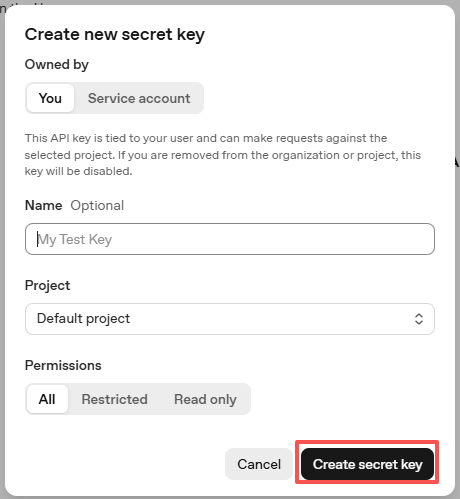
Go to OpenAI Platform and log in. On the API keys page, click Create new secret key.

Fill in the details (Owner, Name, Project, and permissions if needed), then click Create secret key.
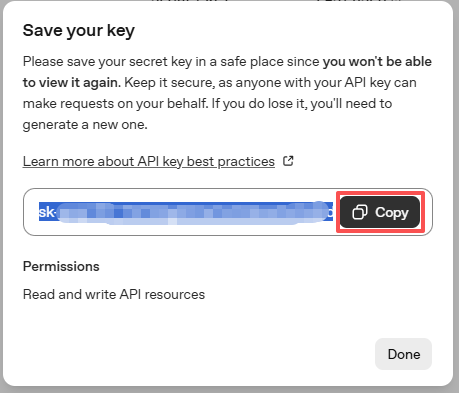
Once the key is created, copy it right away — you won’t be able to see it again. If you lose it, you’ll need to generate a new one.
In your project folder (for example:
/), create a file calledsecret.py:cd ~/ai-lab-kit/llm sudo nano secret.py
Paste your key into the file like this:
# secret.py
# Store secrets here. Never commit this file to Git.
OPENAI_API_KEY = "sk-xxx"
Enable billing and check models
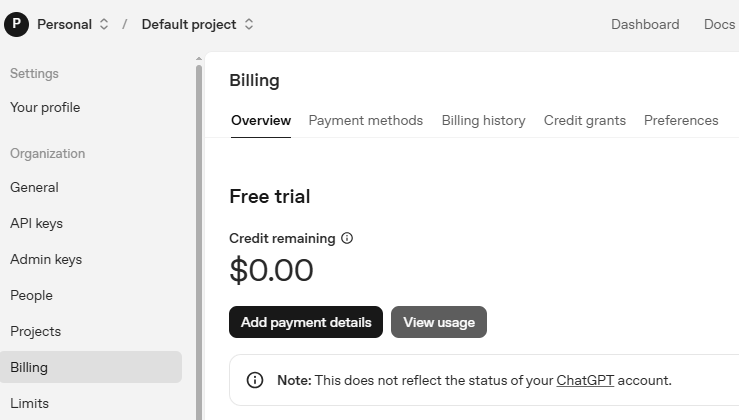
Before using the key, go to the Billing page in your OpenAI account, add your payment details, and top up a small amount of credits.
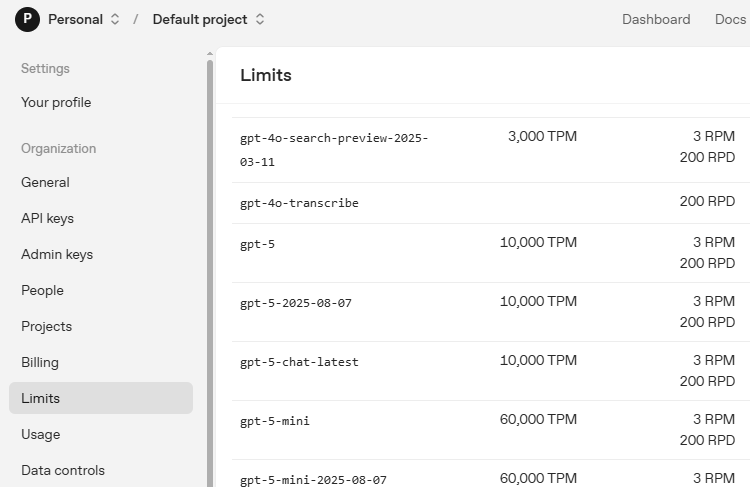
Then go to the Limits page to check which models are available for your account and copy the exact model ID to use in your code.
Run the Example
Run the code
cd ~/ai-lab-kit/llm
sudo python3 llm_openai_blindfolded_game.py
Play the game
After the script starts, the game will randomly place a watermelon on the 20×20 meter field. Use the joystick to move step by step, and listen to the AI assistant for direction guidance.
When you think you have reached the watermelon position, press the button to smash. If your coordinates match the watermelon exactly, you win the game.
Understand the game mechanics
Coordinate System:
The game field is a 20×20 meter grid
Coordinates range from (-10,-10) to (10,10)
Positive X = East, Negative X = West
Positive Y = South, Negative Y = North (inverted Y-axis)
Center point is (0,0)
Movement Rules:
Joystick right → X+1 (East)
Joystick left → X-1 (West)
Joystick up → Y-1 (North)
Joystick down → Y+1 (South)
Each movement changes position by 1 meter
Winning Condition:
Player must be at exact watermelon coordinates
Press button to “smash” at current position
Exact match ends game with victory message
AI Assistant Role:
Receives both player and watermelon coordinates
Provides cardinal direction guidance (N, NE, E, SE, S, SW, W, NW)
Gives distance approximation in meters
Keeps responses brief for audio playback
Code
Here is the full Python script for the Blindfolded Watermelon Smashing Game:
from fusion_hat.llm import OpenAI
from secret import OPENAI_API_KEY
from fusion_hat.adc import ADC
from fusion_hat.pin import Pin
from fusion_hat.tts import Pico2Wave
import random, time

# Register OpenAI API
# openai.com

# Export your openai api key with :LLM_API_KEY
# export LLM_API_KEY=sk-xxxxxxxxxxxxxxxxx

# Setup TTS
tts = Pico2Wave()
tts.set_lang('en-US')

# Setup Joystick
btn_pin = Pin(17, mode=Pin.IN, pull=Pin.PULL_UP, bounce_time=0.05)
x_axis = ADC('A1')
y_axis = ADC('A0')

def MAP(x, in_min, in_max, out_min, out_max):
    """
    Map a value from one range to another.
    """
    return (x - in_min) * (out_max - out_min) / (in_max - in_min) + out_min

def activate():
    global smash_tips
    smash_tips = True

btn_pin.when_activated = activate

# Setup LLM
INSTRUCTIONS = "This is a blindfolded watermelon-smashing game. A point representing a watermelon is randomly generated within a 20x20 meter area with coordinates ranging from (-10,-10) to (10,10). The player starts from the origin (0,0) and moves using a joystick. Even if the player can't see anything, they press a button to perform a smash action. After smashing, you will receive the watermelon's and player's coordinates. You need to advise the player on the direction of the watermelon, like 'The watermelon is ten meters to your northeast.' If the smash coordinates match, the game ends. Your responses will be converted into speech via TTS, so please keep them brief, ideally within two sentences."

WELCOME = "Hello, I am Blindfolded Watermelon Smashing Game Assistant. Use the joystick to move and press the button to smash. I will guide you to find the watermelon. Good luck!"


llm = OpenAI(
    api_key=OPENAI_API_KEY,
    model="gpt-4o",
)

# Set how many messages to keep
llm.set_max_messages(20)
# Set instructions
llm.set_instructions(INSTRUCTIONS)
# Set welcome message
llm.set_welcome(WELCOME)

print(WELCOME)

# Define the map size and the joystick pins
watermelon_x, watermelon_y = random.randint(-10, 10), random.randint(-10, 10)
player_x, player_y = 0, 0
smash_tips = False

while True:
    x_val = MAP(x_axis.read(), 0, 4095, -100, 100)
    y_val = MAP(y_axis.read(), 0, 4095, -100, 100)

    if x_val > 80:
        player_x += 1
    elif x_val < -80:
        player_x -= 1

    if y_val > 80:
        player_y -= 1
    elif y_val < -80:
        player_y += 1

    # Debug positions (commented out in actual game)
    # print('Watermelon position: %d, %d  ' % (watermelon_x, watermelon_y))
    # print('Player position: %d, %d  ' % (player_x, player_y))

    time.sleep(0.3)

    if smash_tips:
        smash_tips = False
        print("Smash!")

        if (player_x, player_y) == (watermelon_x, watermelon_y):
            print("Target hit!")
            tts.say("Target hit!")
            break
        else:
            input_text = f"Watermelon position: ({watermelon_x}, {watermelon_y}), Player position: ({player_x}, {player_y})"

            # Response with stream
            response = llm.prompt(input_text, stream=True)
            string = ""

            for next_word in response:
                if next_word:
                    # print(next_word, end="", flush=True)  # Uncomment for streaming display
                    string += next_word

            # print("")  # New line after streaming
            print("AI: " + string)
            tts.say(string)

print("Game over!")
Understanding the Code
Text-to-Speech Setup
The game uses Pico2Wave for audio feedback:
tts = Pico2Wave()
tts.set_lang('en-US')
This converts the AI’s text responses into spoken English instructions.
Joystick Input Handling
The joystick uses two ADC channels for X and Y axis reading:
x_axis = ADC('A1')  # Horizontal movement
y_axis = ADC('A0')  # Vertical movement

def MAP(x, in_min, in_max, out_min, out_max):
    return (x - in_min) * (out_max - out_min) / (in_max - in_min) + out_min

# Convert 0-4095 ADC reading to -100 to 100 range
x_val = MAP(x_axis.read(), 0, 4095, -100, 100)
y_val = MAP(y_axis.read(), 0, 4095, -100, 100)
Button Setup with Interrupt
The button uses an interrupt callback for immediate response:
btn_pin = Pin(17, mode=Pin.IN, pull=Pin.PULL_UP, bounce_time=0.05)

def activate():
    global smash_tips
    smash_tips = True

btn_pin.when_activated = activate
When pressed, it sets
smash_tipstoTrue, triggering the smash action in the main loop.OpenAI LLM Configuration
The AI assistant is configured with specific game instructions:
INSTRUCTIONS = "This is a blindfolded watermelon-smashing game..."
WELCOME = "Hello, I am Blindfolded Watermelon Smashing Game Assistant..."

llm = OpenAI(
    api_key=OPENAI_API_KEY,
    model="gpt-4o",
)

llm.set_max_messages(20)       # Keep conversation history
llm.set_instructions(INSTRUCTIONS)  # Set game rules
llm.set_welcome(WELCOME)       # Set initial greeting
Game State Management
The game maintains player and target positions:
# Random watermelon placement
watermelon_x, watermelon_y = random.randint(-10, 10), random.randint(-10, 10)

# Player starts at center
player_x, player_y = 0, 0

# Movement thresholds (80% joystick deflection)
if x_val > 80:
    player_x += 1      # Move right
elif x_val < -80:
    player_x -= 1      # Move left

if y_val > 80:
    player_y -= 1      # Move up (negative Y)
elif y_val < -80:
    player_y += 1      # Move down (positive Y)
Smash Action and AI Response
When the button is pressed, the game checks for a hit or requests AI guidance:
if smash_tips:
    smash_tips = False
    print("Smash!")

    if (player_x, player_y) == (watermelon_x, watermelon_y):
        print("Target hit!")
        tts.say("Target hit!")
        break  # Game ends
    else:
        # Send positions to AI for guidance
        input_text = f"Watermelon position: ({watermelon_x}, {watermelon_y}), Player position: ({player_x}, {player_y})"

        # Get streaming response from AI
        response = llm.prompt(input_text, stream=True)
        string = ""

        for next_word in response:
            if next_word:
                string += next_word

        print("AI: " + string)
        tts.say(string)  # Speak the guidance
Streaming Response Processing
The AI response is processed word-by-word for potential real-time display:
response = llm.prompt(input_text, stream=True)
string = ""

for next_word in response:
    if next_word:
        # Uncomment to display words as they arrive
        # print(next_word, end="", flush=True)
        string += next_word
Movement Logic with Dead Zone
The joystick has an 80-unit dead zone to prevent accidental movements:
# Only move when joystick is pushed >80% in any direction
# This prevents drifting from center position
if x_val > 80:    # Right
elif x_val < -80: # Left

if y_val > 80:    # Up
elif y_val < -80: # Down
Game Loop Structure
The main game loop continuously:
Reads joystick position
Updates player coordinates if joystick is pushed
Checks for smash button press
Processes AI responses when needed
Provides audio feedback via TTS
Troubleshooting
No response from joystick
Verify ADC connections: A0 for Y-axis, A1 for X-axis
Check power: VCC to 3.3V, GND to ground
Test ADC reading:
print(x_axis.read())should show 0-4095Ensure joystick is centered (should read ~2048)
No audio from TTS
Check audio output:
sudo raspi-config→ System Options → AudioTest speaker:
speaker-test -t sine -f 440Ensure Pico2Wave is installed:
pico2wave --helpCheck volume:
alsamixerRe-execute the audio setup script:
sudo /opt/setup_fusion_hat_audio.sh
OpenAI API errors
Verify API key in
secret.pyCheck internet connection:
ping 8.8.8.8Ensure billing is enabled on OpenAI account
Verify model “gpt-4o” is available to your account
Player moves too fast/slow
Adjust movement threshold (currently 80): higher = more joystick deflection needed
Modify movement increment (currently 1): change to 0.5 for finer control
Adjust sleep time (currently 0.3s): longer = slower movement response
AI responses too long
Emphasize brevity in INSTRUCTIONS
Add “Respond in 10 words or less” to instructions
Implement response length checking in code
This blindfolded watermelon game demonstrates how physical controls, AI guidance, and audio feedback can create an engaging sensory-based gaming experience that challenges spatial awareness and listening skills!