Note
Hello, welcome to the SunFounder Raspberry Pi & Arduino & ESP32 Enthusiasts Community on Facebook! Dive deeper into Raspberry Pi, Arduino, and ESP32 with fellow enthusiasts.
Why Join?
Expert Support: Solve post-sale issues and technical challenges with help from our community and team.
Learn & Share: Exchange tips and tutorials to enhance your skills.
Exclusive Previews: Get early access to new product announcements and sneak peeks.
Special Discounts: Enjoy exclusive discounts on our newest products.
Festive Promotions and Giveaways: Take part in giveaways and holiday promotions.
👉 Ready to explore and create with us? Click [here] and join today!
Flow LEDs
In this kit is equipped with a WS2812 RGB 8 LEDs Strip, which can display colorful colors and each LED can be controlled independently.
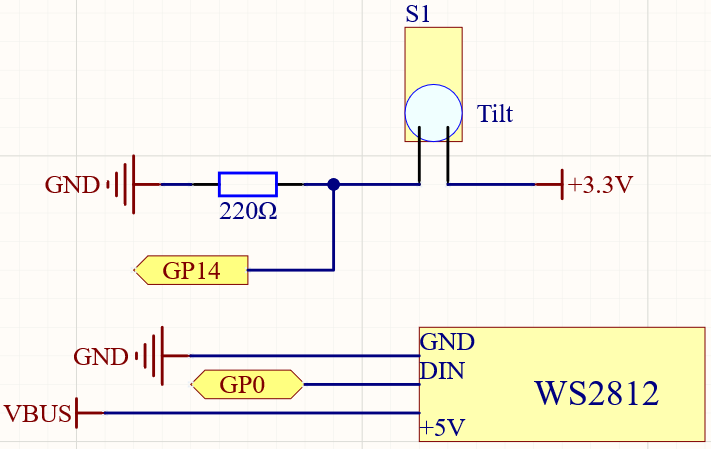
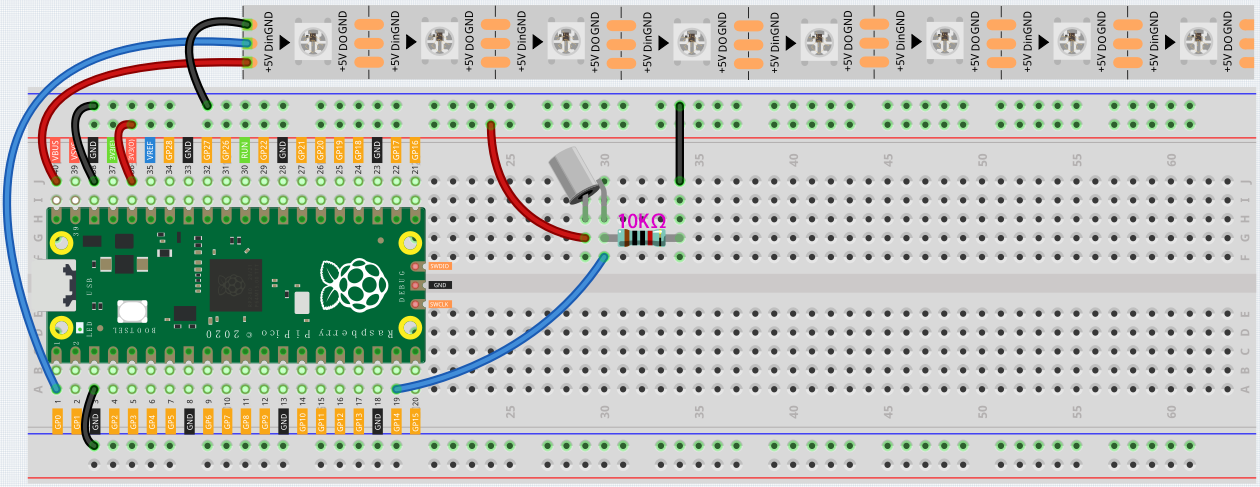
Here, a tilt switch is used to control the flow direction of LED on the WS2812 Strip.
Schematic
Wiring
Code
After the code runs, when the tilt switch is placed vertically, the LED on the WS2812 Strip will light up from one side, and when it is placed horizontally, the WS2812 will light up from the other side.
How it works?
#include <Adafruit_NeoPixel.h>

Adafruit_NeoPixel pixels(NUMPIXELS, PIN, NEO_GRB + NEO_KHZ800);
Import the Adafruit_NeoPixel.h library and create a object pixel to control WS2812.
The three parameters NUMPIXELS, PIN, NEO_GRB + NEO_KHZ800 are used to declare the number of LED pixels, pin number and Pixel type flags.
Note
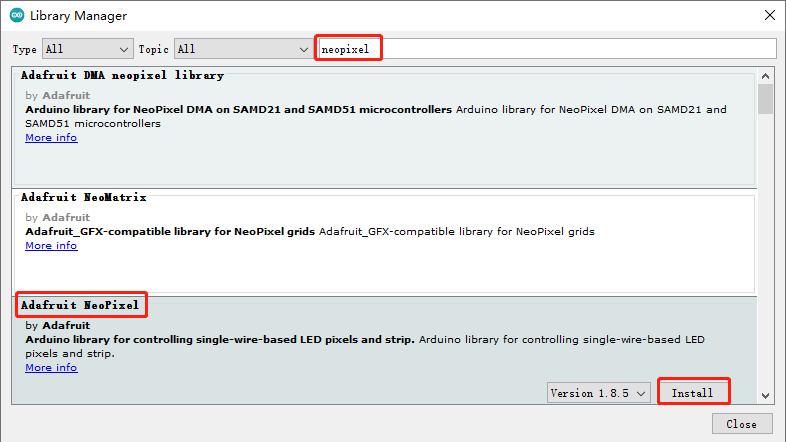
To use this library, open the Library Manager in the Arduino IDE and install it from there.
Sketch -> Include Library -> Manager Libraries
pixels.begin()
This statement is used to initialize the NeoPixel strip object.
if (ledIndex < 0) {
  ledIndex = NUMPIXELS-1;
}
else if (ledIndex >= NUMPIXELS) {
  ledIndex = 0;
}
Limit the value of ledIndex to 0 to NUMPIXELS. When it is greater than this range, ledIndex is re-assigned to 0. When it is less than this range, ledIndex is re-assigned to NUMPIXELS-1.
pixels.clear()
This statement set pixel colors to 0 (off).
pixels.setPixelColor(ledIndex, pixels.Color(100, 50, 0))
This statement is used to set the color of the WS2812 Strip, the first parameter refers to the serial number of the WS2812 Strip, and the second parameter represents the color.
pixels.show()
Show the effect on WS2812 Strip.