注釈
こんにちは、SunFounder Raspberry Pi & Arduino & ESP32 Enthusiasts Communityへようこそ!仲間たちと一緒にRaspberry Pi、Arduino、ESP32についてさらに深く学びましょう。
なぜ参加するべきか?
専門家のサポート: 購入後の問題や技術的な課題を、コミュニティやチームの助けを借りて解決できます。
学びと共有: ヒントやチュートリアルを交換し、スキルを向上させましょう。
限定プレビュー: 新製品の発表や先行情報をいち早く手に入れることができます。
特別割引: 最新製品の特別割引をお楽しみいただけます。
季節限定プロモーションやプレゼント企画: プレゼント企画や祝日セールに参加しましょう。
👉 一緒に探求し、創造を楽しみませんか?[ここ] をクリックして、今すぐ参加してください!
If Else
特定の条件が満たされた場合にのみコードを実行したいときは、条件分岐が必要です。
if
if test expression:
    statement(s)
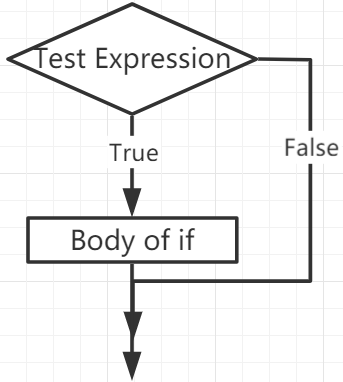
ここでは、プログラムが test expression を評価し、その結果がTrueのときだけ statement が実行されます。
もし test expression がFalseの場合、 statement(s) は実行されません。
MicroPythonではインデントが if 文の本体を意味します。本体はインデント行で始まり、インデントされていない行に達したところで終わります。
Pythonでは0以外の値は「True」、Noneと0は「False」として解釈されます。
if Statement Flowchart
Example
num = 8
if num > 0:
    print(num, "is a positive number.")
print("End with this line")
>>> %Run -c $EDITOR_CONTENT
8 is a positive number.
End with this line
if...else
if test expression:
    Body of if
else:
    Body of else
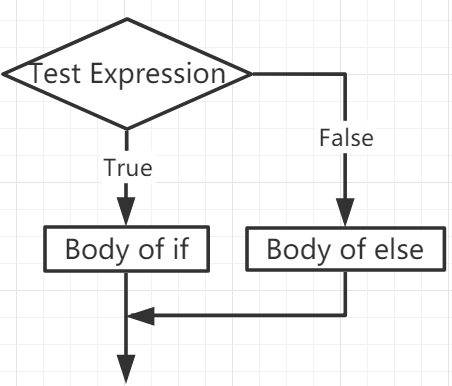
if..else 文は test expression を評価し、条件がTrueのときに if ブロックが実行されます。
条件がFalseの場合は else ブロックが実行されます。インデントによってブロックを区別します。
if...else Statement Flowchart
Example
num = -8
if num > 0:
    print(num, "is a positive number.")
else:
    print(num, "is a negative number.")
>>> %Run -c $EDITOR_CONTENT
-8 is a negative number.
if...elif...else
if test expression:
    Body of if
elif test expression:
    Body of elif
else:
    Body of else
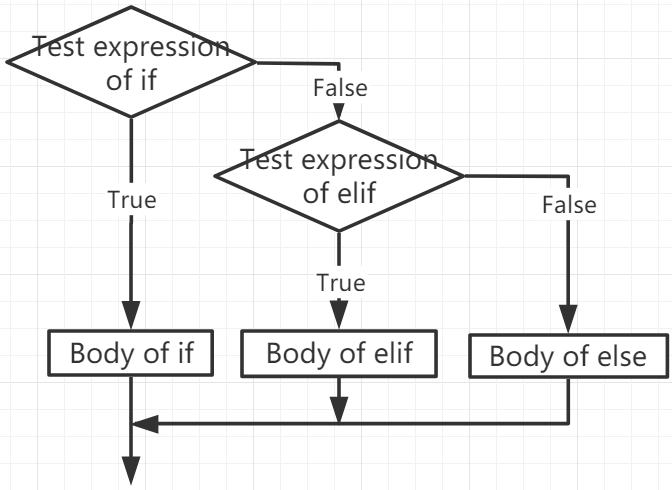
elif は else if の略で、複数の条件をチェックできます。
if の条件がFalseであれば、次の elif の条件をチェックし、以下同様に評価されます。
すべての条件がFalseの場合、 else ブロックが実行されます。
if...elif...else ブロックでは、一連の条件のいずれか一つだけが実行されます。
if ブロックに対して else は1回だけ使用できますが、 elif は複数追加可能です。
if...elif...else Statement Flowchart
Example
x = 10
y = 9

if x > y:
    print("x is greater than y")
elif x == y:
    print("x and y are equal")
else:
    print("x is greater than y")
>>> %Run -c $EDITOR_CONTENT
x is greater than y
Nested if
if 文の内部に別の if 文を入れ子にすることで、ネストした if 文を実現できます。
Example
x = 67

if x > 10:
    print("Above ten,")
    if x > 20:
        print("and also above 20!")
    else:
        print("but not above 20.")
>>> %Run -c $EDITOR_CONTENT
Above ten,
and also above 20!