Note
Hello, welcome to the SunFounder Raspberry Pi & Arduino & ESP32 Enthusiasts Community on Facebook! Dive deeper into Raspberry Pi, Arduino, and ESP32 with fellow enthusiasts.
Why Join?
Expert Support: Solve post-sale issues and technical challenges with help from our community and team.
Learn & Share: Exchange tips and tutorials to enhance your skills.
Exclusive Previews: Get early access to new product announcements and sneak peeks.
Special Discounts: Enjoy exclusive discounts on our newest products.
Festive Promotions and Giveaways: Take part in giveaways and holiday promotions.
👉 Ready to explore and create with us? Click [here] and join today!
Servo
Servo is a position (angle) servo device, which is suitable for those control systems that require constant angle changes and can be maintained. It has been widely used in high-end remote control toys, such as airplanes, submarine models, and remote control robots.
Now, try to make the servo sway!
Wiring
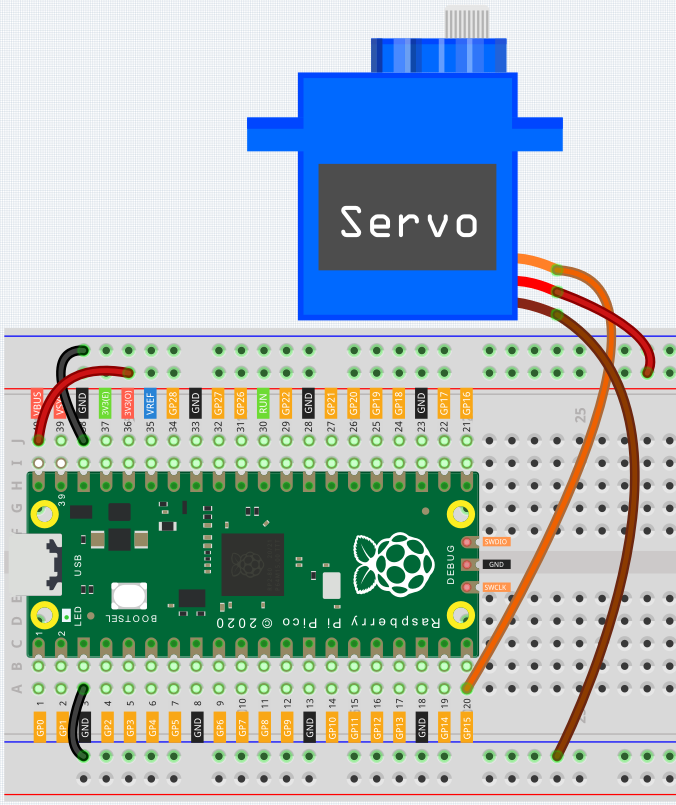
The brown wire of the servo is GND, the red wire is VCC and the yellow wire is signal.
Connect VBUS (not 3V3) to the power bus of the breadboard.
Code
After connecting Pico, click the Start button and the code starts to run. If necessary, press the Servo Arm into the Servo output shaft, then you can see the Servo Arm swinging back and forth from 0° to 180°.
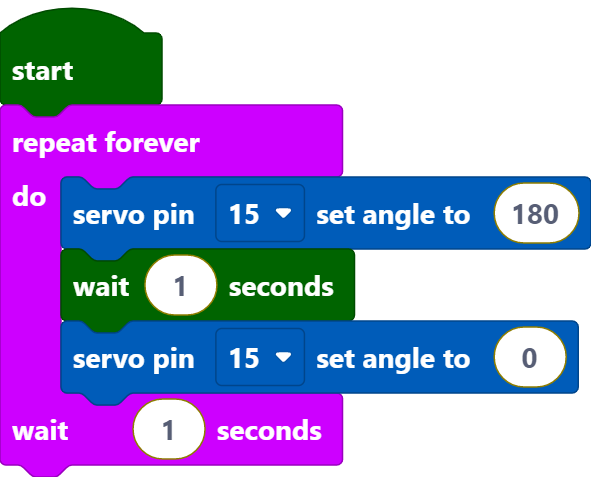
[servo pin () set angle to ()]: This block is used to set the rotation angle of the servo, the range is 0~180 degrees.