Nota
¡Hola, bienvenido a la comunidad de entusiastas de SunFounder Raspberry Pi & Arduino & ESP32 en Facebook! Sumérgete más en Raspberry Pi, Arduino y ESP32 con otros entusiastas.
¿Por qué unirse?
Soporte experto: Resuelve problemas post-venta y desafíos técnicos con la ayuda de nuestra comunidad y equipo.
Aprender y compartir: Intercambia consejos y tutoriales para mejorar tus habilidades.
Preestrenos exclusivos: Obtén acceso anticipado a nuevos anuncios de productos y adelantos.
Descuentos especiales: Disfruta de descuentos exclusivos en nuestros productos más nuevos.
Promociones festivas y sorteos: Participa en sorteos y promociones de temporada.
👉 ¿Listo para explorar y crear con nosotros? Haz clic en [Aquí] y únete hoy mismo.
2.2.9 Módulo MPU6050
Introducción
El MPU-6050 es el primer y único dispositivo de seguimiento de movimiento de 6 ejes del mundo (Giroscopio de 3 ejes y Acelerómetro de 3 ejes) diseñado para teléfonos inteligentes, tabletas y sensores portátiles que cuentan con estas características, incluyendo los requisitos de bajo consumo, bajo costo y alto rendimiento.
En este experimento, utiliza I2C para obtener los valores del sensor de aceleración de tres ejes y el giroscopio de tres ejes del MPU6050 y mostrarlos en la pantalla.
Componentes necesarios
En este proyecto, necesitamos los siguientes componentes.
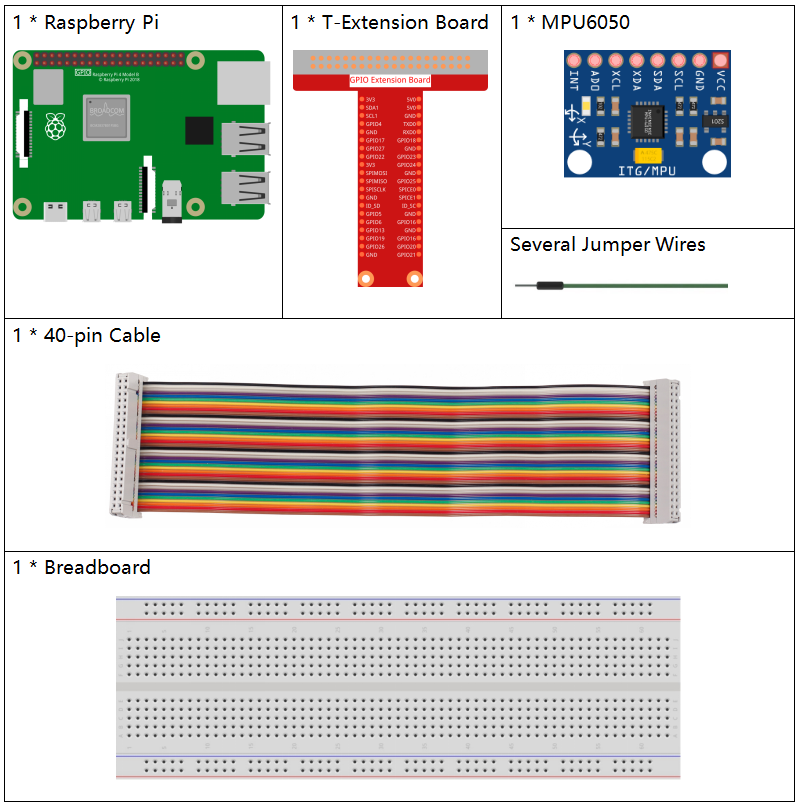
Es definitivamente conveniente comprar un kit completo, aquí tienes el enlace:
Nombre |
ARTÍCULOS EN ESTE KIT |
ENLACE |
|---|---|---|
Raphael Kit |
337 |
También puedes comprarlos por separado en los siguientes enlaces.
INTRODUCCIÓN DEL COMPONENTE |
ENLACE DE COMPRA |
|---|---|
Diagrama esquemático
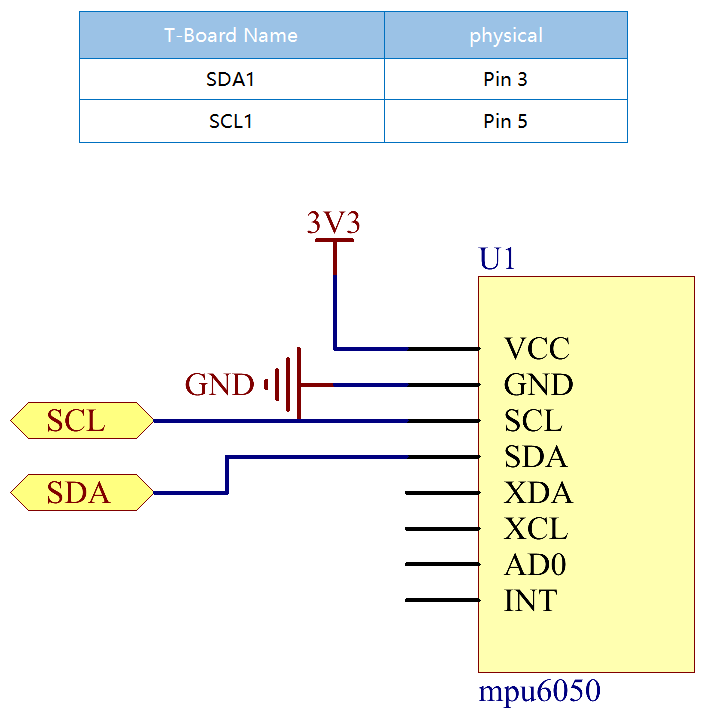
El MPU6050 se comunica con el microcontrolador a través de la interfaz del bus I2C. Es necesario conectar el SDA1 y el SCL1 al pin correspondiente.
Procedimientos experimentales
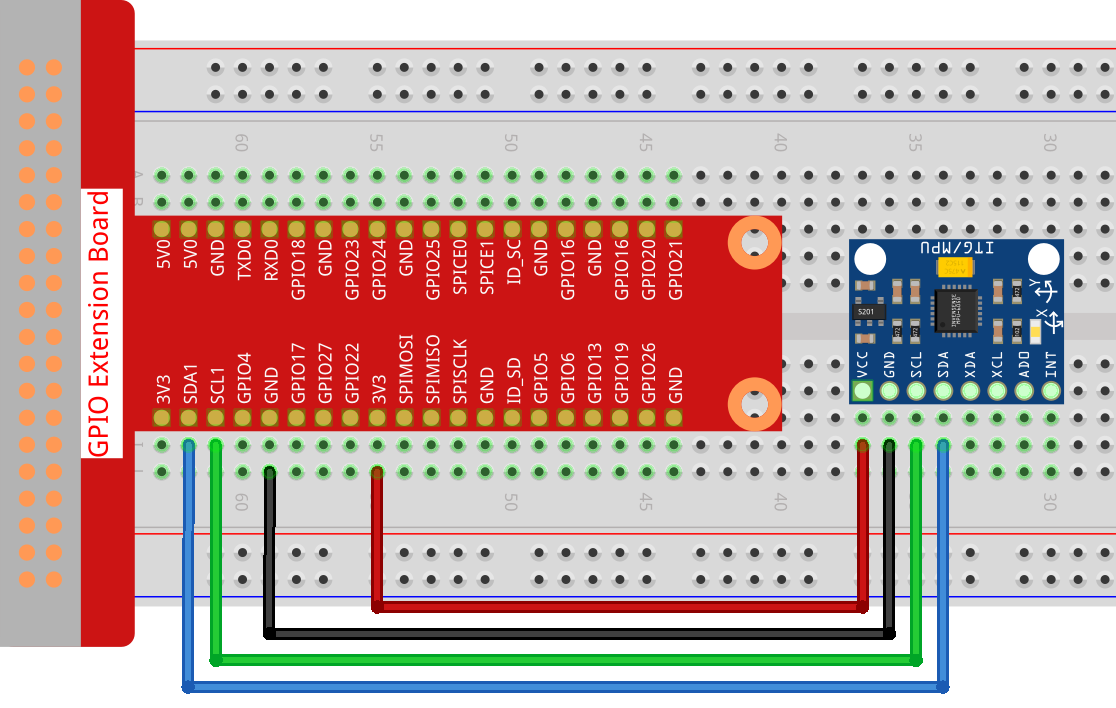
Paso 1: Construye el circuito.
Paso 2: Configura el I2C (consulta el Apéndice Configuración de I²C. Si ya has configurado el I2C, omite este paso.)
Paso 3: Ve a la carpeta del código.
cd ~/raphael-kit/python
Paso 4: Ejecuta el archivo ejecutable.
sudo python3 2.2.9_mpu6050.py
Al ejecutar el código, el ángulo de deflexión del eje x y el eje y, y la aceleración, velocidad angular en cada eje leídos por el MPU6050 se calcularán y se imprimirán en la pantalla.
Nota
Si obtienes el error
FileNotFoundError: [Errno 2] No such file or directory: '/dev/i2c-1', necesitas consultar Configuración de I²C para habilitar el I2C.Si obtienes el error
ModuleNotFoundError: No module named 'smbus2', por favor ejecutasudo apt install python3-smbus2.Si aparece el error
OSError: [Errno 121] Remote I/O error, significa que el módulo está mal cableado o que el módulo está roto.
Code
Nota
You can Modify/Reset/Copy/Run/Stop the code below. But before that, you need to go to source code path like raphael-kit/python. After modifying the code, you can run it directly to see the effect.
import smbus
import math
import time

# Power management registers
power_mgmt_1 = 0x6b
power_mgmt_2 = 0x6c

def read_byte(adr):
    return bus.read_byte_data(address, adr)

def read_word(adr):
    high = bus.read_byte_data(address, adr)
    low = bus.read_byte_data(address, adr+1)
    val = (high << 8) + low
    return val

def read_word_2c(adr):
    val = read_word(adr)
    if (val >= 0x8000):
        return -((65535 - val) + 1)
    else:
        return val

def dist(a,b):
    return math.sqrt((a*a)+(b*b))

def get_y_rotation(x,y,z):
    radians = math.atan2(x, dist(y,z))
    return -math.degrees(radians)

def get_x_rotation(x,y,z):
    radians = math.atan2(y, dist(x,z))
    return math.degrees(radians)


bus = smbus.SMBus(1) # or bus = smbus.SMBus(1) for Revision 2 boards
address = 0x68       # This is the address value read via the i2cdetect command

# Now wake the 6050 up as it starts in sleep mode
bus.write_byte_data(address, power_mgmt_1, 0)

while True:
    time.sleep(0.1)
    gyro_xout = read_word_2c(0x43)
    gyro_yout = read_word_2c(0x45)
    gyro_zout = read_word_2c(0x47)

    print ("gyro_xout : ", gyro_xout, " scaled: ", (gyro_xout / 131))
    print ("gyro_yout : ", gyro_yout, " scaled: ", (gyro_yout / 131))
    print ("gyro_zout : ", gyro_zout, " scaled: ", (gyro_zout / 131))

    accel_xout = read_word_2c(0x3b)
    accel_yout = read_word_2c(0x3d)
    accel_zout = read_word_2c(0x3f)

    accel_xout_scaled = accel_xout / 16384.0
    accel_yout_scaled = accel_yout / 16384.0
    accel_zout_scaled = accel_zout / 16384.0

    print ("accel_xout: ", accel_xout, " scaled: ", accel_xout_scaled)
    print ("accel_yout: ", accel_yout, " scaled: ", accel_yout_scaled)
    print ("accel_zout: ", accel_zout, " scaled: ", accel_zout_scaled)

    print ("x rotation: " , get_x_rotation(accel_xout_scaled, accel_yout_scaled, accel_zout_scaled))
    print ("y rotation: " , get_y_rotation(accel_xout_scaled, accel_yout_scaled, accel_zout_scaled))

    time.sleep(1)
Code Explanation
def read_word(adr):
    high = bus.read_byte_data(address, adr)
    low = bus.read_byte_data(address, adr+1)
    val = (high << 8) + low
    return val

def read_word_2c(adr):
    val = read_word(adr)
    if (val >= 0x8000):
        return -((65535 - val) + 1)
    else:
        return val
Read sensor data sent from MPU6050.
def get_y_rotation(x,y,z):
    radians = math.atan2(x, dist(y,z))
    return -math.degrees(radians)
Calculate the deflection angle of the y-axis.
def get_x_rotation(x,y,z):
    radians = math.atan2(y, dist(x,z))
    return math.degrees(radians)
Calculate the deflection angle of the x-axis.
gyro_xout = read_word_2c(0x43)
gyro_yout = read_word_2c(0x45)
gyro_zout = read_word_2c(0x47)

print ("gyro_xout : ", gyro_xout, " scaled: ", (gyro_xout / 131))
print ("gyro_yout : ", gyro_yout, " scaled: ", (gyro_yout / 131))
print ("gyro_zout : ", gyro_zout, " scaled: ", (gyro_zout / 131))
Read the values of the x axis, y axis and z axis on the gyroscope sensor, convert the metadata to angular velocity values, and then print them.
accel_xout = read_word_2c(0x3b)
accel_yout = read_word_2c(0x3d)
accel_zout = read_word_2c(0x3f)

accel_xout_scaled = accel_xout / 16384.0
accel_yout_scaled = accel_yout / 16384.0
accel_zout_scaled = accel_zout / 16384.0

print ("accel_xout: ", accel_xout, " scaled: ", accel_xout_scaled)
print ("accel_yout: ", accel_yout, " scaled: ", accel_yout_scaled)
print ("accel_zout: ", accel_zout, " scaled: ", accel_zout_scaled)
Read the values of the x axis, y axis and z axis on the acceleration sensor, convert the elements to accelerated speed value (gravity unit), and print them.
print ("x rotation: " , get_x_rotation(accel_xout_scaled, accel_yout_scaled, accel_zout_scaled))
print ("y rotation: " , get_y_rotation(accel_xout_scaled, accel_yout_scaled, accel_zout_scaled))
Print the deflection angles of the x-axis and y-axis.
Phenomenon Picture
