Note
Hello, welcome to the SunFounder Raspberry Pi & Arduino & ESP32 Enthusiasts Community on Facebook! Dive deeper into Raspberry Pi, Arduino, and ESP32 with fellow enthusiasts.
Why Join?
Expert Support: Solve post-sale issues and technical challenges with help from our community and team.
Learn & Share: Exchange tips and tutorials to enhance your skills.
Exclusive Previews: Get early access to new product announcements and sneak peeks.
Special Discounts: Enjoy exclusive discounts on our newest products.
Festive Promotions and Giveaways: Take part in giveaways and holiday promotions.
👉 Ready to explore and create with us? Click [here] and join today!
Obstacle Avoidance
In this project, picrawler will use an ultrasonic module to detect obstacles in front. When PiCrawler detects an obstacle, it will send a signal and look for another direction to move forward.

Program
Note
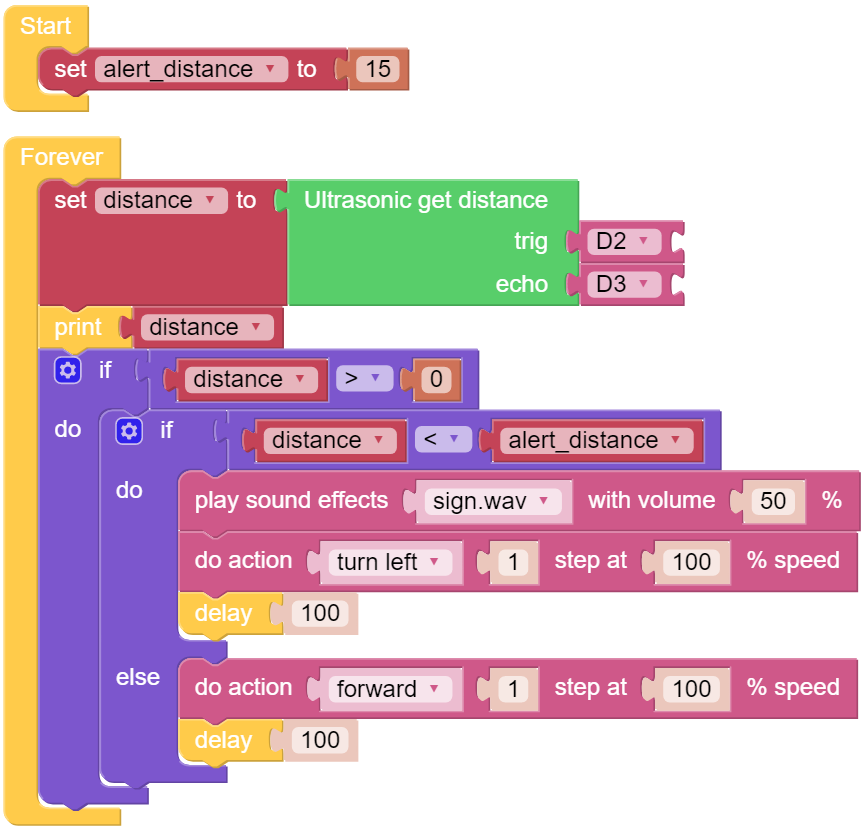
You can write the program according to the following picture, please refer to the tutorial: How to Create a New Project?.
Or find the code with the same name on the Examples page of the EzBlock Studio and click Run or Edit directly.
How it works?
You can find the following blocks in the Module category to achieve distance detection:
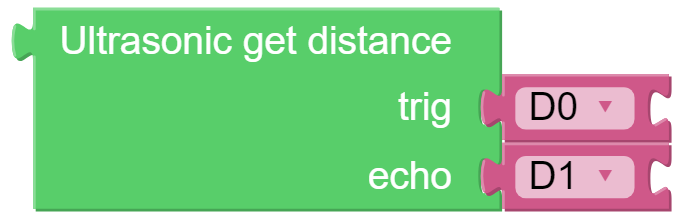
It should be noted that the two pins of the block should correspond to the actual wiring, that is, trig-D2, echo-D3.
Here is the main program.
Read the
distancedetected by ultrasonic module and filter out the values less than 0 (When the ultrasonic module is too far from the obstacle or cannot read the data correctly,distance<0will appear).When the
distanceis less thanalert_distance(the threshold value set earlier, which is 10), play the sound effectsign.wav. PiCrawler doesturn left.When the
distanceis greater thanalert_distance, PiCrawler will moveforward.