Note
Hello, welcome to the SunFounder Raspberry Pi & Arduino & ESP32 Enthusiasts Community on Facebook! Dive deeper into Raspberry Pi, Arduino, and ESP32 with fellow enthusiasts.
Why Join?
Expert Support: Solve post-sale issues and technical challenges with help from our community and team.
Learn & Share: Exchange tips and tutorials to enhance your skills.
Exclusive Previews: Get early access to new product announcements and sneak peeks.
Special Discounts: Enjoy exclusive discounts on our newest products.
Festive Promotions and Giveaways: Take part in giveaways and holiday promotions.
👉 Ready to explore and create with us? Click [here] and join today!
10. One Touch Start
In this project, we have integrated the previous projects - line following, following, obstacle avoidance, self-driving, etc. together. They can be switched by buttons on the remote control, so you can start the car and experience all functions at once.
Wiring
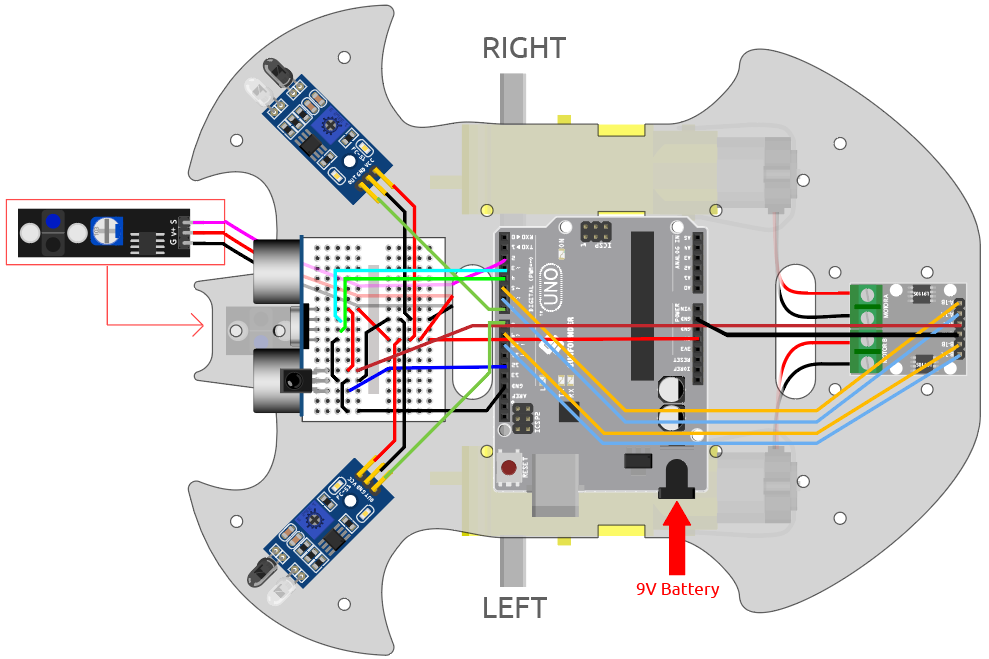
Code
Note
Open the
10.one_touch_start.inofile under the path of3in1-kit\car_project\10.one_touch_start.Or copy this code into Arduino IDE.
The
IRremotelibrary is used here, you can install it from the Library Manager.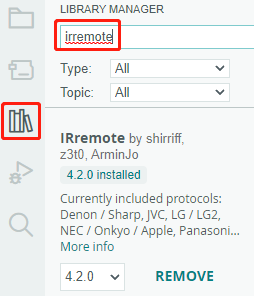
After the code is uploaded successfully, the LED will flash rapidly 3 times for every signal received from the remote control by the IR receiver. You can press the following keys to operate the cart.
+: Accelerate
-: Decelerate
1: Move to the left front
2: Forward
3: Move to the right.
4: Turn left
6: Turn right
7: Backward to the left
8: Backward.
9: Backward to the right
CYCLE: Follow the line
U/SD: Self-driving
▷▷|: Obstacle avoidance with ultrasonic module
|◁◁: Obstacle avoidance with IR Obstacle module
EQ: Follow your hand
0: Stop