Note
Hello, welcome to the SunFounder Raspberry Pi & Arduino & ESP32 Enthusiasts Community on Facebook! Dive deeper into Raspberry Pi, Arduino, and ESP32 with fellow enthusiasts.
Why Join?
Expert Support: Solve post-sale issues and technical challenges with help from our community and team.
Learn & Share: Exchange tips and tutorials to enhance your skills.
Exclusive Previews: Get early access to new product announcements and sneak peeks.
Special Discounts: Enjoy exclusive discounts on our newest products.
Festive Promotions and Giveaways: Take part in giveaways and holiday promotions.
👉 Ready to explore and create with us? Click [here] and join today!
2.2.7 PIR
Introduction
In this project, we will make a device by using the human body infrared pyroelectric sensors. When someone gets closer to the LED, the LED will turn on automatically. If not, the light will turn off. This infrared motion sensor is a kind of sensor that can detect the infrared emitted by human and animals.
Required Components
In this project, we need the following components.

It’s definitely convenient to buy a whole kit, here’s the link:
Name |
ITEMS IN THIS KIT |
LINK |
|---|---|---|
Raphael Kit |
337 |
You can also buy them separately from the links below.
COMPONENT INTRODUCTION |
PURCHASE LINK |
|---|---|
- |
Schematic Diagram

Experimental Procedures
Step 1: Build the circuit.

Step 2: Go to the folder of the code.
cd ~/raphael-kit/python-pi5
Step 3: Run the executable file.
sudo python3 2.2.7_PIR_zero.py
After the code runs, PIR detects surroundings and let RGB LED glow yellow if it senses someone walking by.
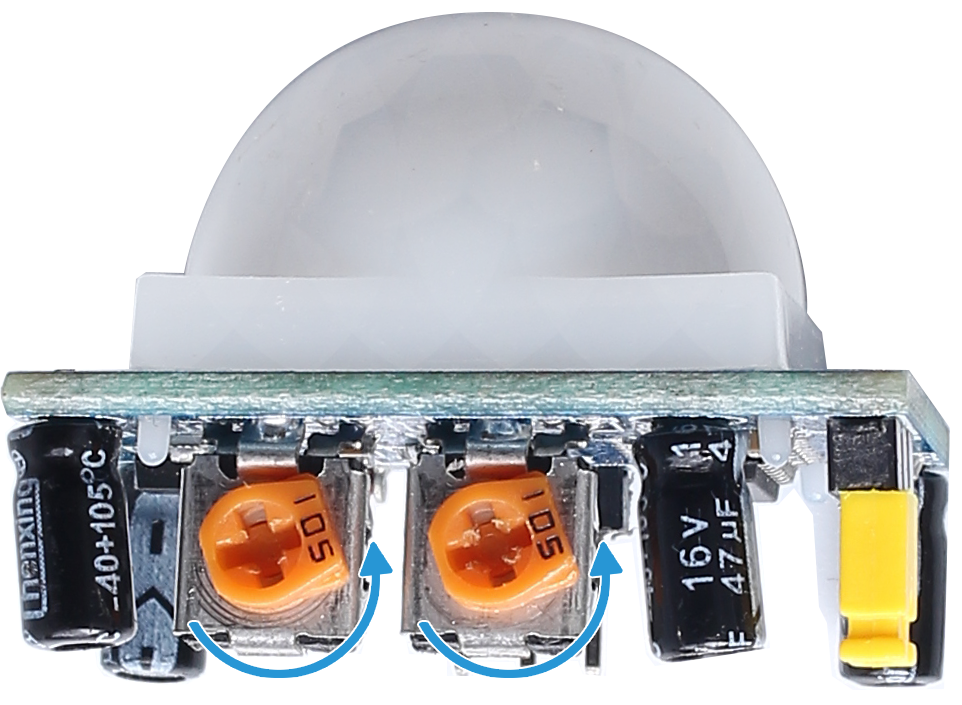
There are two potentiometers on the PIR module: one is to adjust sensitivity and the other is to adjust the detection distance. To make the PIR module work better, you You need to turn both of them counterclockwise to the end.
Warning
If there is an error prompt RuntimeError: Cannot determine SOC peripheral base address, please refer to If gpiozero doesn’t work.
Code
Note
You can Modify/Reset/Copy/Run/Stop the code below. But before that, you need to go to source code path like raphael-kit/python-pi5. After modifying the code, you can run it directly to see the effect.
#!/usr/bin/env python3
from gpiozero import RGBLED, MotionSensor
from time import sleep

# Initialize RGB LED and PIR motion sensor using GPIO Zero library
led = RGBLED(red=18, green=27, blue=22)  # RGB LED connected to GPIO pins 18 (Red), 27 (Green), 22 (Blue)
pir = MotionSensor(17)  # PIR sensor connected to GPIO pin 17

try:
    # Continuously monitor for motion and update LED color
    while True:
        if pir.motion_detected:  # Check for motion detected by PIR sensor
            led.color = (1, 1, 0)  # Set LED color to yellow (Red + Green)
        else:
            led.color = (0, 0, 1)  # Set LED color to blue (only Blue)
        sleep(0.1)  # Short delay to reduce CPU load

except KeyboardInterrupt:
    # Handle KeyboardInterrupt (Ctrl+C) to exit the loop gracefully
    pass
Code Explanation
Imports the
RGBLEDclass for controlling an RGB LED and theMotionSensorclass for motion detection from the GPIO Zero library. Also imports thesleepfunction for creating delays.#!/usr/bin/env python3 from gpiozero import RGBLED, MotionSensor from time import sleep
Initializes an RGB LED with red, green, and blue components connected to GPIO pins 18, 27, and 22, respectively. Also, initializes a PIR sensor on GPIO pin 17.
# Initialize RGB LED and PIR motion sensor using GPIO Zero library
led = RGBLED(red=18, green=27, blue=22)  # RGB LED connected to GPIO pins 18 (Red), 27 (Green), 22 (Blue)
pir = MotionSensor(17)  # PIR sensor connected to GPIO pin 17
The program enters an infinite loop, continuously checking for motion using the PIR sensor. If motion is detected, the LED is set to yellow (mix of red and green). If no motion is detected, the LED turns blue. A short sleep of 0.1 seconds reduces CPU load.
try:
    # Continuously monitor for motion and update LED color
    while True:
        if pir.motion_detected:  # Check for motion detected by PIR sensor
            led.color = (1, 1, 0)  # Set LED color to yellow (Red + Green)
        else:
            led.color = (0, 0, 1)  # Set LED color to blue (only Blue)
        sleep(0.1)  # Short delay to reduce CPU load

except KeyboardInterrupt:
    # Handle KeyboardInterrupt (Ctrl+C) to exit the loop gracefully
    pass