Note
Hello, welcome to the SunFounder Raspberry Pi & Arduino & ESP32 Enthusiasts Community on Facebook! Dive deeper into Raspberry Pi, Arduino, and ESP32 with fellow enthusiasts.
Why Join?
Expert Support: Solve post-sale issues and technical challenges with help from our community and team.
Learn & Share: Exchange tips and tutorials to enhance your skills.
Exclusive Previews: Get early access to new product announcements and sneak peeks.
Special Discounts: Enjoy exclusive discounts on our newest products.
Festive Promotions and Giveaways: Take part in giveaways and holiday promotions.
👉 Ready to explore and create with us? Click [here] and join today!
2.2.2 Thermistor
Note

Depending on your kit version, please identify whether you have ADC0834 or MCP3008 and proceed with the matching section.
Introduction
Just like photoresistor can sense light, thermistor is a temperature sensitive electronic device that can be used for realizing functions of temperature control, such as making a heat alarm.
Required Components
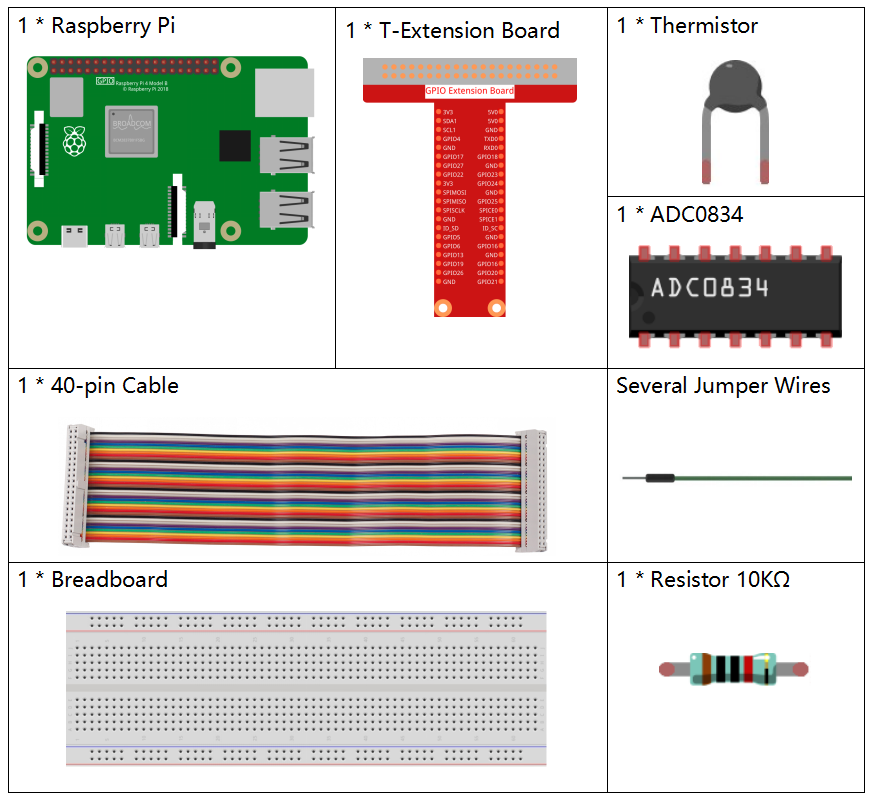
In this project, we need the following components.
It’s definitely convenient to buy a whole kit, here’s the link:
Name |
ITEMS IN THIS KIT |
LINK |
|---|---|---|
Raphael Kit |
337 |
You can also buy them separately from the links below.
COMPONENT INTRODUCTION |
PURCHASE LINK |
|---|---|
- |
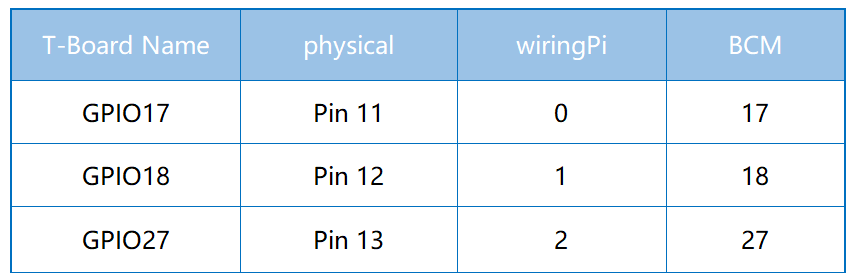
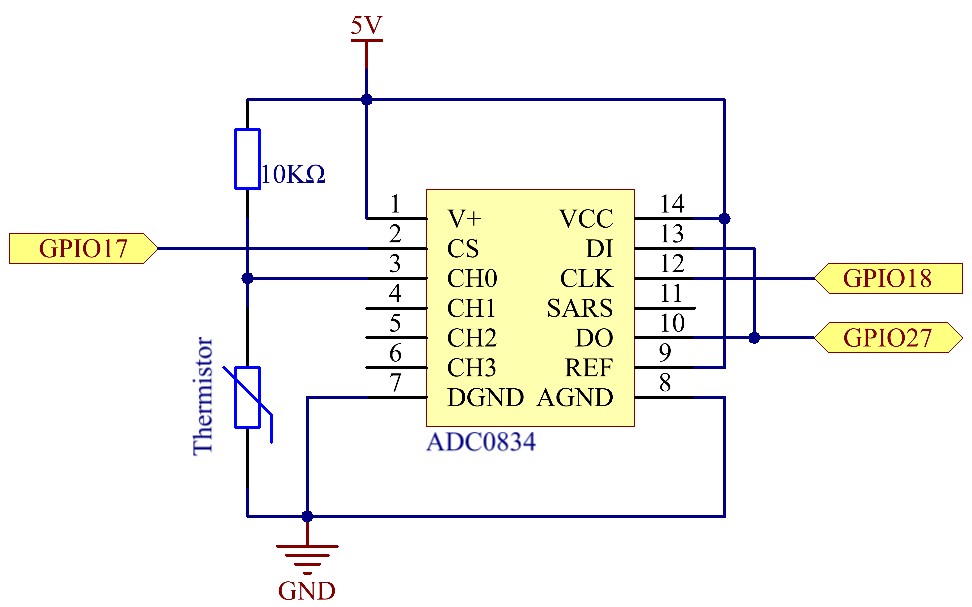
Schematic Diagram
Experimental Procedures
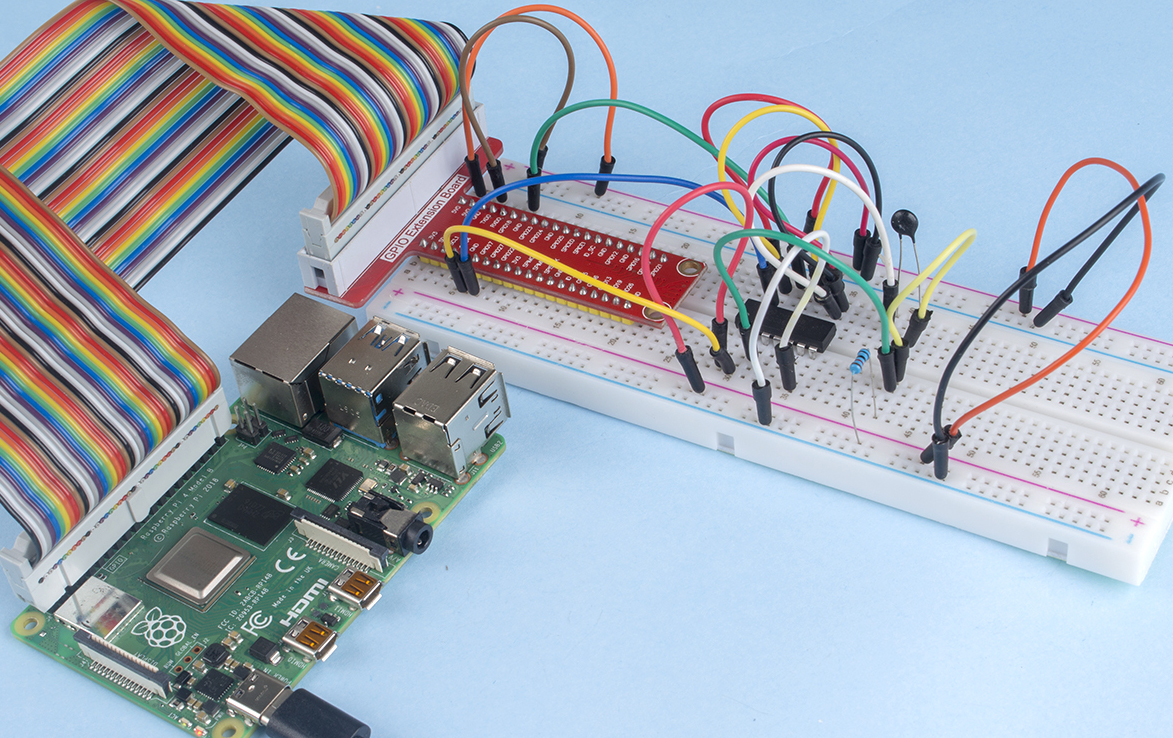
Step 1: Build the circuit.
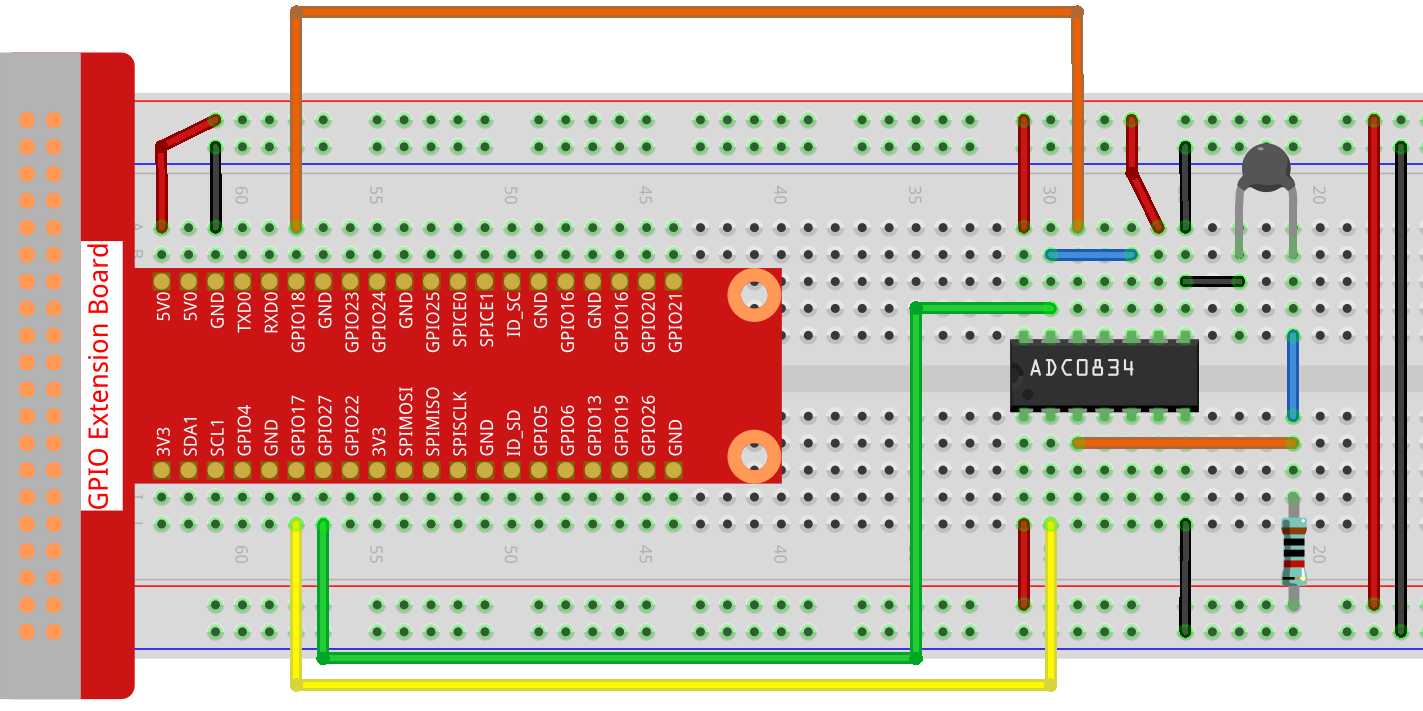
Step 2: Go to the folder of the code.
cd ~/raphael-kit/python/
Step 3: Run the executable file
sudo python3 2.2.2_Thermistor.py
With the code run, the thermistor detects ambient temperature which will be printed on the screen once it finishes the program calculation.
Code
Note
You can Modify/Reset/Copy/Run/Stop the code below. But before that, you need to go to source code path like raphael-kit/python. After modifying the code, you can run it directly to see the effect.
#!/usr/bin/env python3
# -*- coding: utf-8 -*-

import RPi.GPIO as GPIO
import ADC0834
import time
import math

def init():
    ADC0834.setup()

def loop():
    while True:
        analogVal = ADC0834.getResult()
        Vr = 5 * float(analogVal) / 255
        Rt = 10000 * Vr / (5 - Vr)
        temp = 1/(((math.log(Rt / 10000)) / 3950) + (1 / (273.15+25)))
        Cel = temp - 273.15
        Fah = Cel * 1.8 + 32
        print ('Celsius: %.2f °C  Fahrenheit: %.2f ℉' % (Cel, Fah))
        time.sleep(0.2)

if __name__ == '__main__':
    init()
    try:
        loop()
    except KeyboardInterrupt:
        ADC0834.destroy()
Code Explanation
import math
There is a numerics library which declares a set of functions to compute common mathematical operations and transformations.
analogVal = ADC0834.getResult()
This function is used to read the value of the thermistor.
Vr = 5 * float(analogVal) / 255
Rt = 10000 * Vr / (5 - Vr)
temp = 1/(((math.log(Rt / 10000)) / 3950) + (1 / (273.15+25)))
Cel = temp - 273.15
Fah = Cel * 1.8 + 32
print ('Celsius: %.2f °C  Fahrenheit: %.2f ℉' % (Cel, Fah))
These calculations convert the thermistor values into centigrade degree and Fahrenheit degree.
Vr = 5 * float(analogVal) / 255
Rt = 10000 * Vr / (5 - Vr)
These two lines of codes are calculating the voltage distribution with the read value analog so as to get Rt (resistance of thermistor).
temp = 1/(((math.log(Rt / 10000)) / 3950) + (1 / (273.15+25)))
This code refers to plugging Rt into the formula TK=1/(ln(RT/RN)/B+1/TN) to get Kelvin temperature.
temp = temp - 273.15
Convert Kelvin temperature into centigrade degree.
Fah = Cel * 1.8 + 32
Convert the centigrade degree into Fahrenheit degree.
print ('Celsius: %.2f °C Fahrenheit: %.2f ℉' % (Cel, Fah))
Print centigrade degree, Fahrenheit degree and their units on the display.
Phenomenon Picture