Note
Hello, welcome to the SunFounder Raspberry Pi & Arduino & ESP32 Enthusiasts Community on Facebook! Dive deeper into Raspberry Pi, Arduino, and ESP32 with fellow enthusiasts.
Why Join?
Expert Support: Solve post-sale issues and technical challenges with help from our community and team.
Learn & Share: Exchange tips and tutorials to enhance your skills.
Exclusive Previews: Get early access to new product announcements and sneak peeks.
Special Discounts: Enjoy exclusive discounts on our newest products.
Festive Promotions and Giveaways: Take part in giveaways and holiday promotions.
👉 Ready to explore and create with us? Click [here] and join today!
Treasure Hunt
Arrange a maze in your room and place six different color cards in six corners. Then control PiCrawler to search for these color cards one by one!
Note
You can download and print the PDF Color Cards for color detection.
Run the Code
cd /home/pi/picrawler/examples
sudo python3 treasure_hunt.py
View the Image
After the code runs, the terminal will display the following prompt:
No desktop !
* Serving Flask app "vilib.vilib" (lazy loading)
* Environment: production
WARNING: Do not use the development server in a production environment.
Use a production WSGI server instead.
* Debug mode: off
* Running on http://0.0.0.0:9000/ (Press CTRL+C to quit)
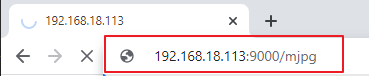
Then you can enter http://<your IP>:9000/mjpg in the browser to view the video screen. such as: http://192.168.18.113:9000/mjpg
Code
from picrawler import Picrawler
from time import sleep
from robot_hat import Music,TTS
from vilib import Vilib
import readchar
import random
import threading

crawler = Picrawler([10,11,12,4,5,6,1,2,3,7,8,9])
#crawler.set_offset([0,0,0,0,0,0,0,0,0,0,0,0])

music = Music()
tts = TTS()

manual = '''
Press keys on keyboard to control Picrawler!
        w: Forward
        a: Turn left
        s: Backward
        d: Turn right
        space: Say the target again
        esc: Quit
'''

color = "red"
color_list=["red","orange","yellow","green","blue","purple"]
key_dict = {
        'w': 'forward',
        's': 'backward',
        'a': 'turn_left',
        'd': 'turn_right',
}
def renew_color_detect():
        global color
        color = random.choice(color_list)
        Vilib.color_detect(color)
        tts.say("Look for " + color)

key = None
lock = threading.Lock()
def key_scan_thread():
        global key
        while True:
                key_temp = readchar.readkey()
                print('\r',end='')
                with lock:
                        key = key_temp.lower()
                        if key == readchar.key.SPACE:
                                key = 'space'
                        elif key == readchar.key.CTRL_C or key in readchar.key.ESCAPE_SEQUENCES:
                                key = 'quit'
                                break
                sleep(0.01)

def main():
        global key
        action = None
        Vilib.camera_start(vflip=False,hflip=False)
        Vilib.display(local=False,web=True)
        sleep(0.8)
        speed = 100
        print(manual)

        sleep(1)
        _key_t = threading.Thread(target=key_scan_thread)
        _key_t.setDaemon(True)
        _key_t.start()

        tts.say("game start")
        sleep(0.05)
        renew_color_detect()
        while True:

                if Vilib.detect_obj_parameter['color_n']!=0 and Vilib.detect_obj_parameter['color_w']>100:
                        tts.say("will done")
                        sleep(0.05)
                        renew_color_detect()

                with lock:
                        if key != None and key in ('wsad'):
                                action = key_dict[str(key)]
                                key =  None
                        elif key == 'space':
                                tts.say("Look for " + color)
                                key =  None
                        elif key == 'quit':
                                _key_t.join()
                                Vilib.camera_close()
                                print("\n\rQuit")
                                break

                if action != None:
                        crawler.do_action(action,1,speed)
                        action = None

                sleep(0.05)


if __name__ == "__main__":
        main()
How it works?
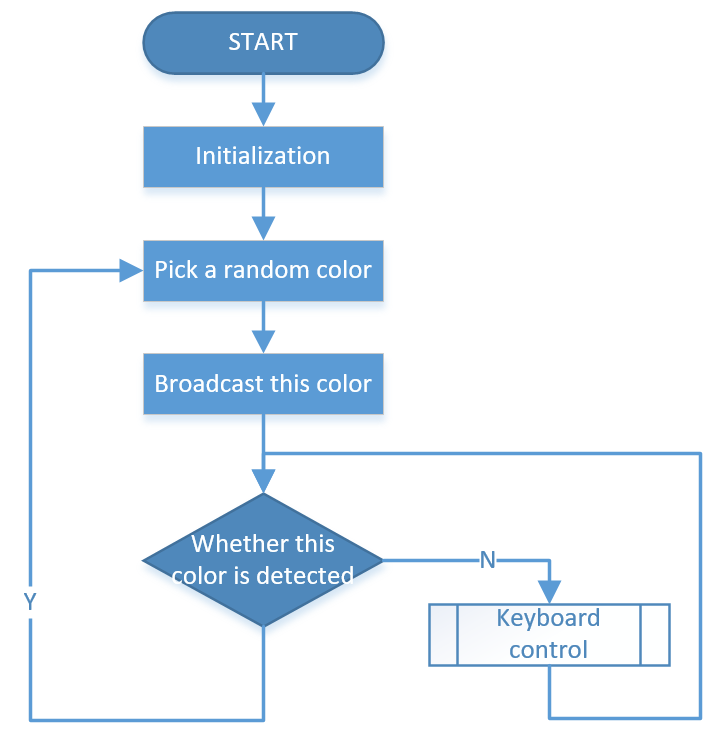
In general, this project combines the knowledge points of Keyboard Control, Computer Vision and Sound Effect.
Its flow is shown in the figure below: