Note
Hello, welcome to the SunFounder Raspberry Pi & Arduino & ESP32 Enthusiasts Community on Facebook! Dive deeper into Raspberry Pi, Arduino, and ESP32 with fellow enthusiasts.
Why Join?
Expert Support: Solve post-sale issues and technical challenges with help from our community and team.
Learn & Share: Exchange tips and tutorials to enhance your skills.
Exclusive Previews: Get early access to new product announcements and sneak peeks.
Special Discounts: Enjoy exclusive discounts on our newest products.
Festive Promotions and Giveaways: Take part in giveaways and holiday promotions.
👉 Ready to explore and create with us? Click [here] and join today!
Adjust Posture
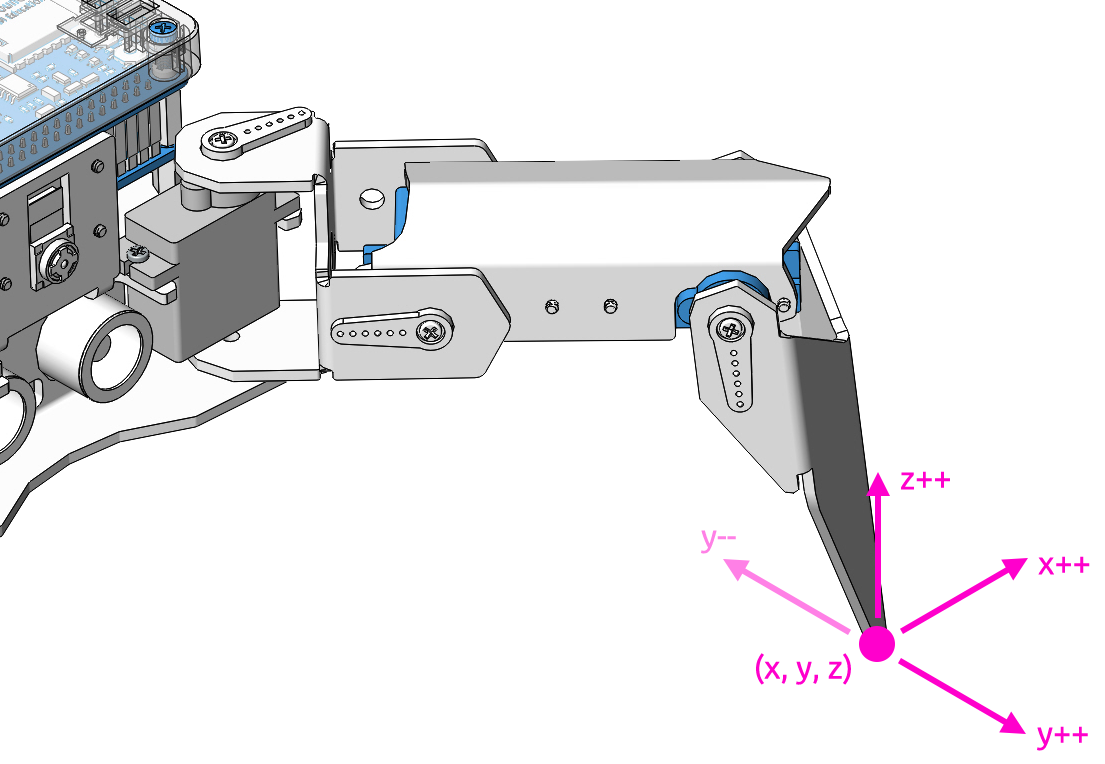
In this example, we use the keyboard to control the PiCrawler foot by foot and assume the desired posture.
You can press the space bar to print out the current coordinate values. These coordinate values come in handy when you create unique actions for PiCrawler.
Run the Code
cd /home/pi/picrawler/examples
sudo python3 do_single_leg.py
After the code runs, please operate according to the prompt that pops up in the terminal.
Press
1234to select the feet separately,1: right front foot,2: left front foot,3: left rear foot,4: right rear footPress
w,a,s,d,r, andfto slowly control the PiCrawler’s coordinate values.Press
spaceto print all coordinate values.Press
escto exit.
Code
from picrawler import Picrawler
from time import sleep
import readchar

crawler = Picrawler([10,11,12,4,5,6,1,2,3,7,8,9])
speed = 80


manual = '''
-------- PiCrawler Controller ---------
    .......          .......
    <=|   2   |┌-┌┐┌┐-┐|   1   |=>
    ``````` ├      ┤ ```````
    ....... ├      ┤ .......
    <=|   3   |└------┘|   4   |=>
    ```````          ```````
    1: Select right front leg
    2: Select left front leg
    3: Select left rear leg
    4: Select right rear leg
    W: Y++          R: Z++
    A: X--          F: Z--
    S: Y--
    D: X++          Esc: Quit
'''
legs_list = ['right front', 'left front', 'left rear', 'right rear']

def main():
    leg = 0
    speed = 80
    step = 2
    print(manual)
    crawler.do_step('stand',speed)
    sleep(0.2)
    coordinate=crawler.current_step_all_leg_value()

    def show_info():
        print("\033[H\033[J",end='')  # clear terminal windows
        print(manual)
        print('%s : %s'%(leg+1, legs_list[leg]))
        print('coordinate: %s'%(coordinate))

    show_info()

    while True:
        # readkey
        key = readchar.readkey()
        key = key.lower()
        # select the leg
        if key in ('1234'):
            leg = int(key) - 1
            show_info()
        # move
        elif key in ('wsadrf'):
            if 'w' == key:
                coordinate[leg][1]=coordinate[leg][1] + step
            elif 's' == key:
                coordinate[leg][1]=coordinate[leg][1] - step
            elif 'a' == key:
                coordinate[leg][0]=coordinate[leg][0] - step
            elif 'd' == key:
                coordinate[leg][0]=coordinate[leg][0] + step
            elif 'r' == key:
                coordinate[leg][2]=coordinate[leg][2] + step
            elif 'f' == key:
                coordinate[leg][2]=coordinate[leg][2] - step

            crawler.do_single_leg(leg,coordinate[leg],speed)
            sleep(0.1)
            # coordinate=crawler.current_step_all_leg_value()
            show_info()
        # quit
        elif key == readchar.key.CTRL_C or key in readchar.key.ESCAPE_SEQUENCES:
            print("\n Quit")
            break

        sleep(0.05)


if __name__ == "__main__":
    main()
current_step_all_leg_value(): Returns the coordinate values of all legs.do_single_leg(leg,coordinate,speed): Modify the coordinate value of a certain leg individually.