Note
Hello, welcome to the SunFounder Raspberry Pi & Arduino & ESP32 Enthusiasts Community on Facebook! Dive deeper into Raspberry Pi, Arduino, and ESP32 with fellow enthusiasts.
Why Join?
Expert Support: Solve post-sale issues and technical challenges with help from our community and team.
Learn & Share: Exchange tips and tutorials to enhance your skills.
Exclusive Previews: Get early access to new product announcements and sneak peeks.
Special Discounts: Enjoy exclusive discounts on our newest products.
Festive Promotions and Giveaways: Take part in giveaways and holiday promotions.
👉 Ready to explore and create with us? Click [here ] and join today!
FAQ - NVMe Kit Series
This section answers common questions about the SunFounder NVMe Kit Series, including both Dual NVMe Raft and General NVMe PIP.
If you’re unsure which kit you own, see SunFounder NVMe Kit Series.
General Questions
Q1. How to identify my NVMe Kit?
The Dual NVMe Raft supports two NVMe SSDs, while the General NVMe PIP supports only one. If your board has two M.2 slots and a larger form factor, it is the Dual NVMe Raft.
Q2. My PWR LED is off, what should I check?
Ensure the FPC (PCIe) cable is properly connected and oriented.
Use the official 27 W Raspberry Pi 5 power supply — underpowered adapters may cause the LED to remain off.
Check whether the board’s FORCE EN jumper is correctly set.
If the LED still stays off, try providing external 5 V power.
Q3. The SSD is not detected by the system.
Check the following:
Run
dmesg | grep pcieto verify PCIe initialization.Run
lspciandls /dev/nvme*to see if the SSD appears.Ensure
dtparam=pciex1ordtparam=nvmeis added to/boot/firmware/config.txt.Try reseating or swapping the SSD or the cable.
Q4. Raspberry Pi cannot boot from NVMe SSD.
Confirm you’ve updated the bootloader to NVMe/USB mode.
Ensure EEPROM boot order is set to PCIe first.
Verify
dtparam=pciex1_no_l0s=onis enabled.Make sure the NVMe SSD has a valid OS image (see Installing Raspberry Pi OS).
Q5. What is the “FORCE ENABLE” jumper?
The FORCE EN jumper (J4) manually enables the 3.3 V rail for NVMe SSDs when the PCIe power signal isn’t provided. Use it only when the SSD isn’t powering on automatically.
Q6. Can I use a longer FPC cable?
Not recommended. The included cable is tuned for signal integrity. Longer cables may cause instability or detection failure.
Q7. Why is my SSD extremely hot?
NVMe SSDs can reach high temperatures under load.
Ensure proper airflow or active cooling.
Avoid enclosing the Raspberry Pi and NVMe board in sealed cases.
Some SSDs throttle performance above 70 °C; this is normal.
Q8. The SSD appears but cannot be formatted.
If the SSD shows up in lsblk but cannot be formatted:
Make sure it’s not mounted.
Use
sudo fdisk /dev/nvme0n1to delete old partitions.Then re-format with
mkfs.ext4 /dev/nvme0n1p1.
Q9. Power LED flickers or NVMe disconnects under load.
This usually indicates insufficient power.
Use a genuine 27 W Raspberry Pi power supply.
Avoid powering other peripherals from the same USB port.
Consider using the board’s external 5 V input.
Q10. PCIe or NVMe not initializing after config changes.
If dmesg shows PCIe errors:
Double-check
/boot/firmware/config.txtsyntax.Remove extra spaces or duplicate
dtparamlines.Reset the bootloader using a Micro SD recovery image if needed.
Q11. Is it safe to update Raspberry Pi OS?
Yes. Updates are recommended, but always back up data first. If boot fails after an update, re-flash the bootloader using Raspberry Pi Imager.
Q12. Can I copy my existing OS to an NVMe SSD?
Yes. Use SD Card Copier in Raspberry Pi OS to duplicate your Micro SD card to the NVMe drive. See Copying the OS from a Micro SD Card to an NVMe SSD.
Q13. OpenMediaVault (OMV) cannot detect my disks.
Verify you installed Raspberry Pi OS Lite, not the Desktop version.
Ensure the SSD is properly mounted and formatted (ext4).
Run
lsblkto confirm detection before starting OMV.
Q14. I get “500 – Internal Server Error” in OMV when setting RAID.
Restart the OMV service:
sudo systemctl restart openmediavault
and retry. Ensure at least two drives are present for RAID 0/1.
Dual NVMe Raft Specific
Q15. Does the Dual NVMe Raft require driver installation?
No. Raspberry Pi OS Bookworm and most Linux kernels support PCIe NVMe natively.
Q16. Does it support PCIe Gen 3 or higher drives?
Yes, but all devices operate at PCIe Gen 2 speeds due to Raspberry Pi 5 limitations.
Q17. Can I install only one NVMe SSD?
Yes. It works with one or two drives installed.
Q18. Will using both slots reduce performance?
Slightly. Both drives share the same PCIe 2.0 lane, so bandwidth is divided during simultaneous transfers.
Q19. Can I use one slot for an AI accelerator and the other for storage?
Yes. You can combine an AI accelerator (like Hailo) in one slot and an NVMe SSD in the other.
General NVMe PIP Specific
Q20. Does the NVMe PIP support hot swapping?
No. PCIe on Raspberry Pi 5 does not support hot plug. Always power off before inserting or removing SSDs.
Q21. Can I mount the PIP both above and beside the Pi?
Yes. It supports dual mounting (top or side) using the included standoffs and FPC cables. Ensure the cable isn’t twisted or bent sharply.
Q22. Does the NVMe PIP need external power?
Normally no, but high-power SSDs (> 5 W) may require connecting the 2-pin external 5 V input.
Compatibility and Other Topics
Q23. Which SSDs are compatible?
See Compatible NVMe SSDs for the tested list. Avoid models using Phison controllers (e.g. WD SN770, Corsair MP600).
Q24. Why can’t I boot with a Western Digital Blue SN550 SSD?
Older bootloaders cannot recognize this drive.
Install the latest pieeprom-2024-01-24.bin via sudo rpi-eeprom-update.
Q25. Compatibility between AI Kit, AI HAT+, and NVMe modules
The Raspberry Pi AI Kit and the AI HAT+ are both official Raspberry Pi products, but they differ in design:
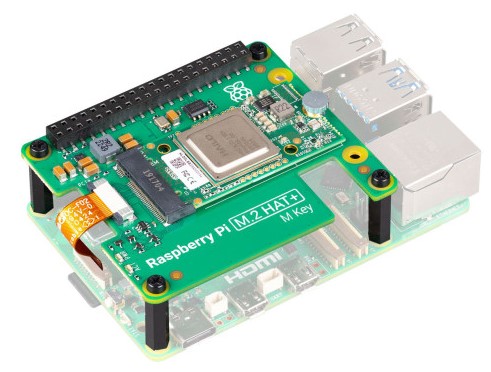
Raspberry Pi AI Kit includes a M.2 HAT+ carrier and a detachable Hailo-8L M.2 module (2242, M-Key).
The AI module is pre-installed on the HAT+ and can be removed. This M.2 module can be installed directly into the General NVMe PIP (M-Key slot) if desired. When doing so, ensure adequate cooling and power delivery.
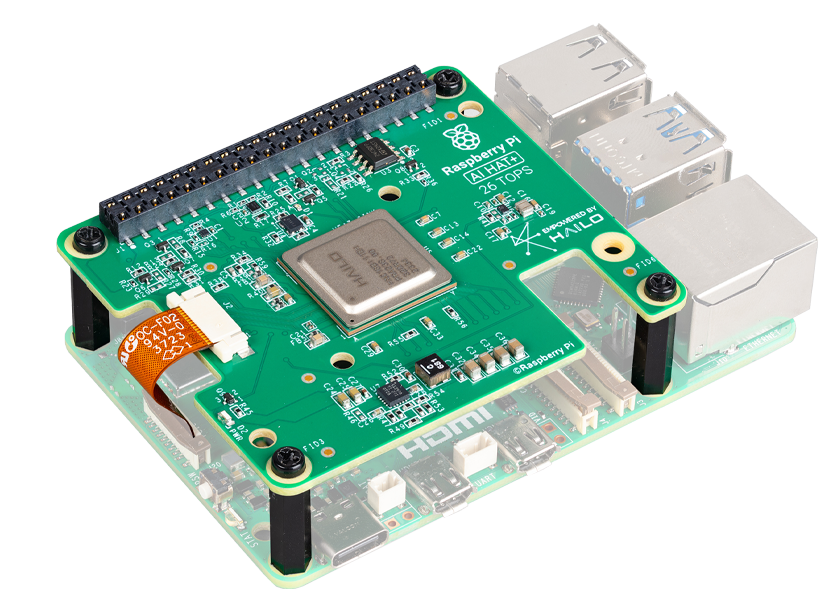
Raspberry Pi AI HAT+ is an integrated board with a built-in Hailo accelerator chip (Hailo-8L 13 TOPS or Hailo-8 26 TOPS).
Its accelerator is soldered onto the PCB and cannot be detached or used with NVMe boards. It also occupies the Pi 5’s PCIe interface, meaning it cannot be used simultaneously with any NVMe expansion.
Note
When moving the Hailo module from the AI Kit to the NVMe PIP:
Verify form factor (M.2 2242, M-Key) and standoff alignment.
Provide sufficient cooling (the Hailo module can reach > 70 °C under load).
Use the official Raspberry Pi AI Kit SDK and Hailo driver stack for software setup.
Q26. Is RAID 0/1 supported on Raspberry Pi?
Yes, using software RAID (via OpenMediaVault). RAID 0 = performance, RAID 1 = redundancy.
Q27. My NVMe SSD disappears after reboot.
Possible causes:
PCIe not initialized at boot (check
config.txt).Power supply insufficient.
SSD requires more than 3 A startup current.