Note
Hello, welcome to the SunFounder Raspberry Pi & Arduino & ESP32 Enthusiasts Community on Facebook! Dive deeper into Raspberry Pi, Arduino, and ESP32 with fellow enthusiasts.
Why Join?
Expert Support: Solve post-sale issues and technical challenges with help from our community and team.
Learn & Share: Exchange tips and tutorials to enhance your skills.
Exclusive Previews: Get early access to new product announcements and sneak peeks.
Special Discounts: Enjoy exclusive discounts on our newest products.
Festive Promotions and Giveaways: Take part in giveaways and holiday promotions.
👉 Ready to explore and create with us? Click [here] and join today!
2. Detect Anything with YOLOE
YOLOE (You Only Look Once with Embeddings) is the latest member of the YOLO family, introducing language-vision joint learning capabilities to traditional YOLO. Simply put, YOLOE can not only detect objects it was trained on, but also detect arbitrary new objects through text descriptions or prompts without retraining.
Key features of YOLOE:
Open-vocabulary detection: Detect arbitrary objects through text descriptions, not limited to predefined categories
Prompt-Free mode: Automatically detect salient objects in images without any prompts
Efficient deployment: Inherits YOLO’s efficient architecture, runs smoothly on Raspberry Pi
Multi-task support: Supports various tasks including object detection and instance segmentation
This makes YOLOE particularly suitable for rapid prototyping and applications requiring flexible detection of various objects.
Installing Dependencies
First, install the CLIP library required by YOLOE:
pip3 install git+https://github.com/ultralytics/CLIP.git --break-system-packages
Prompt-Free Mode
Prompt-Free mode is the most intuitive way to use YOLOE. In this mode, the model automatically detects all salient objects in the image without any text prompts. This behaves similarly to traditional YOLO but with better open-vocabulary capabilities.
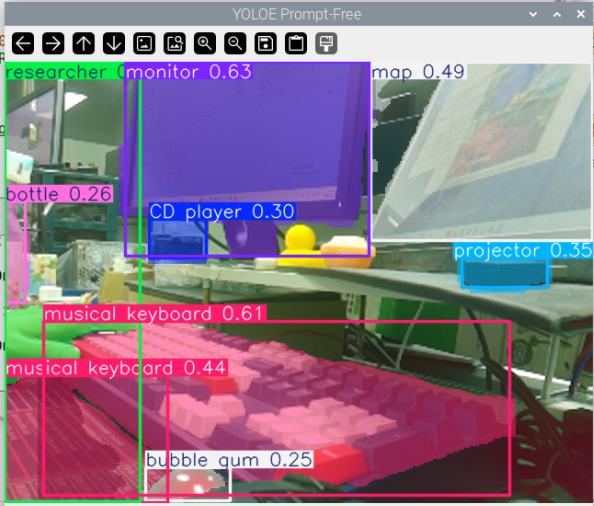
Figure: I pointed the camera at my cluttered desk, and YOLOE’s Prompt-Free mode automatically identified and segmented all salient objects in view—monitor, keyboard, water cup, notebook, mouse… Each object is annotated with a different colored segmentation mask, without requiring any text prompts. Everything is clearly presented at a glance.
How it works: The model automatically identifies foreground objects in the image through visual feature analysis and performs segmentation. This approach is suitable for quickly browsing image content or when you’re unsure what objects need to be detected.
The following code demonstrates how to run YOLOE in Prompt-Free mode on a Raspberry Pi:
cd ~/ai-lab-kit/yolo
python3 yoloe_prompt_free.py
from ultralytics import YOLO
from picamera2 import Picamera2
import cv2

# prompt-free mode
model = YOLO("yoloe-11s-seg-pf.pt")  # pf = prompt-free

picam2 = Picamera2()
picam2.preview_configuration.main.size = (640, 480)
picam2.preview_configuration.main.format = "RGB888"
picam2.configure("preview")
picam2.start()

print("Prompt-free mode: detecting everything automatically...")
print("Press 'q' to exit")

while True:
   frame = picam2.capture_array()
   results = model.predict(frame, imgsz=320)
   annotated = results[0].plot()
   cv2.imshow("YOLOE Prompt-Free", annotated)

   if cv2.waitKey(1) & 0xFF == ord('q'):
      break

cv2.destroyAllWindows()
picam2.stop()
Features of Prompt-Free Mode:
No configuration needed: Run directly to detect salient objects in images
Automatic segmentation: Outputs both detection boxes and segmentation masks
No class labels: Only shows detected object locations without category names
Use cases: Quick browsing, general object detection, discovering unknown objects
Text Prompt Mode
Text prompt mode is where YOLOE’s power truly shines. Through natural language descriptions, you can tell the model what objects to detect, and the model will identify and locate these objects in real-time.
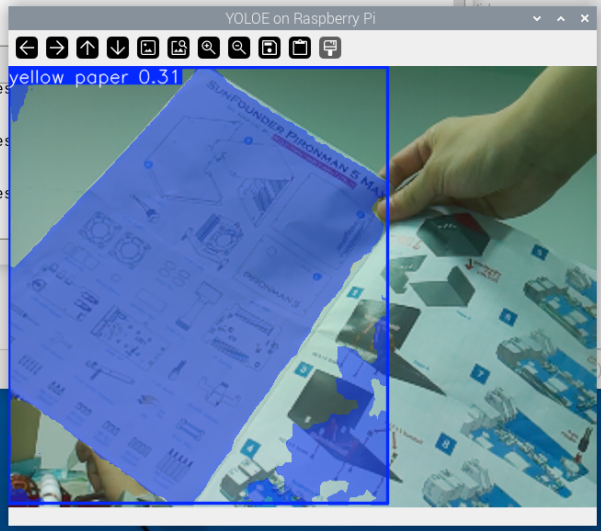
Figure: I held up a piece of paper that was half yellow and half white in front of the camera, and used a text prompt to tell the model to look for “yellow paper”. YOLOE accurately understood this description, segmenting only the yellow half of the paper and marking it with a bounding box, while completely ignoring the white portion. This demonstrates YOLOE’s ability to perform fine-grained object recognition through natural language.
How it works: The model encodes text prompts into feature vectors, then matches them against image features to identify regions that best correspond to the text descriptions. This approach allows you to dynamically specify detection targets without retraining the model.
The following code demonstrates how to use text prompts to detect specific objects:
cd ~/ai-lab-kit/yolo
python3 yoloe_prompt_text.py
from ultralytics import YOLOE
from picamera2 import Picamera2
import cv2

# load YOLOE model
model = YOLOE("yoloe-26n-seg.pt")  # nano version

# set the classes to detect (text prompt)
names = ["yellow paper", "red cup", "person wearing glasses"]
model.set_classes(names, model.get_text_pe(names))

# initialize the camera
picam2 = Picamera2()
picam2.preview_configuration.main.size = (640, 480)
picam2.preview_configuration.main.format = "RGB888"
picam2.configure("preview")
picam2.start()

print("YOLOE running with text prompts, press 'q' to exit...")
print(f"Detecting: {', '.join(names)}")

while True:
   frame = picam2.capture_array()
   results = model.predict(frame, conf=0.3)  # set confidence threshold to 0.3
   annotated = results[0].plot()
   cv2.imshow("YOLOE on Raspberry Pi", annotated)

   if cv2.waitKey(1) & 0xFF == ord('q'):
      break

cv2.destroyAllWindows()
picam2.stop()
Features of Text Prompt Mode:
Dynamic detection: Modify detection targets at any time without retraining
Natural language: Use everyday language to describe objects, like “blue car”, “wooden chair”
Multi-target detection: Specify multiple detection targets at once
Fine-grained control: Describe attributes like color, material, shape, etc.
Confidence threshold: Control detection sensitivity through the
confparameter
Advanced Usage
Dynamically Switching Detection Targets
You can modify text prompts at runtime without restarting the program:
# Initialize model
model = YOLOE("yoloe-26n-seg.pt")

# Initial detection targets
current_names = ["red apple"]
model.set_classes(current_names, model.get_text_pe(current_names))

while True:
   frame = picam2.capture_array()

   # Check if detection target needs to be switched
   key = cv2.waitKey(1) & 0xFF
   if key == ord('1'):
      current_names = ["banana"]
      model.set_classes(current_names, model.get_text_pe(current_names))
      print("Now detecting: banana")
   elif key == ord('2'):
      current_names = ["orange"]
      model.set_classes(current_names, model.get_text_pe(current_names))
      print("Now detecting: orange")

   results = model.predict(frame, conf=0.3)
   annotated = results[0].plot()
   cv2.imshow("YOLOE", annotated)

   if key == ord('q'):
      break
Using More Complex Text Descriptions
YOLOE supports complex natural language descriptions for more precise object localization:
# More precise description examples
names = [
    "person wearing a red hat",
    "car with open door",
    "small dog on the left side",
    "yellow paper on the desk"
]
model.set_classes(names, model.get_text_pe(names))
Adjusting Detection Parameters
Performance optimization for Raspberry Pi:
# Performance optimization configuration
results = model.predict(
    frame,
    imgsz=224,        # Lower resolution for faster speed
    conf=0.4,         # Higher confidence threshold reduces false positives
    iou=0.5,          # Adjust IOU threshold
    verbose=False     # Disable verbose output
)
Performance Optimization Tips
When running YOLOE on Raspberry Pi, the following optimizations can help achieve better performance:
Choose the right model:
yoloe-26n-seg.pt: Nano version, fastest speedyoloe-11s-seg-pf.pt: S version, higher accuracy but slower
Reduce input resolution:
imgsz=224: Fastest speedimgsz=320: Balanced choice (recommended)imgsz=416: Higher accuracy
Adjust confidence threshold:
Increasing the
confparameter (e.g., to 0.5) reduces detection count and improves speed
Reduce detection categories:
In text prompt mode, limiting the length of the
nameslist can improve inference speed
FAQ
Q: What’s the difference between YOLOE and traditional YOLO?
A: Traditional YOLO can only detect fixed categories defined during training, while YOLOE can detect arbitrary objects through text prompts without retraining.
Q: Does Prompt-Free mode detect all objects?
A: Prompt-Free mode detects visually salient objects in the image but doesn’t provide category labels, making it suitable for quickly browsing scenes.
Q: Does text prompt support Chinese?
A: English prompts are recommended for best results, as the model is primarily trained on English data.
Q: What’s the speed of running YOLOE on Raspberry Pi?
A: On Raspberry Pi 5, using the nano model with 320 resolution, you can achieve 3-5 FPS real-time performance.
Q: Can I use multiple text prompts simultaneously?
A: Yes, simply add multiple descriptions to the names list, and the model will detect all of these objects simultaneously.